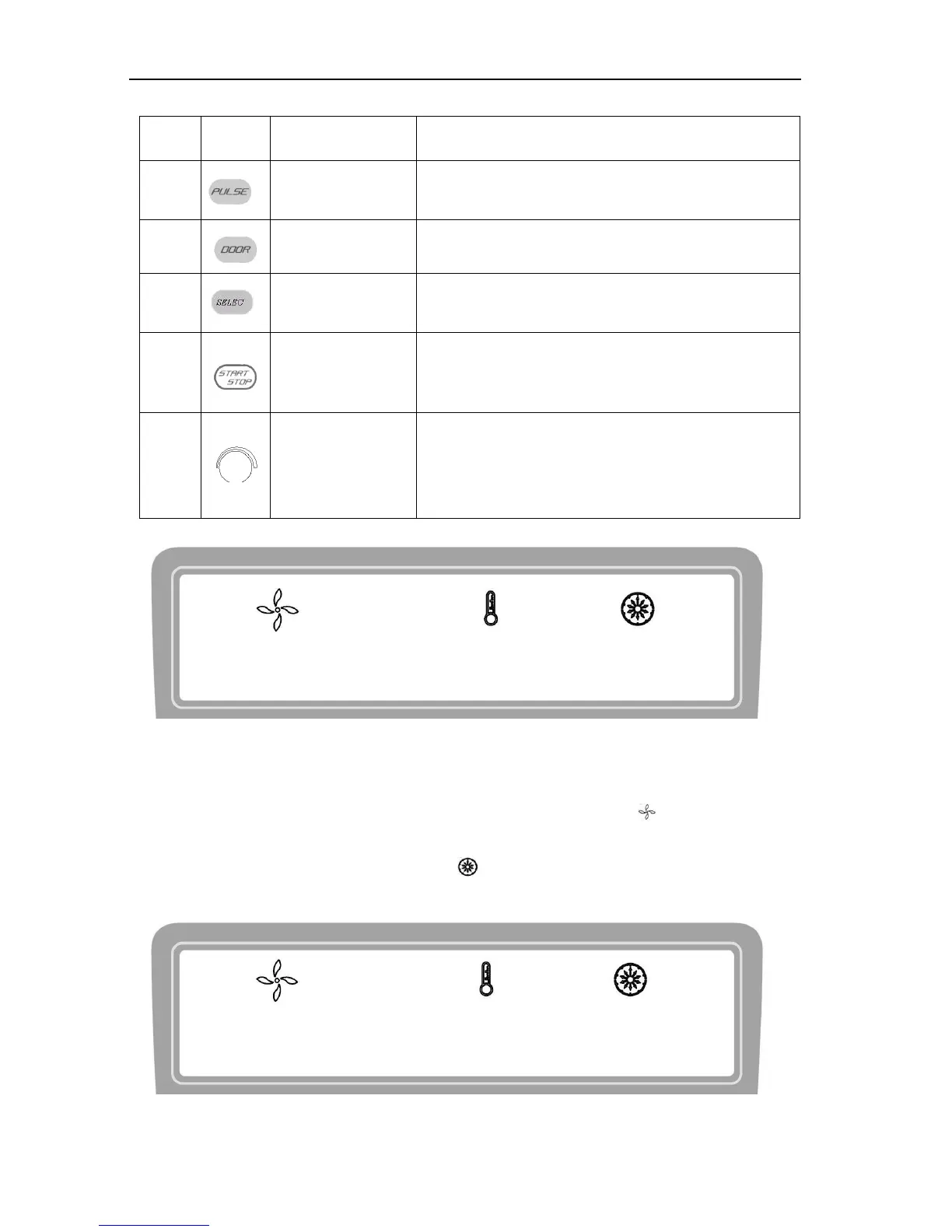
When the door closed, press and hold the button to
accelerate running, release the button to stop it.
Press the button to open the door The button is not
available when the centrifuge is running.
Press the button to choose the parameter which you want to
modify.
Press down the button to start running. The centrifuge will
brake to stop running if press the button during
centrifugation.
Clockwise rotate to increase parameter values.
counter-clockwise rotate to decrease parameter values.
Press down the button, shift between speed and RCF
display.
15000 25 ℃ 12 min
Figure 6-2 the main interface (D3024)
Main interface of D3024 model is as figure 6-2. The speed is set to be 15000rpm, temperature of centrifugal
chamber is 25℃, and the running time is12 minutes. When speed symbol is rotating, indicating the
centrifuge is running, the rotation is faster, the speed is higher. Temperature only displays the temperature of
chamber and can not be controlled. Time symbol displays the ratio of working to time setting. The total
time setting is divided into 10 scales.
15000 4 ℃ 12 min
Figure 6-3 The main interface (D3024R)



 To Next Page