18 BA FlexxPump 125 - 24 V_20181121_EN de 201811
Operation
5.5 Changing Parameters in the Standard Menu (Pro)
The following parameters can be set in the Standard menu:
• Pulse mode Pu
• Emptying time t
• Number of cycles C
A description of the individual parameters can be found in chapter 5.1 Adjustable
Parameters.
Note
The emptying time t can only be set in the FlexxPump 125 if it not controlled by an external
controller (Pu0).
Changing parameters
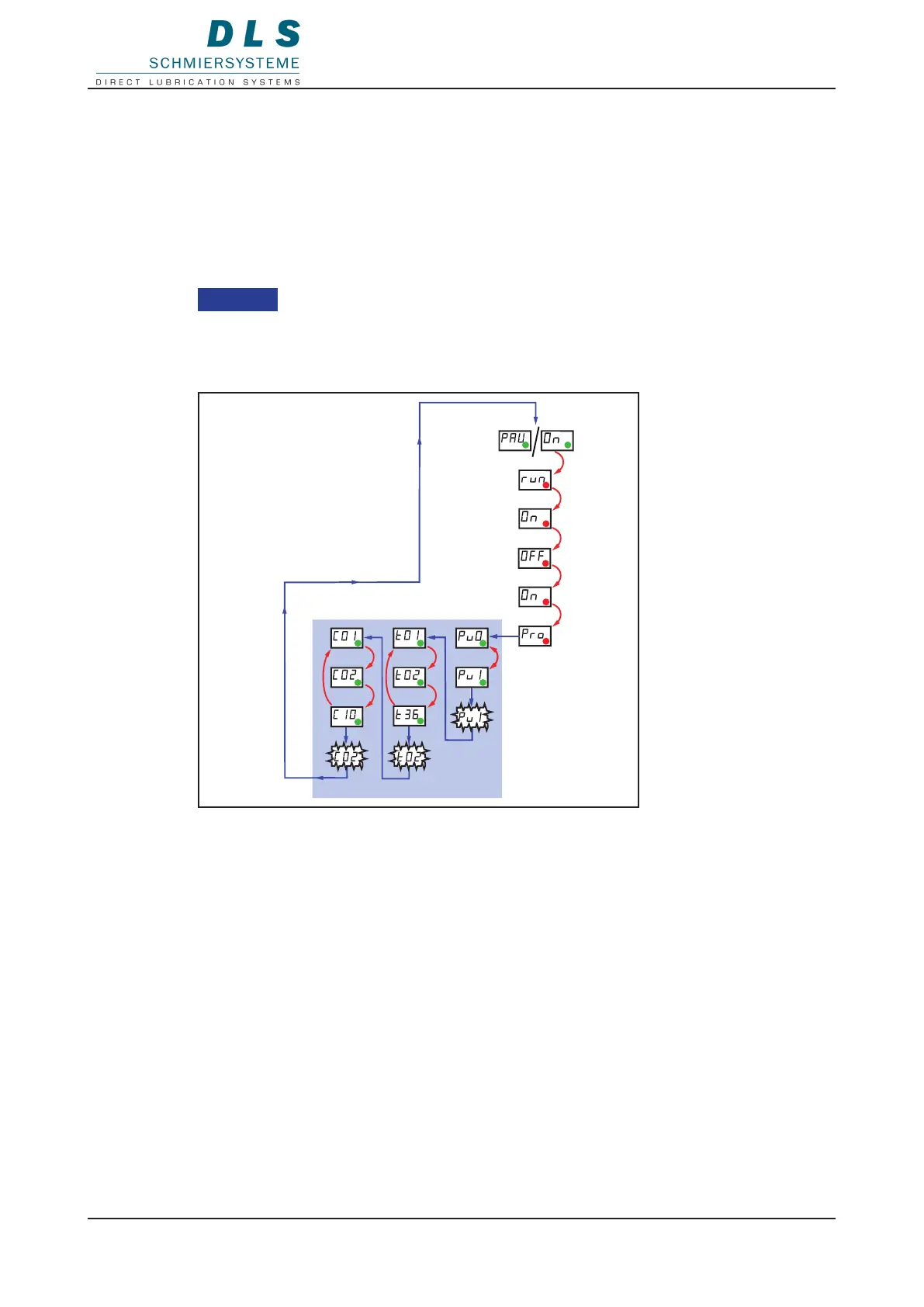
9 FlexxPump 125 in operation (PAU / On)
1. Hold the magnetic pin against the area of activity.
The LED ashes red and run, On, OFF, On, Pro are displayed one after another in the
LCD.
2. Remove the magnetic pin when Pro is displayed.
The display shows the parameters Pu, t and C one after another (depending on the
FlexxPump 125 type).
3. Hold the magnetic pin against the eld of activity for the parameter to be set.
The value for the parameter is counted up in the LCD and starts again from the begin-
ning after the highest value.
4. Remove the magnetic pin from the eld of activity at the desired value.
The set value ashes twice.
The next parameter is displayed in the LCD.
The FlexxPump 125 starts operating again automatically after the last parameter.


 To Next Page