20 BA FlexxPump 125 - 24 V_20181121_EN de 201811
Operation
5.7 Triggering the Filling Funktion
You can trigger the lling function of the FlexxPump 125 for lling or venting. The FlexxPump
125 then performs 40 pumping processes automatically with a total lubricant quantity of 6
cm³.
You can abort the lling function again manually.
MAX1 MAX2 MAX1 MAX2MAX1
9 FlexxPump 125 in operation (PAU / On)
1. Hold the magnetic pin against the area of activity.
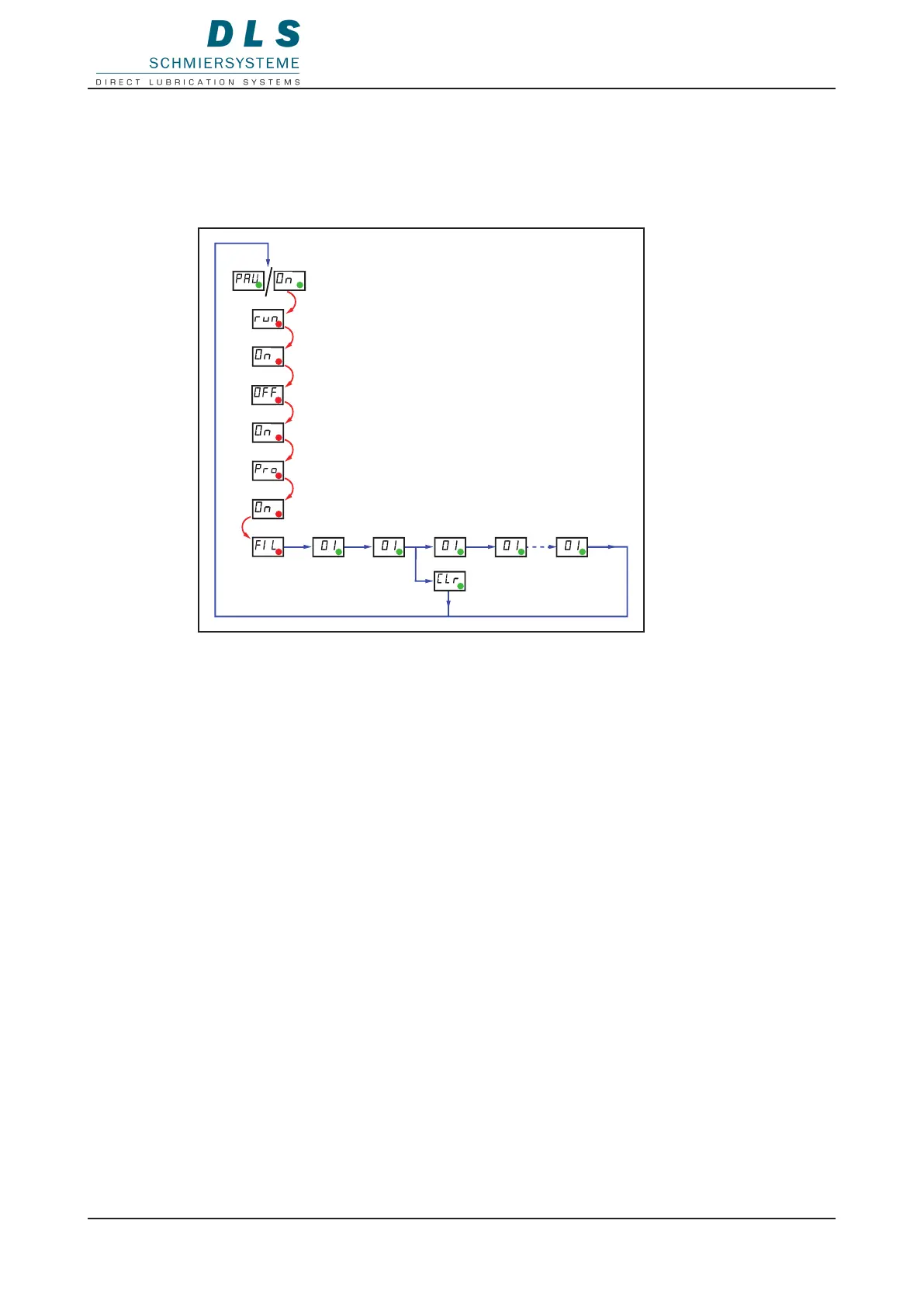
The LED ashes red and run, On, OFF, On, Pro, FIL are displayed one after another
in the LCD.
2. Remove the magnetic pin when FIL is displayed.
The FlexxPump 125 starts the lling process.
The LCD displayed the approximate counter-pressure and the pumping pump piston.
The FlexxPump 125 starts operating again automatically at the end of the lubrication
process.
Aborting the lling process
1. Hold the magnetic pin against the eld of activity during the lling function.
The LCD shows CLr.
2. Remove the magnetic pin.
The lling function is aborted.
The FlexxPump 125 starts operating again automatically.


 To Next Page