22 BA FlexxPump 125 - 24 V_20181121_EN de 201811
Operation
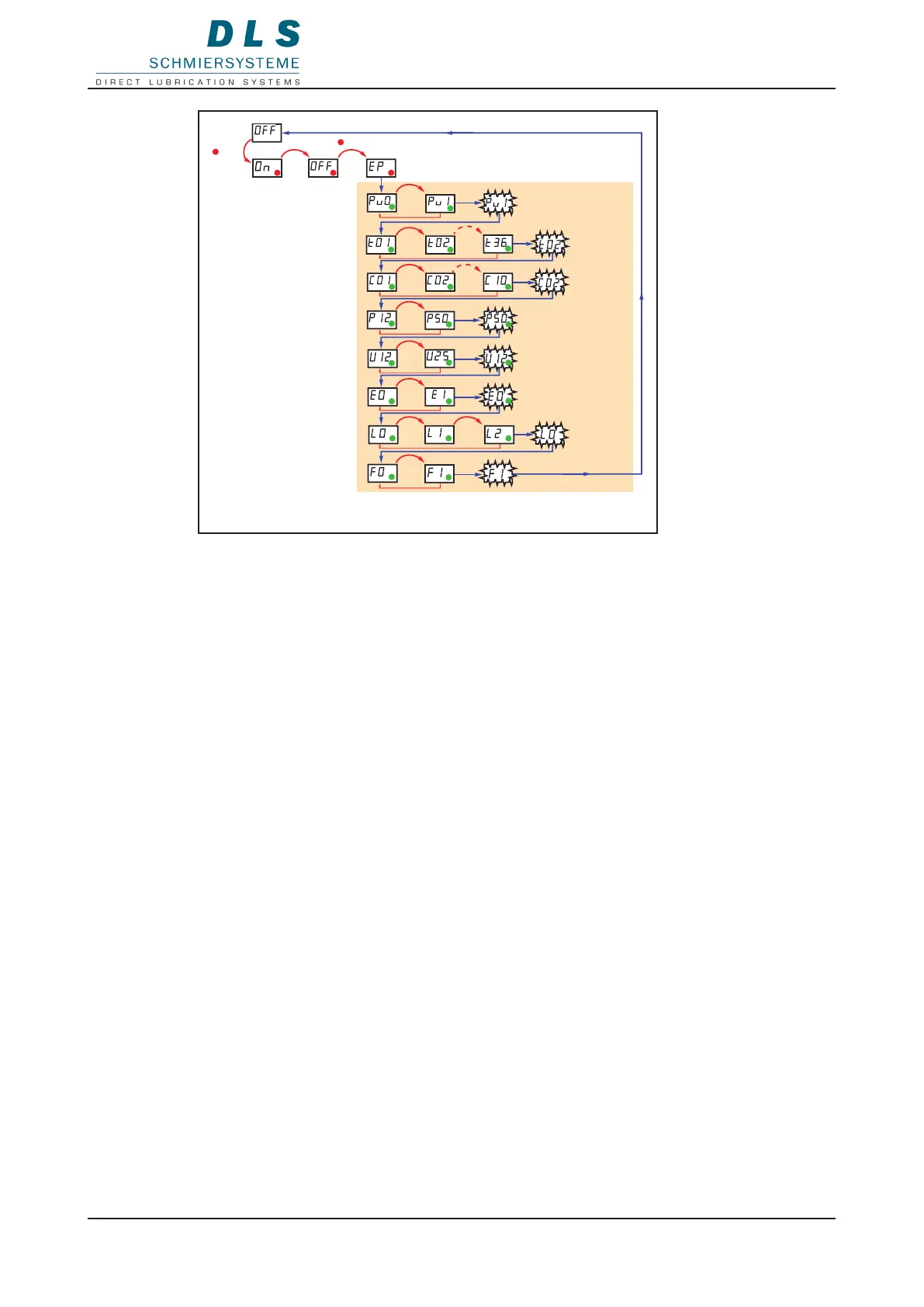
3x
7x
Changing parameters
9 FlexxPump 125 ready for operation (OFF)
1. Hold the magnetic pin against the area of activity.
The LED ashes red three times, then the LCD displays On.
The LCD ashes red seven times and OFF is displayed in the LCD, then
EP is displayed in the LCD.
2. Remove the magnetic pin when EP is displayed.
The LCD shows the rst adjustable parameter.
3. Hold the magnetic pin against the eld of activity to change the parameter.
The value for the parameter is counted up in the LCD and starts again from the
beginning after the highest value.
4. Remove the magnetic pin from the eld of activity at the desired value.
The set value ashes twice.
The next parameter is displayed in the LCD.
The current value ashes twice if the parameter is not changed.
The FlexxPump 125 automatically switches to standby after the last parameter.


 To Next Page