18
Set-up (continued)
Setting cards
Please use cards specified by your dealer. This unit
can take both 0.76 mm-thick and 0.25 mm-thick
cards. The factory setting is for 0.76 mm-thickness.
See p.20 to set the thickness switching plate to 0.25
when using 0.25 mm cards.
Fingerprints, soiling, etc. on card
surface can result in print errors. Wear lint-free
gloves when handling.
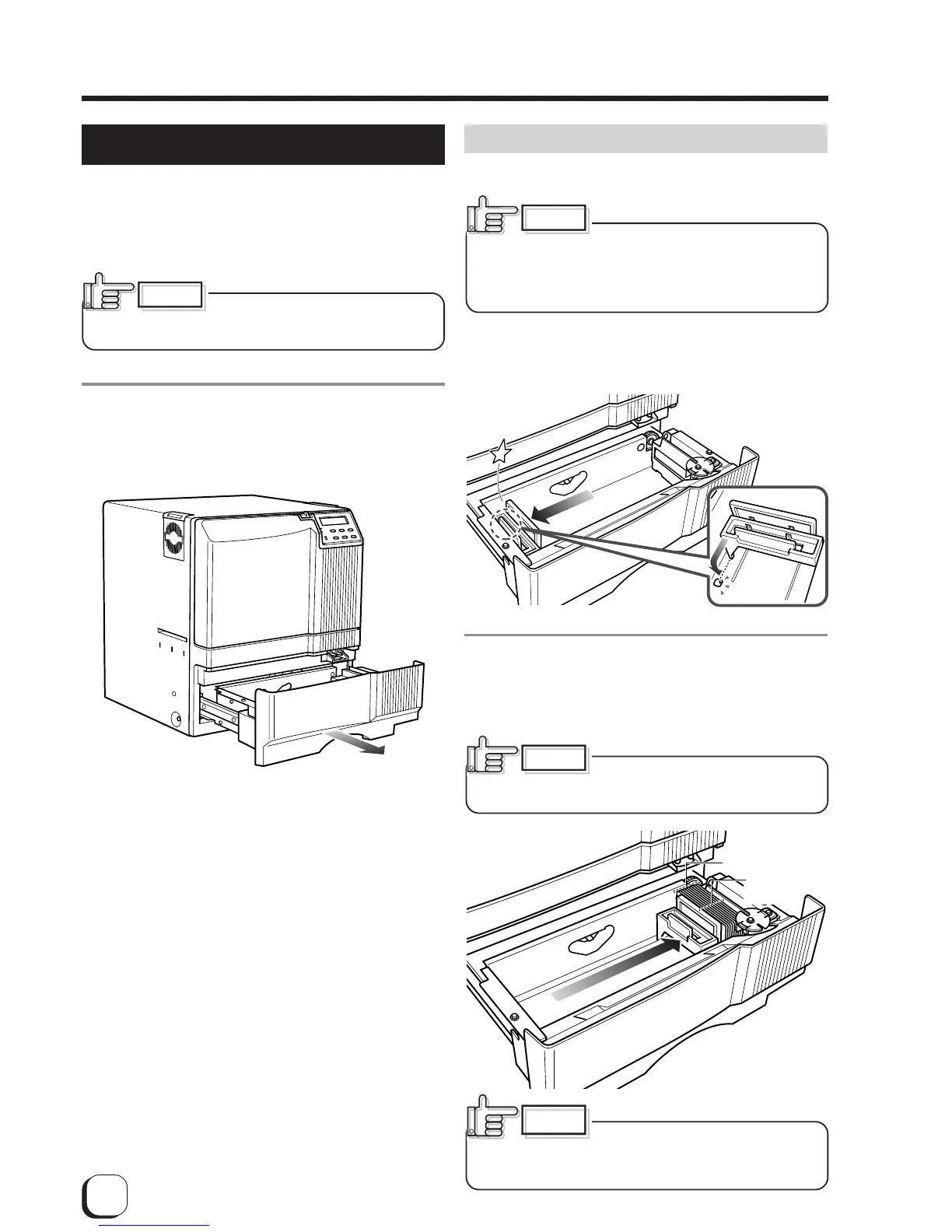
1.
Open the card tray.
Hold the lower part of the card tray and pull the tray
toward you slowly until it no longer moves.
CAUTION
Inserting cards
The unit can take about 300 0.76mm-thick cards.
When removing new cards from
the box, it is possible that cards may be stuck due to
static electricity. In this case, peel the cards off one at
a time before setting into position. Hold the edges of
the card when carrying out these operations.
1.
Pull the card bracket back.
The card bracket locks when it reaches the hole.
2.
Insert the cards and move the bracket back
into position.
Limit the number of cards as the card bracket moves
back slightly from the lock position.
Setting the cards improperly can
cause feed jams. Check that the cards are neatly
arranged.
When moving the card bracket
back into position, do this slowly to avoid jamming
your fingers. Leaving the card bracket out of position
may cause card jams.
CAUTION
CAUTION
CAUTION
Align the cards
neatly with the
side
Be sure that the
tops of the cards
are aligned
properly



 To Next Page