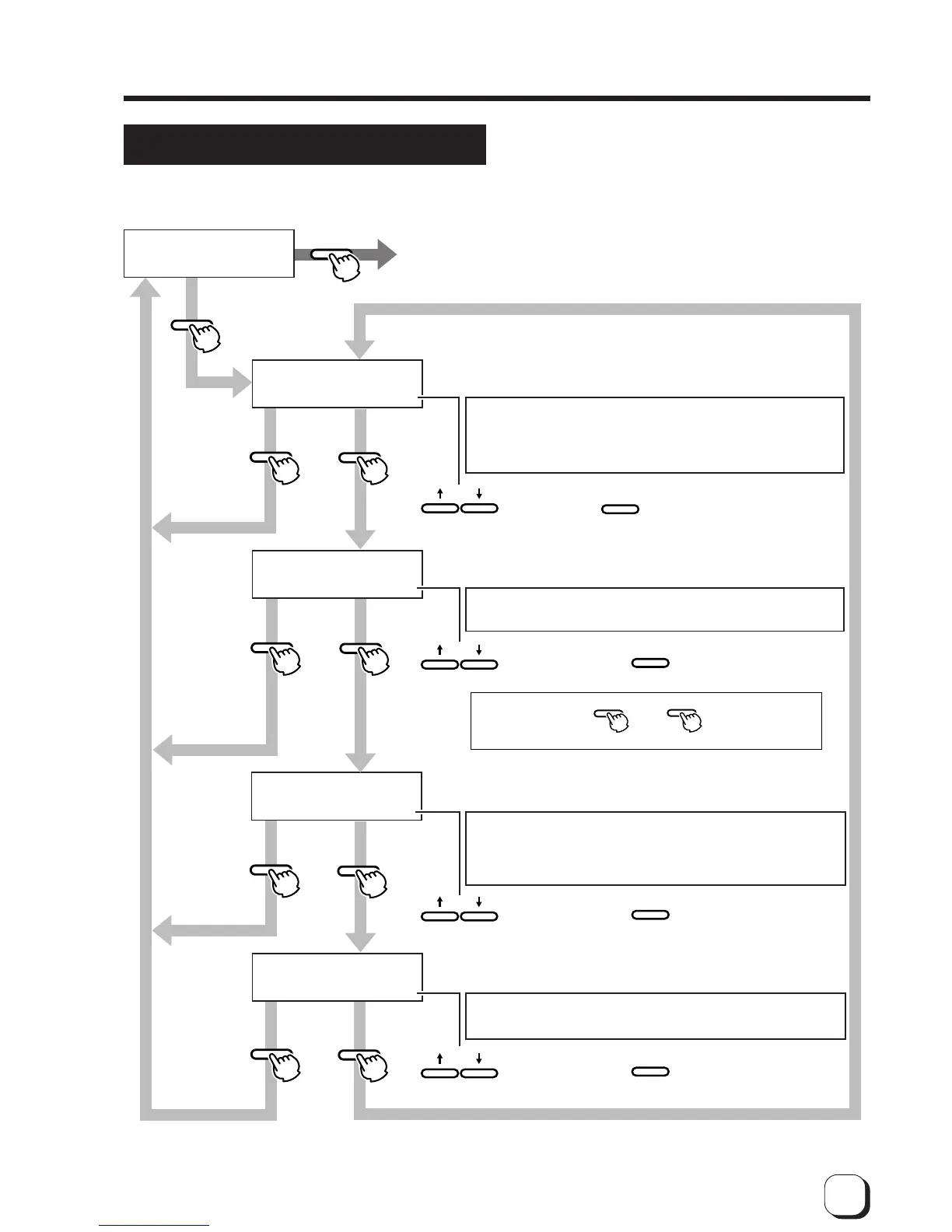
Set retransfer film
Set film type
(The electronic beep sounds .)
Set the retransfer temperature.
8 gradations can be set
(from –5 to +2, the larger the value the higher the temperature)
Set the reverse retransfer speed:
5 gradations can be set
(from –2 to +2, the higher the value the faster the speed.)
Exit user mode
If initialization is not carried out, the temperature setting will have no effect on the printer.
Set the retransfer speed:
5 gradations can be set
(from –2 to +2, the larger the value the faster the speed)
to select the
setting and
press
to select the
setting value
and press
to select the setting
value and press
to select the
setting value
and press
Press
to save.
Press
to save.
Press
to save.
Press
to save.
Change the setting when using special films (not yet
available). To use these films, a firmware of this machine
needs upgrading. Consult your dealer.
Retransfer may be not performed well depending on the
cards. Increase the temperature level step by step until the
card can be printed clearly.
Partial incompletions may occur depending on the cards
during retransfer. The performance is increased as the
value is lowered. Specify the value mainly on the retransfer
roller temperature setting and use the speed setting for fine
adjustments.
Double-sided printing results in a warp depending on the
cards. Change the speed to correct it.
* After exiting the
user mode, press
and then
press
to initialize.
(The electronic beep sounds .)
(The electronic beep sounds .)
(The electronic beep sounds .)



 To Next Page