18
• Press the "UP" or "DOWN" arrow keys to view jobs
in the library in groups of ten (10) or;
• Press 0/INS key, then: (a) Push the "DOWN" arrow
key until the number under FIND JOB ashes; (b)
Enter job number and the screen will display the
job requested and the nine (9) surrounding jobs.
(c) Press CLEAR or ENTER twice to end.
• Press 0/INS key, then the "DOWN" arrow key to
access JOB edit. (a) Enter the job number and
press "+/-" key to accept and advance, then LENGTH
ashes; (b) Enter the length and press "+/-" key to
accept and advance, then CUTS ashes; (c) Enter
the number of parts to be cut and press "+/-" key
to accept and advance; then DONES ashes; (d)
Enter zero and press the "+/-" key to accept. This
job is now entered into the library. Press CLEAR
key once or ENTER twice to end.
(f) Press F4 and the "RIGHT" arrow key two (2) times
to access screen 3 of 6.
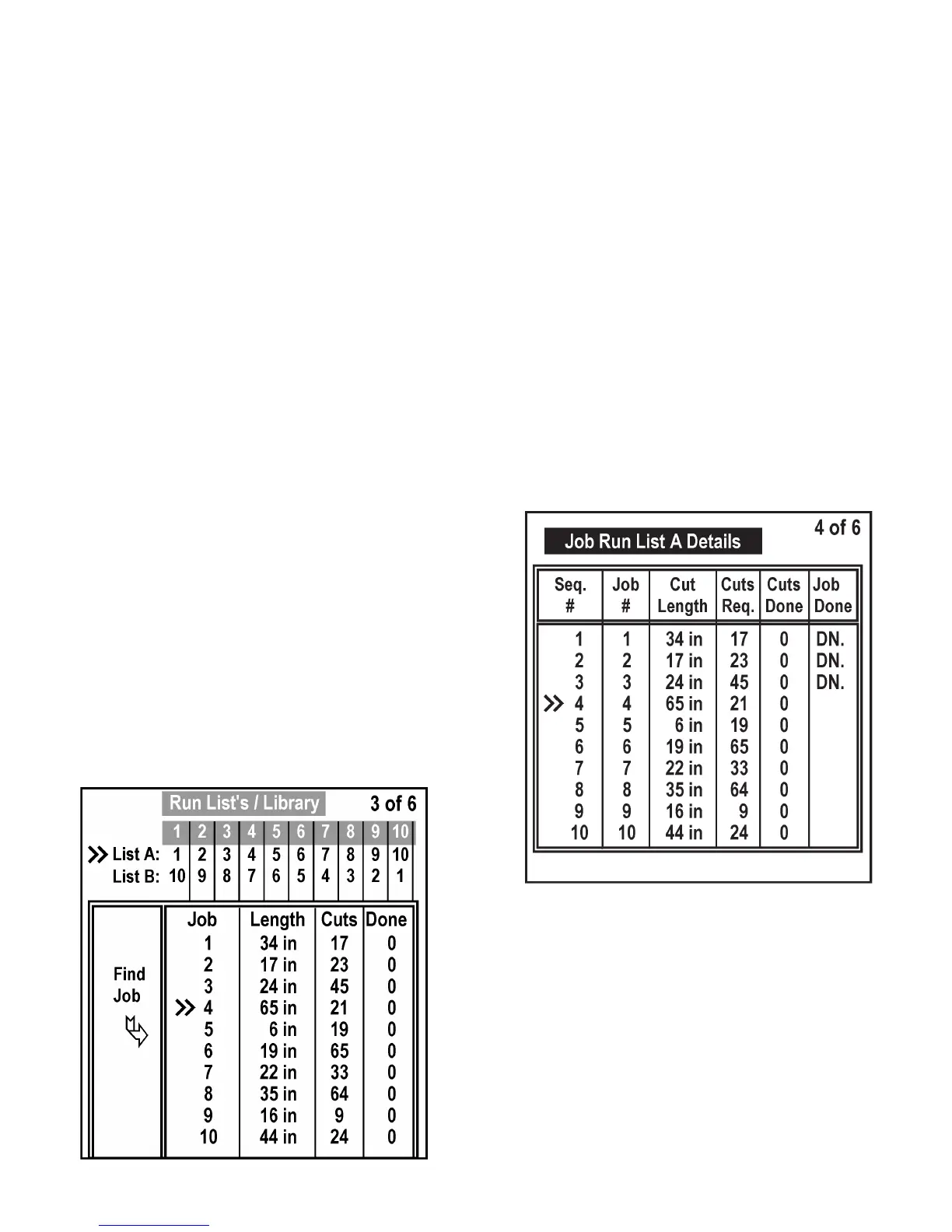
(g) This screen allows the operator to prepare and
modify RUN LIST A and RUN LIST B and to view
sections of the job library.
• Press the "UP" or "DOWN" arrow keys to view
sections of the job library in groups of ten (10),
or press the 0/INS key and locate the ashing job
number in the top two (2) rows identied as LIST A
and LIST B, then: (a) Move the asher through the
lists with the "UP", "DOWN", "LEFT", or "RIGHT"
arrow keys to the desired position; (b) Enter a job
number; (c) press "+/-" key to accept and advance
to the next eld; or press ENTER twice or CLEAR
to quit.
Job Screen Display (3 of 6) (F4).
• If less than ten (10) jobs are entered in a list, a zero
must be entered in the position following the last
job entered in the list. For example, if RUN LIST A
is to contain eight (8) jobs, a zero must be entered
in the ninth position in the list.
(h) Press F4 and the "RIGHT" arrow key three (3) times
to access screen 4 of 6 and four (4) times to access
screen 5 of 6.
(i) These screens provide the details of each respective
JOB RUN LIST with the jobs listed sequentially.
The job numbers contained in the RUN LISTS may
be changed from these screens under the JOB #
column.
• Press the 0/INS key, the rst job number under the
JOB # column will ash, then: (a) Press the "UP"
or "DOWN" arrow key to view jobs in the library in
groups of ten, or press 0/INS key, then: (b) Locate
the desired position in sequence; (c) Enter the
job number; (d) Press the "+/-" key to accept and
advance to the next job number in sequence, or
press ENTER twice or the CLEAR key to quit.
Job Screen Display (4 of 6) (F4).
OPERATOR WORKSTATION (Continued....)



 To Next Page