31
SettingTimeandDate
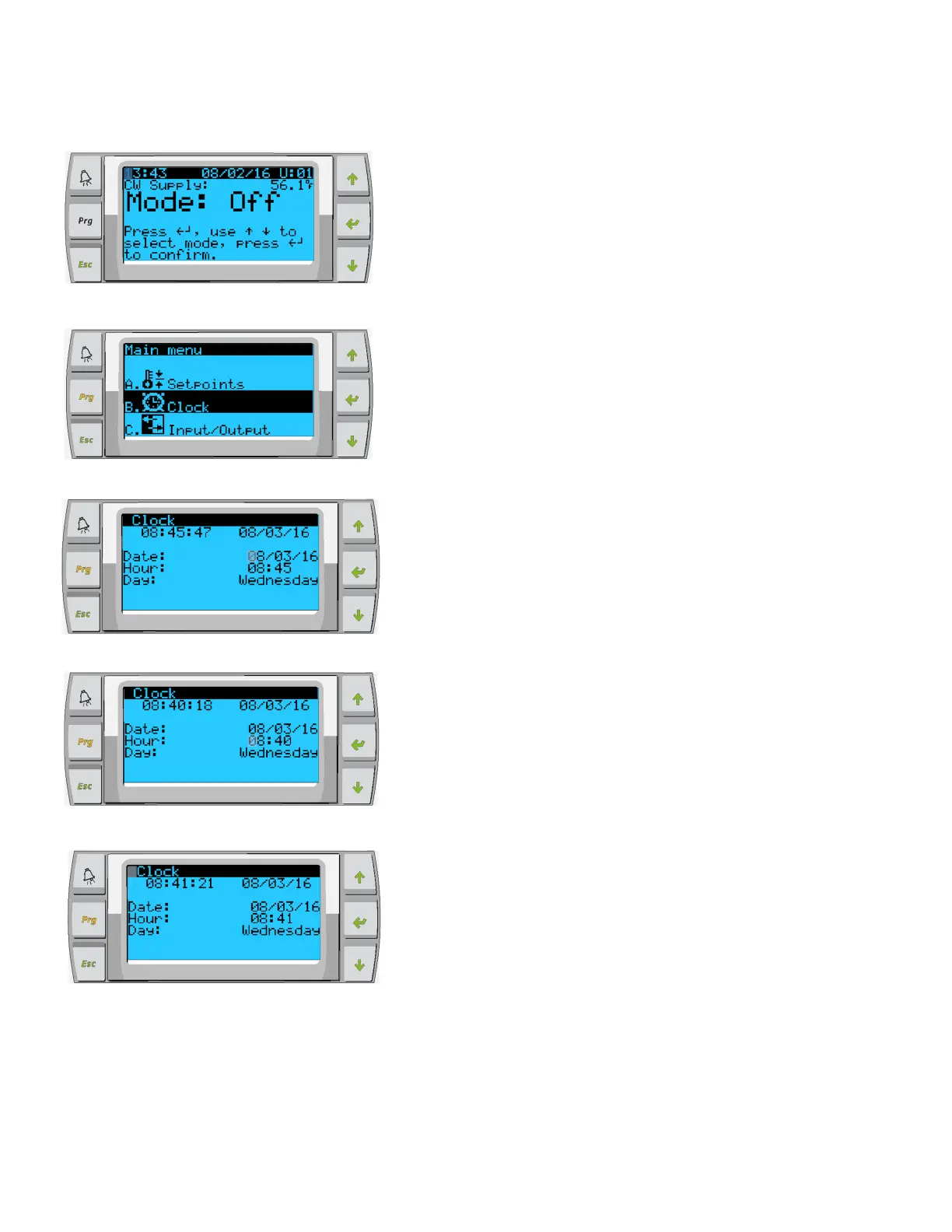
PressPrgbutton
ScrolltoClock/Schedulerandpress
Pressenter,noticethecursorflashesonthedatefield mm/dd/yyyy .
Usetheupand/ordownkeystoselectthecorrectmonth.Hitenter
thepressupand/ordowntoselectthecorrectday.
Pressentertoselecttheyearand/orupdown
buttonstoselectthe
correctyear.
Pressenteragainandthecursordropsdowntothe“Hour”field.
Usetheupanddownkeystoselectthecorrecthour,thenminute
Cursorgoesbacktothe“Clock”title.Settingshavebeensavedand
youcanexittomainscreen.Daylight
Savingisenabledbydefault.
Scrolldownfromtheclockscreenifyouwishtodisab le.
Figure29
Figure30
Figure31
Figure32
Figure33














 To Next Page