ED700
Low Energy
Automatic Swing Door
DORMA
12
DORMA AUTOMATICS, Inc. 924 Sherwood Drive Toll-Free: 877-367-6211
Lake Bluff, IL 60044 Fax: 877-423-7999
DL3038-010 Rev. B 6/08
E-mail: automatics@dorma-usa.com Subject to change without notice
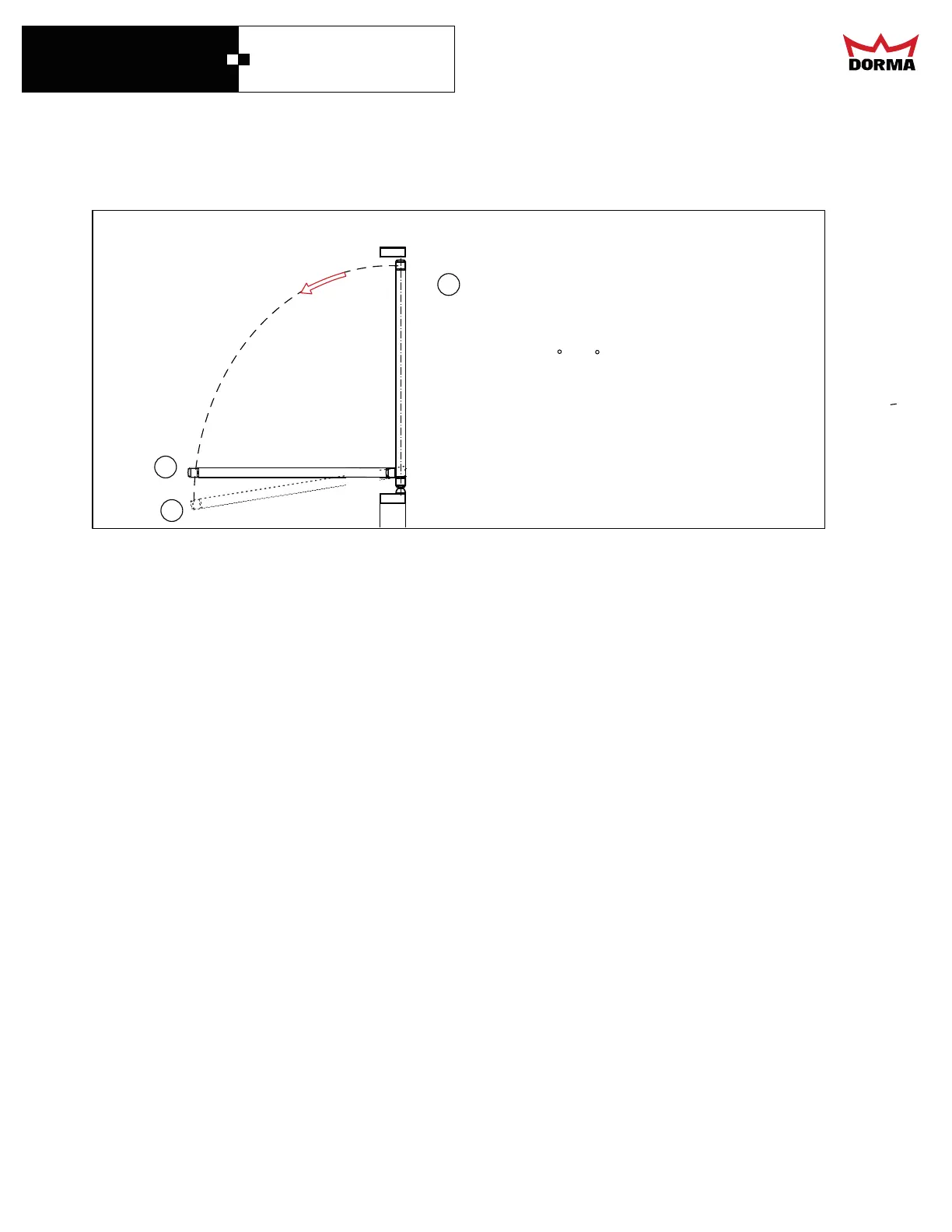
ELECTRONIC STOP SETUP DETAILS
1
2
Hardstop Note
1
Electronic Stop - this is set by the
controller and acts as the backstop during
door operation. It is always set at less
than the angle for the Physical Hardstop.
Set around 3 to 5 less than the Physical
Hardstop.
The ED 700 has two stops one being mechanical and the other being a software controlled stop
when programing the door keep in mind that the softstop has to 3 to 5 degrees before the
hardstop. Once programed the door will stop at the software stop if it is pushed past
this point it will return to the softstop. If you can not swing the door past 90 degrees there are
alternative options to preload the arm please contact technical services for assistance.



 To Next Page