ED700
Low Energy
Automatic Swing Door
DORMA
20
DORMA AUTOMATICS, Inc. 924 Sherwood Drive Toll-Free: 877-367-6211
Lake Bluff, IL 60044 Fax: 877-423-7999
DL3038-010 Rev. B 6/08
E-mail: automatics@dorma-usa.com Subject to change without notice
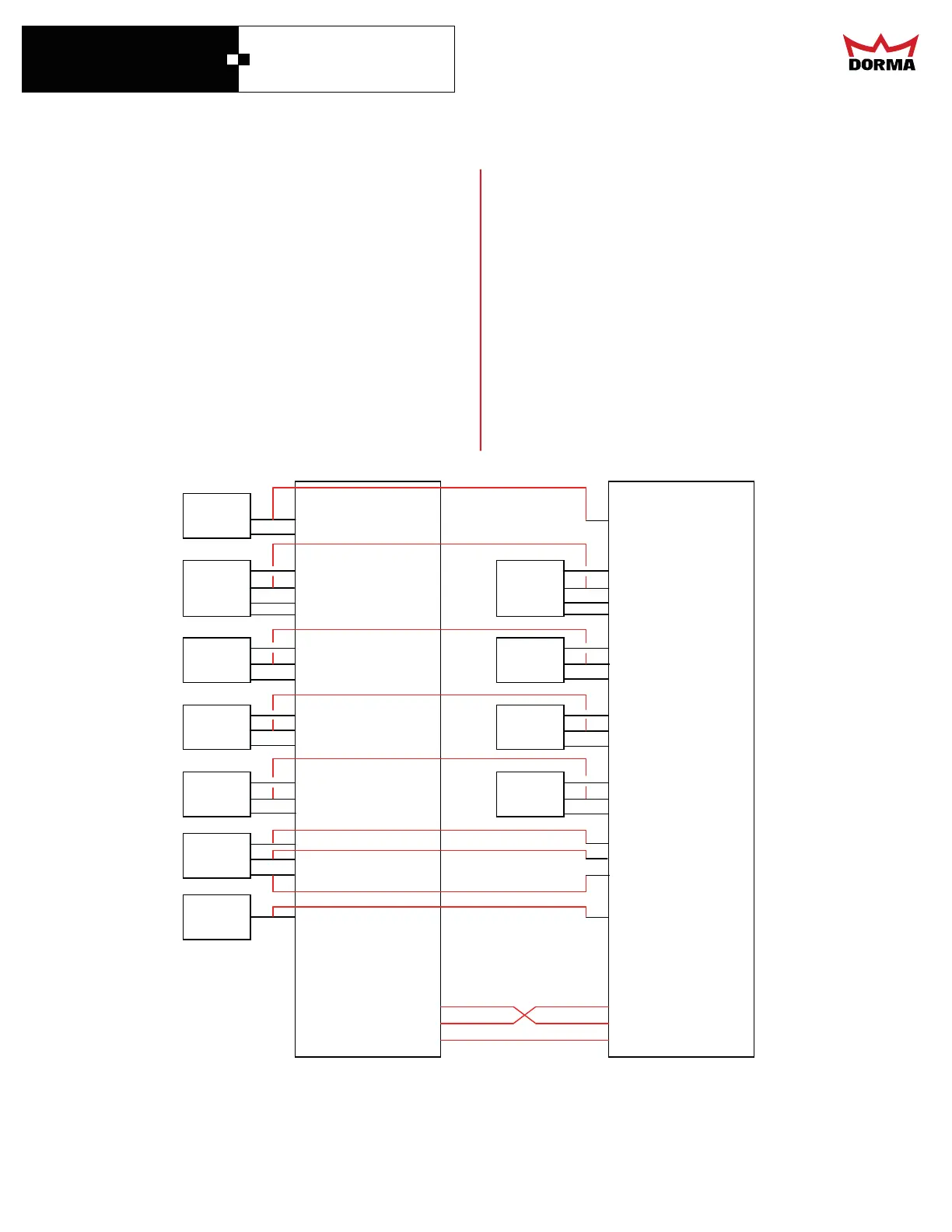
Setting Up Simultaneous Doors
The purpose of the this setup is to synchronize two
side-by-side doors for simultaneous operation.
Connecting the Controllers
Header
Presence
Swing
Presence
Approach
Presence
Safety
Beam
+24V
T
RIGGER
COM
+24V
HEADER
DATA
COM
+24V
S
WING
COM
+24V
APPR.
COM
+24V
BEAM
COM
C
O
N
T
R
O
L
L
E
R
1
Header
Presence
Swing
Presence
Approach
Presence
Safety
Beam
+24V
T
RIGGER
COM
+24V
HEADER
DATA
COM
+24V
S
WING
COM
+24V
BEAM
COM
C
O
N
T
R
O
L
L
E
R
2
OFF
GND
H.O.
Mode
Switch
OFF
GND
H.O.
RXD
TXD
GND
RXD
TXD
GND
GND
FIRE
GND
.
.
+24V
APPR
.
COM
Fire
sensor
• Connect the grounds of the two controllers together.
• Connect the knowing act activation device to both
controllers in parallel.
• Connect the presence sensor to both controllers in
parallel, except for the Data Line.
• Let each controller power it’s presence sensors
• Connect a single program switch to both doors in
parallel.
• Connect the RXD line of each controller to the TXD
line of the other controller.
• If you use the “Fire” input, connect the Fire sensor
to both controllers.
• If you use the “Breatout” input, connect the Breakout
switch to both controllers.
• Connect both controllers to the same AC power source.
• Program the two controllers identically
(Continued on following page)
Push
Plate



 To Next Page