DORMA PORTEO
WN 057472 45532 02/08
Hand-held transmitter RC-T
O
N
O
N
1
2
SW
1
L
1
-
+
Aerial
V AC/DC
Hand-held transmitter RC-T
violett
orange
blue
green
yellow
2.
1.
O
N
O
N
1
2
SW1
1L
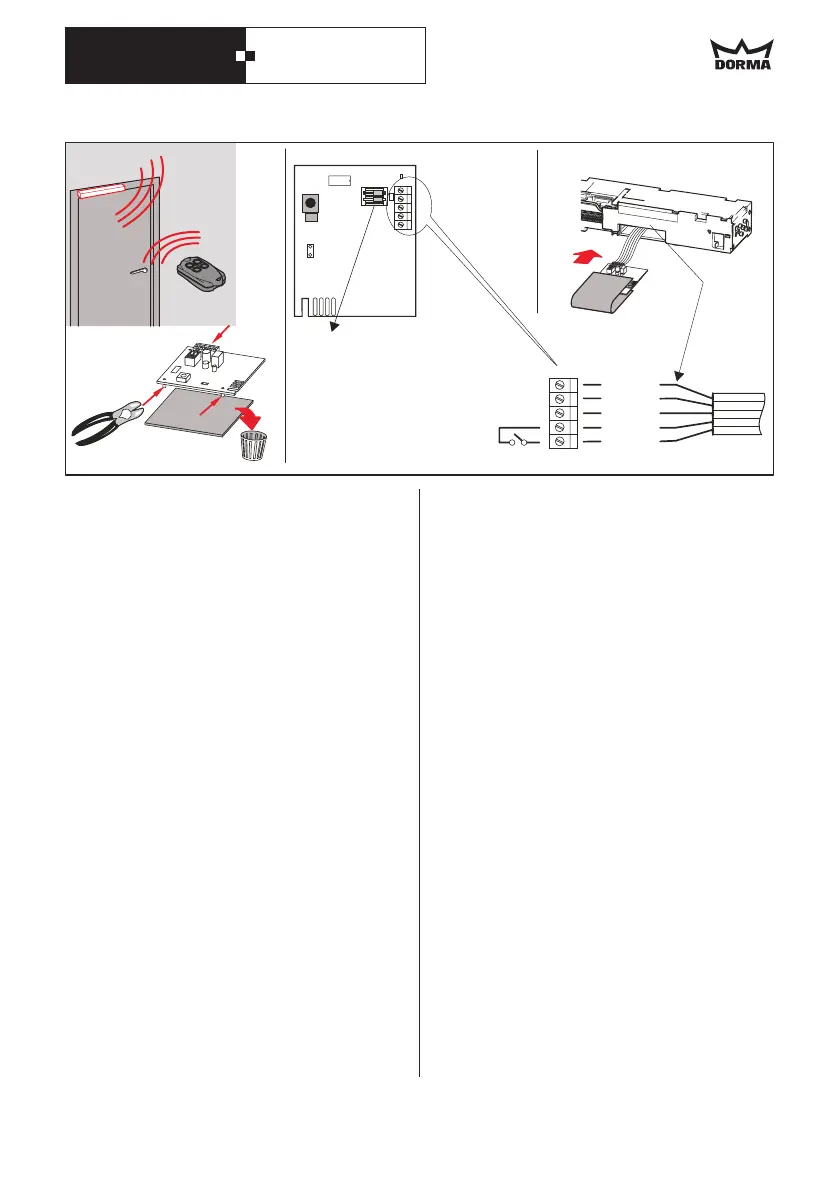
Switch 1
ON = 12 V AC/DC
OFF = 24 V AC/DC
Switch 2
Rolling Code
without function
set in position OFF
Receiver RC-R
ON
1
2
SW
L1
3.
RC-T radio remote control system
DORMA
RC-T transmitter
RC-R
PORTEO door assistant
Activator: open door - close door
Programming
.
As a radio remote control system, the
(option) opens and closes
automatic doors.
The receiver unit (
) is installed in the provided slot
of the
Press programmed pushbutton on hand-held
transmitter:
.
1.
2.
.
.
1.
2.
.
.
Only a limited number of hand-held transmitters
can be applied. Every hand-held transmitter has
to be programmed separately
has to be ordered
separately and
.
The door opens and closes after the preset
hold-open time
With the door closed, press pushbutton:
The door opens and remains in that position
With the door open, again press pushbutton:
The door closes.
Briefly press pushbutton SW on the
The LED near the pushbutton lights up for 5
sec.
Within these 5 sec. press any of pushbuttons
on the handheld transmitter
Function 1 has now been enabled.
At the handheld transmitter this function is
now fixed on the selected pushbutton
Press pushbutton SW on the until the
LED next to the button extinguishes again.
The LED flashes 30 seconds.
Then there is a short permanent light interval
(approx. 3 sec.); press a button of the hand-
held transmitter while the permanent light is
on
Function 2 has now been enabled
At the hand-held transmitter this function is
now fixed on the selected pushbutton.
1. Disconnect the receiver.
2. Press pushbutton SW on the and hold.
3. Switch power back on.
LED lights up.
4. Release pushbutton.
Functions
Function 2 PermanentOpen
Enabling function 1 (Pulse)
RC-R
Enabling function 2 -PermanentOpen
RC-R
Disenabling the modes
Before each change of the pushbutton allocation
setting must be deleted
RC-R
RC-R
·
·
·
·
·
·
.
GB 29


 To Next Page