dormakaba Header Installation Instructions with EML310/320 and 371/372
For use with DRS Rails and Patching Fittings (4-1/8”, 4-1/2”, 6” Headers)
933903
07-2019EML Header Shim
9
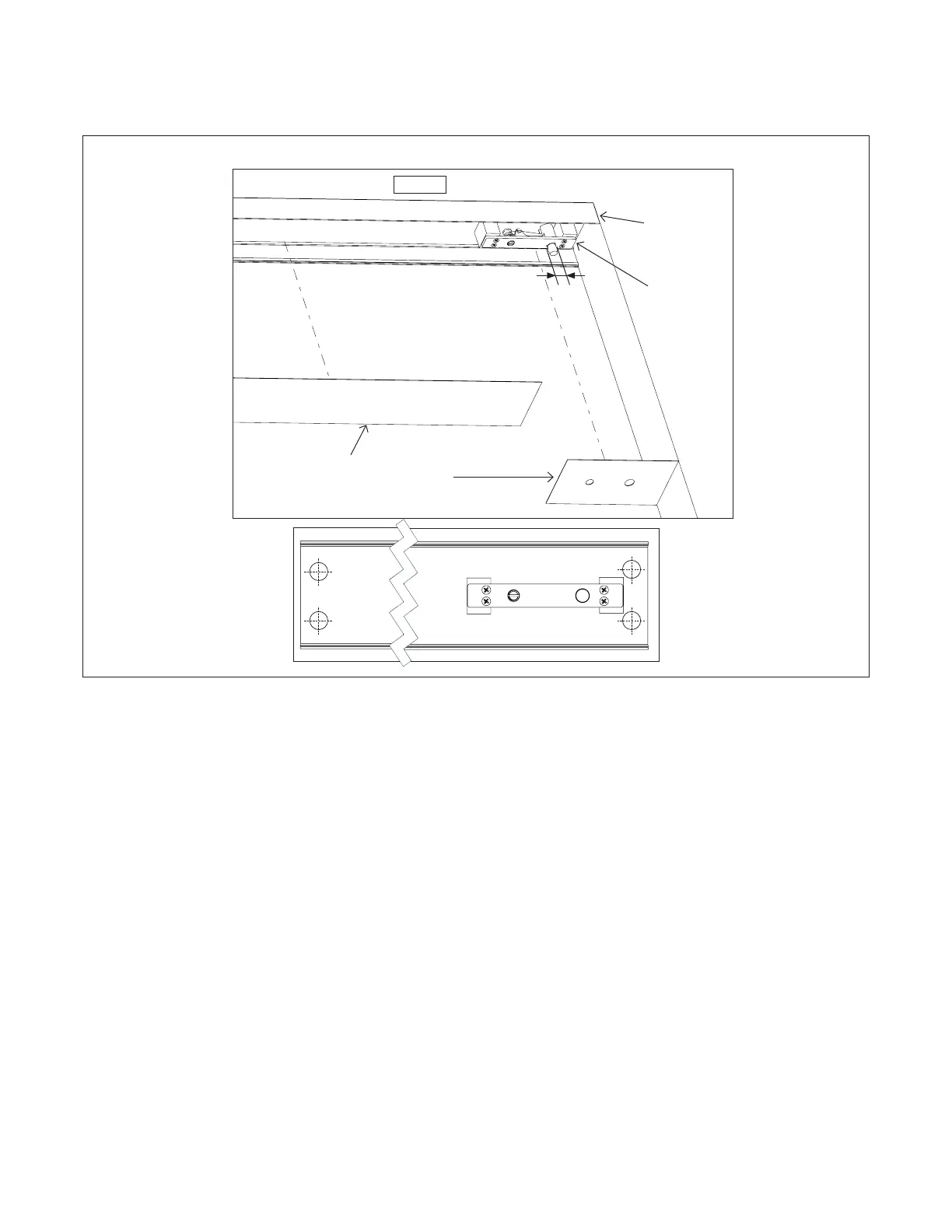
Install PT21 header
. Install PT header for single or double door
2.2.1 Remove covers from header tube.
2.2.2 Pre-drill holes in header tube for installation.
2.2.3 Secure header tube to overhead frame using
appropriate fasteners dependent upon
application.
NOTE: Always ensure the proper fasteners and
adequate number of fixing points for your specific field
conditions.
2.2.4 Adjust PT21 if necessary: See adjustment
section: 2.4
2.2.5 Snap cover cap and flat cover back into place.
2.2.6 For double door applications, follow steps 2.1.1
through 2.1.4.
NOTE: (IF NECESSARY) ENSURE HOLES ARE CUT
INTO HEADER FOR FEEDING WIRES THROUGH.
Header
tube
Flat
cover
Cover
cap
PT21
NOTE: IF HAVE DOUBLE DOORS, FOLLOW ALL STEPS FOR BOTH SIDES.
Frame
Inside of header tube
Unverisal: /” []
MUNDUS: /” []
Fig.




 To Next Page