Connection of Sensors
7 Connection of Sensors
Attention
The sensor may only be operated with safety extra-low voltage (SELV)!
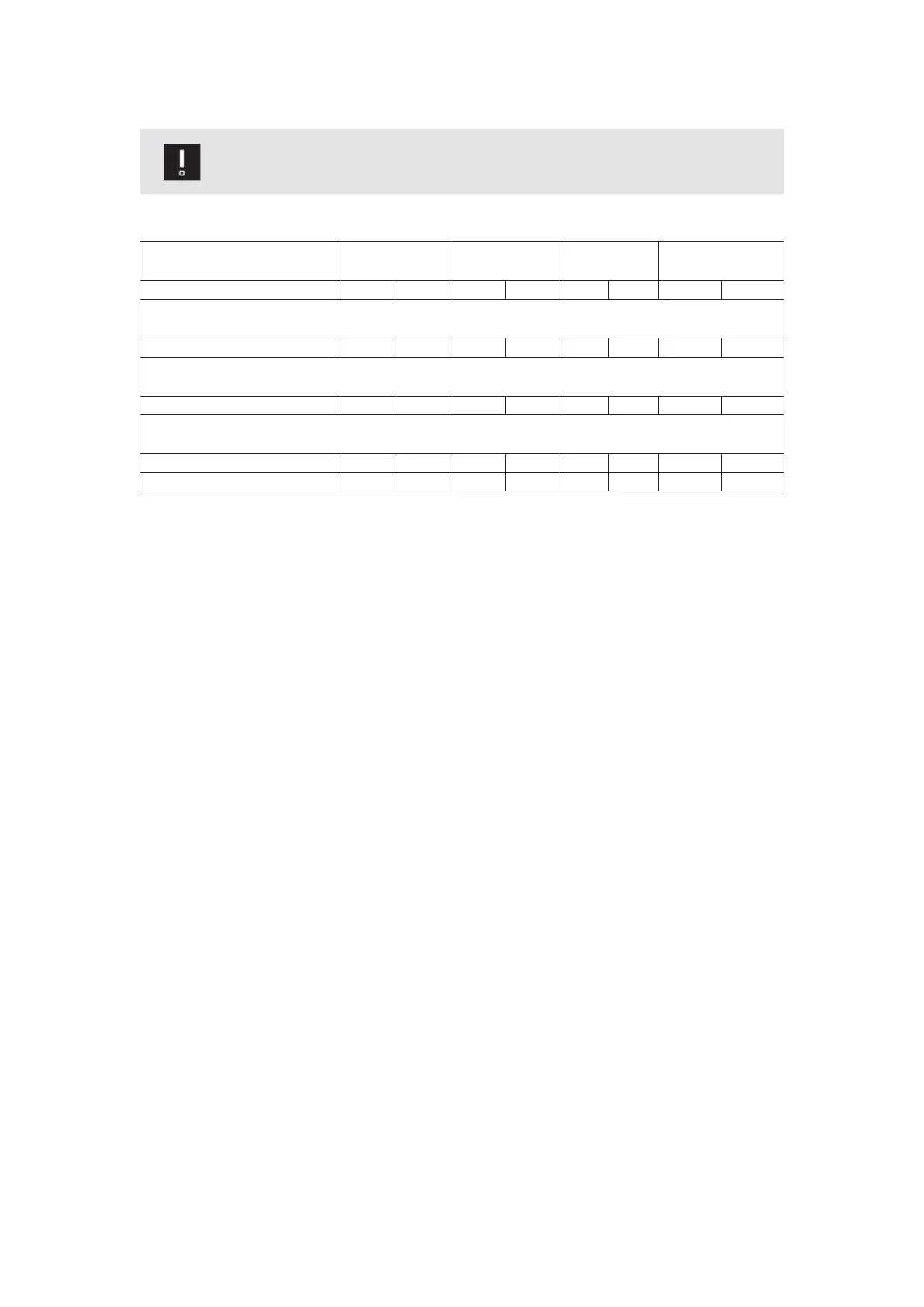
Connection diagram
The color code only applies to the black dormakaba cable.
Protection
(closing edge)
Testing
Opening
impulse
Power supply
RDBUPKGYYEGNBNWHCore identification
Cnnection diagram for use as main closing edge (MCE) inside detector
11311342313ES 250 PRO Easy
Connection diag ram for use as main closing edge (MCE) outside detector
12311341313ES 250 PRO Easy
Connection diag ram for use as secondary closing edge (SCE) inside detector
15311713ES 250 PRO Easy NSK 1
16311713ES 250 PRO Easy NSK 2
When connecting the sensor to the ES PROLINE, the parameter “ST” must be set
as follows:
SCE high active => “ST” = 1
MCE high active => “ST” = 2
SCE+MCE high active => “ST” = 3
BN = brown
BU = blue
GN = green
GY = grey
PK = pink
RD = red
WH = white
YE = yellow
ES 250 PRO Easy
2024-03
52
ES250ProEasy Installation Manual



 To Next Page