VigorAP 900 User’s Guide
123
Extension Channel
With 802.11n, there is one option to double the bandwidth per
channel. The available extension channel options will be varied
according to the Channel selected above.
Channel Width
20 MHZ- the AP will use 20Mhz for data transmission and
receiving between the AP and the stations.
Auto 20/40 MHZ– the AP will use 20Mhz or 40Mhz for data
transmission and receiving according to the station capability.
Such channel can increase the performance for data
transmission.
After finishing this web page configuration, please click OK to save the settings.
3
3
.
.
9
9
.
.
2
2
S
S
e
e
c
c
u
u
r
r
i
i
t
t
y
y
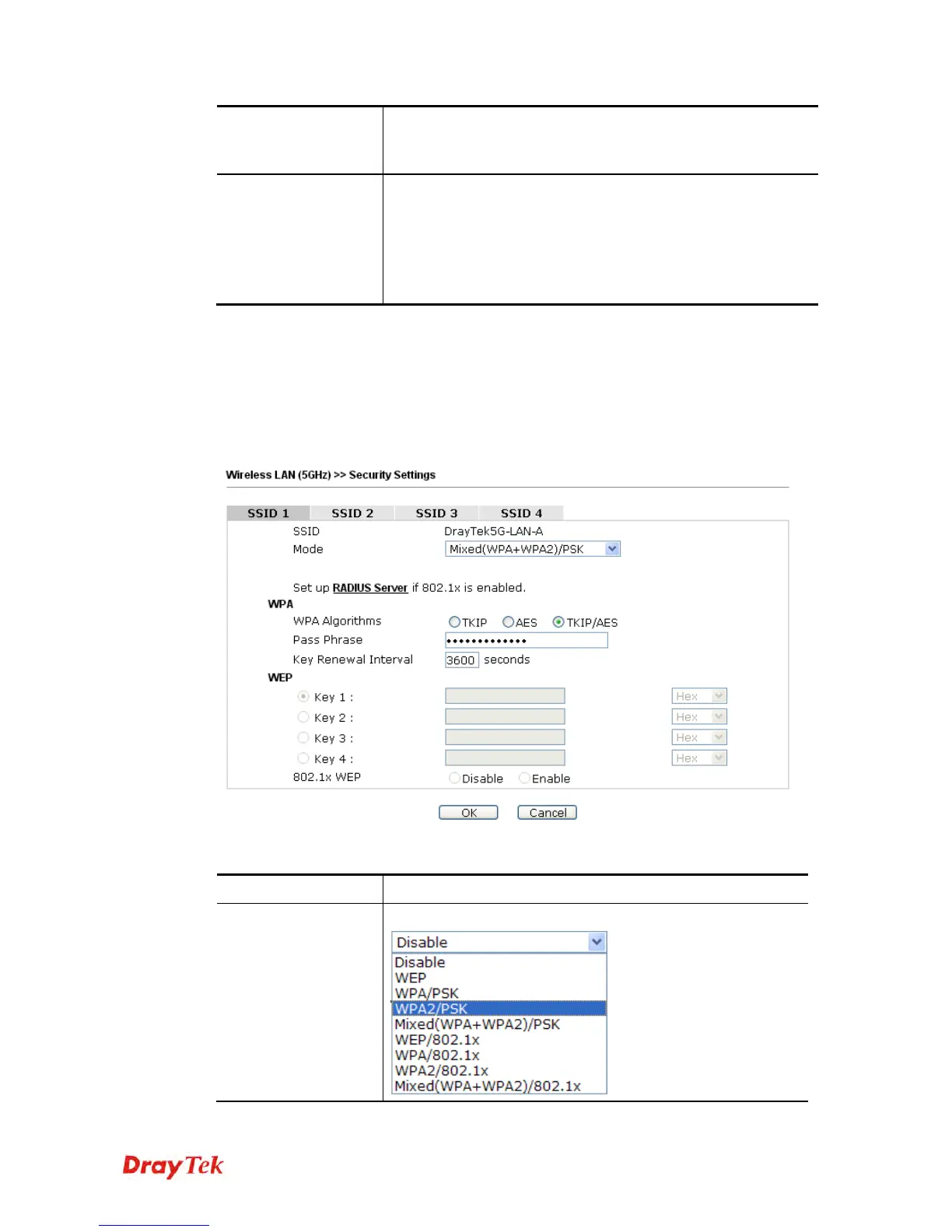
This page allows you to set security with different modes for SSID 1, 2, 3 and 4 respectively.
After configuring the correct settings, please click OK to save and invoke it.
By clicking the Security Settings, a new web page will appear so that you could configure
the settings.
Available settings are explained as follows:
Item Description
Mode
There are several modes provided for you to choose.













 To Next Page