VigorAP 900 User’s Guide
28
128-bit encryption level. The allowed content is the ASCII
characters from 33(!) to 126(~) except '#' and ','.
802.1x WEP
Disable - Disable the WEP Encryption. Data sent to the AP will
not be encrypted.
Enable - Enable the WEP Encryption.
Such feature is available for WEP/802.1x mode.
After finishing this web page configuration, please click Next to continue.
2
2
.
.
7
7
.
.
6
6
F
F
i
i
n
n
i
i
s
s
h
h
i
i
n
n
g
g
t
t
h
h
e
e
W
W
i
i
r
r
e
e
l
l
e
e
s
s
s
s
S
S
e
e
t
t
t
t
i
i
n
n
g
g
s
s
W
W
i
i
z
z
a
a
r
r
d
d
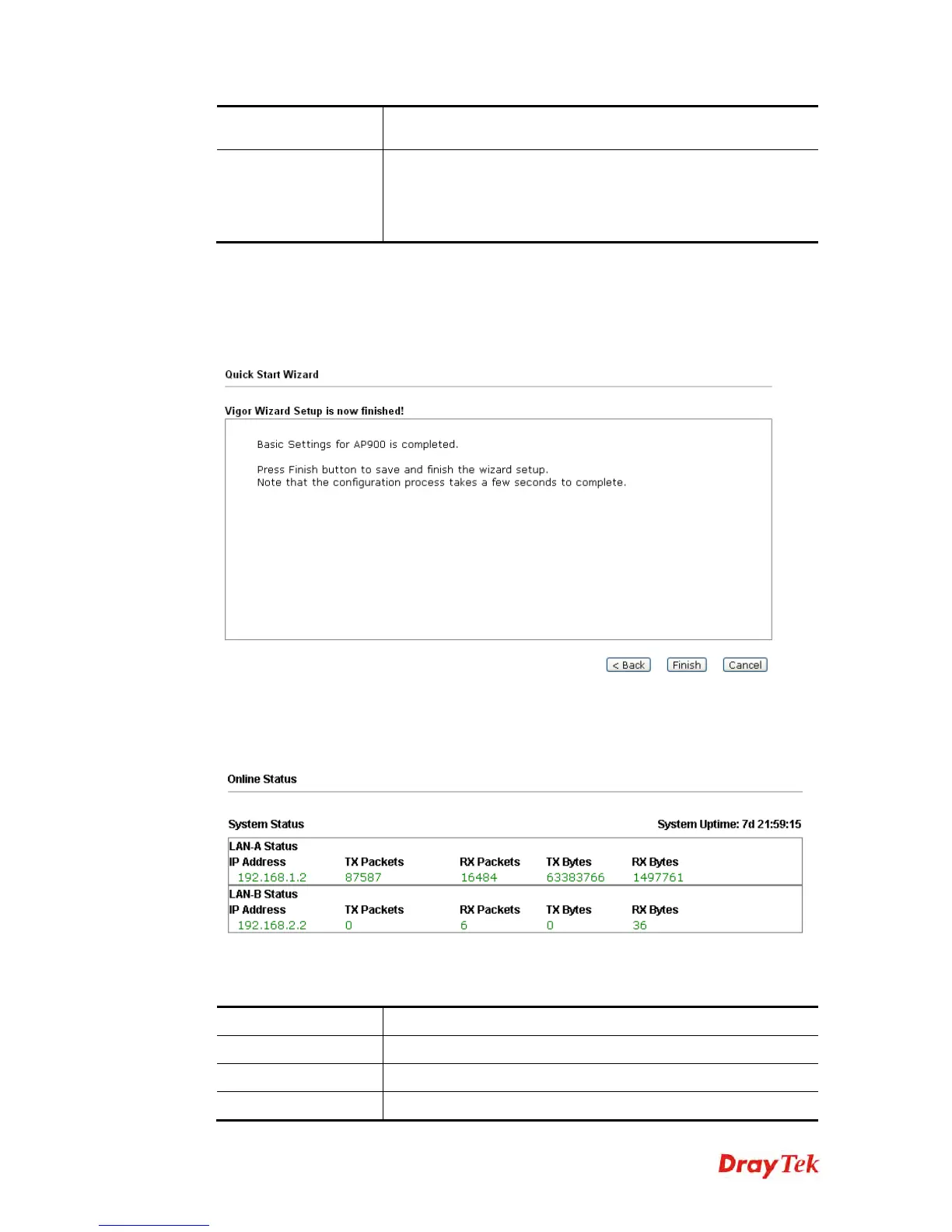
When you see this page, it means the wireless setting wizard is almost finished. Just click
Finish to save the settings and complete the setting procedure.
2
2
.
.
8
8
O
O
n
n
l
l
i
i
n
n
e
e
S
S
t
t
a
a
t
t
u
u
s
s
The online status shows the LAN status, Station Link Status for such device.
Detailed explanation is shown below:
Item Description
IP Address
Displays the IP address of the LAN interface.
TX Packets
Displays the total transmitted packets at the LAN interface.
RX Packets
Displays the total number of received packets at the LAN













 To Next Page