VigorAP 900 User’s Guide
127
Client’s MAC
Address
Manually enter the MAC address of wireless client.
Add
Add a new MAC address into the list.
Delete
Delete the selected MAC address in the list.
Edit
Edit the selected MAC address in the list.
Cancel
Give up the access control set up.
Backup
Click it to store the settings (MAC addresses on MAC Address
Filter table) on this page as a file.
Restore
Click it to restore the settings (MAC addresses on MAC
Address Filter table) from an existed file.
After finishing this web page configuration, please click OK to save the settings.
3
3
.
.
9
9
.
.
4
4
W
W
P
P
S
S
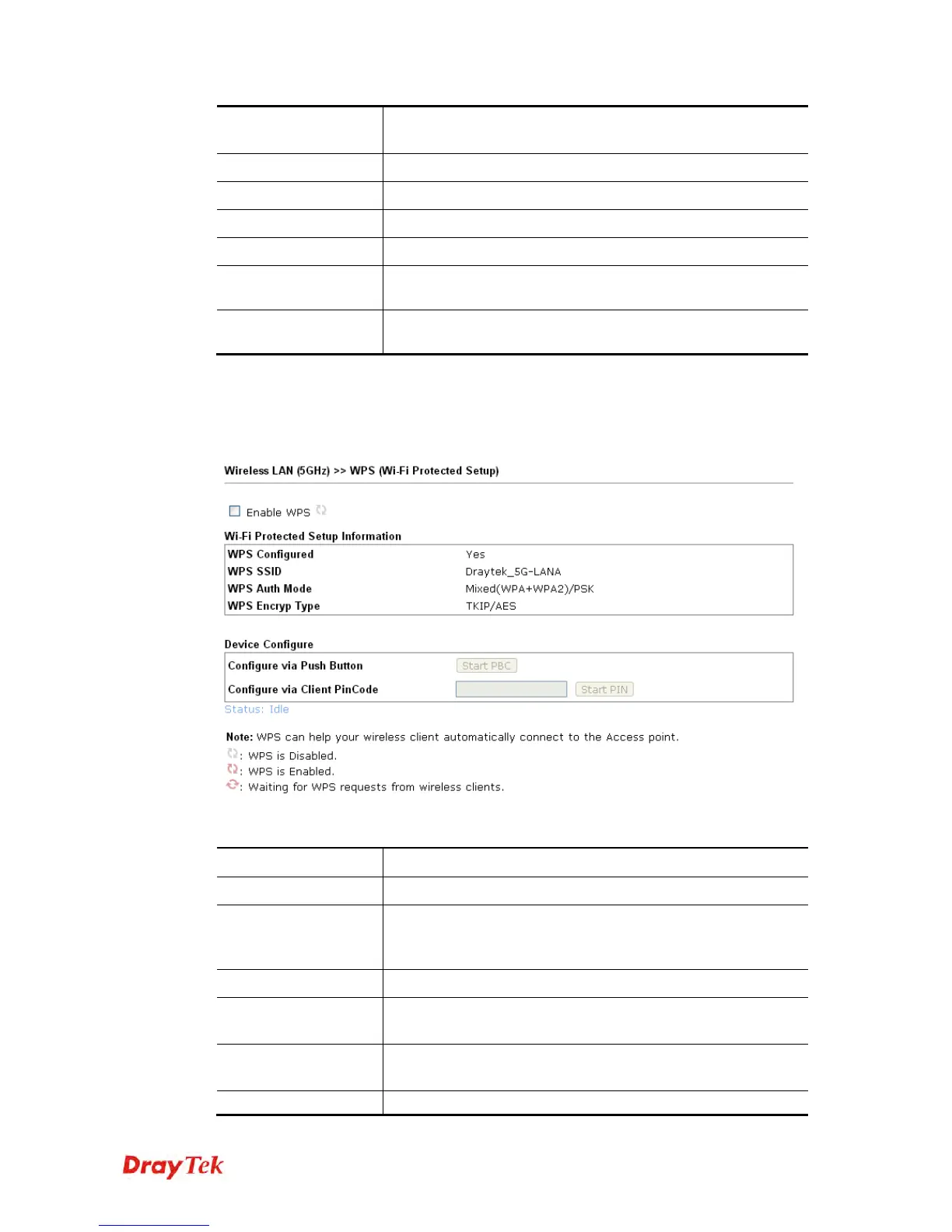
Open Wireless LAN>>WPS to configure the corresponding settings.
Available settings are explained as follows:
Item Description
Enable WPS
Check this box to enable WPS setting.
WPS Configured
Display related system information for WPS. If the wireless
security (encryption) function of VigorAP 900 is properly
configured, you can see ‘Yes’ message here.
WPS SSID
Display current selected SSID.
WPS Auth Mode
Display current authentication mode of the VigorAP 900r.
Only WPA2/PSK and WPA/PSK support WPS.
WPS Encryp Type
Display encryption mode (None, WEP, TKIP, AES, etc.) of
VigorAP 900.
Configure via Push
Click Start PBC to invoke Push-Button style WPS setup













 To Next Page