VigorAP 900 User’s Guide
170
Daylight Saving
Check the box to enable the daylight saving. Such feature is
available for certain area.
NTP synchronization
Select a time interval for updating from the NTP server.
Click OK to save these settings.
3
3
.
.
1
1
3
3
.
.
7
7
M
M
a
a
n
n
a
a
g
g
e
e
m
m
e
e
n
n
t
t
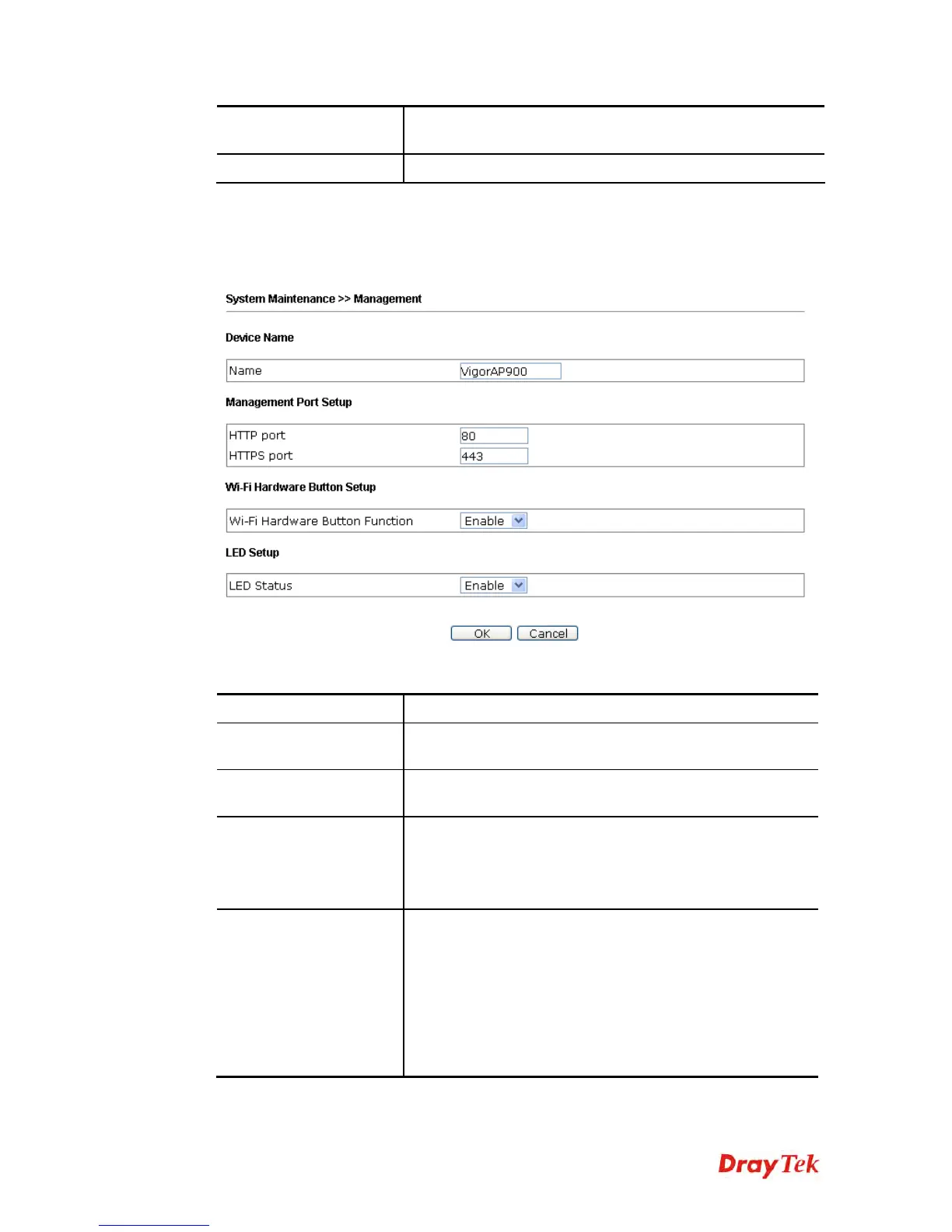
This page allows you to specify the port number for HTTP and HTTPS server.
Available parameters are explained as follows:
Item Description
Device Name
Name - The default setting is VigorAP 900. Change the
name if required.
Management Port Setup
HTTP port/HTTPS port -Specify user-defined port
numbers for the HTTP and HTTPS servers.
Wi-Fi Hardware Button
Setup
Stop people manually disabling the wireless if they do not
have the right of administration to access to the device.
Enable – Choose it to enable the hardware button function.
Disable – Choose it to disable the hardware button function.
LED Setup
The LEDs blink always since VigorAP 900 is powered on.
Some people might not like that. Therefore the function of
LED is allowed to be disabled to make people feeling
comfortable and undisturbed. When the box is checked, all
the LEDs on VigorAP 900 will light off immediately after
clicking OK.
Enable – Choose it to enable the function of LED.
Disable – Choose it to disable the function of LED.













 To Next Page