VigorAP 900 User’s Guide
39
Address
Apply to
White List – MAC address listed inside Client’s MAC Address
will be categorized as one of members in White List.
Black List - MAC address listed inside Client’s MAC Address
will be categorized as one of members in Black List.
Add
Add a new MAC address into the White List/Black List.
Delete
Delete the selected MAC address in the White List/Black List.
Edit
Edit the selected MAC address in the White List/Black List.
Cancel
Give up the configuration.
3
3
.
.
3
3
.
.
5
5
S
S
t
t
a
a
t
t
u
u
s
s
o
o
f
f
S
S
e
e
t
t
t
t
i
i
n
n
g
g
s
s
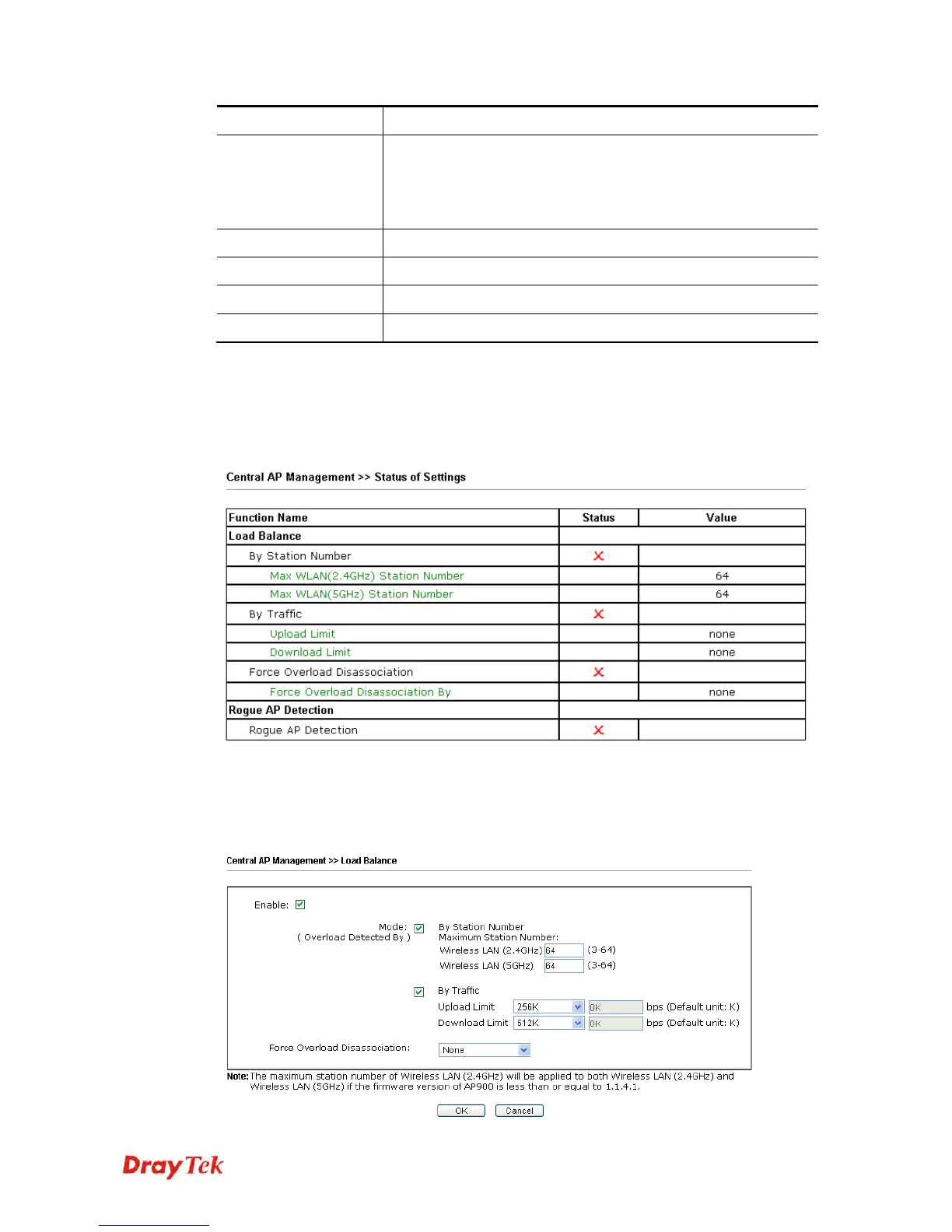
Load Balance can help to distribute the traffic for all of the access points (e.g., VigorAP900s)
registered to Vigor 2860 or Vigor2925 series. This web page displays the settings related to
Load Balance for VigorAP 900. In which, By Station Number, By Traffic and Force
Overload Disassociation indicate settings configured in Vigor 2860 or Vigor2925 series.
“X” means the function is not enabled or VigorAP 900 has not registered to any Vigor router
yet.
Below shows a setting example for Load Balance settings configured in Vigor 2860 or
Vigor2925 series.













 To Next Page