VigorAP 900 User’s Guide
4
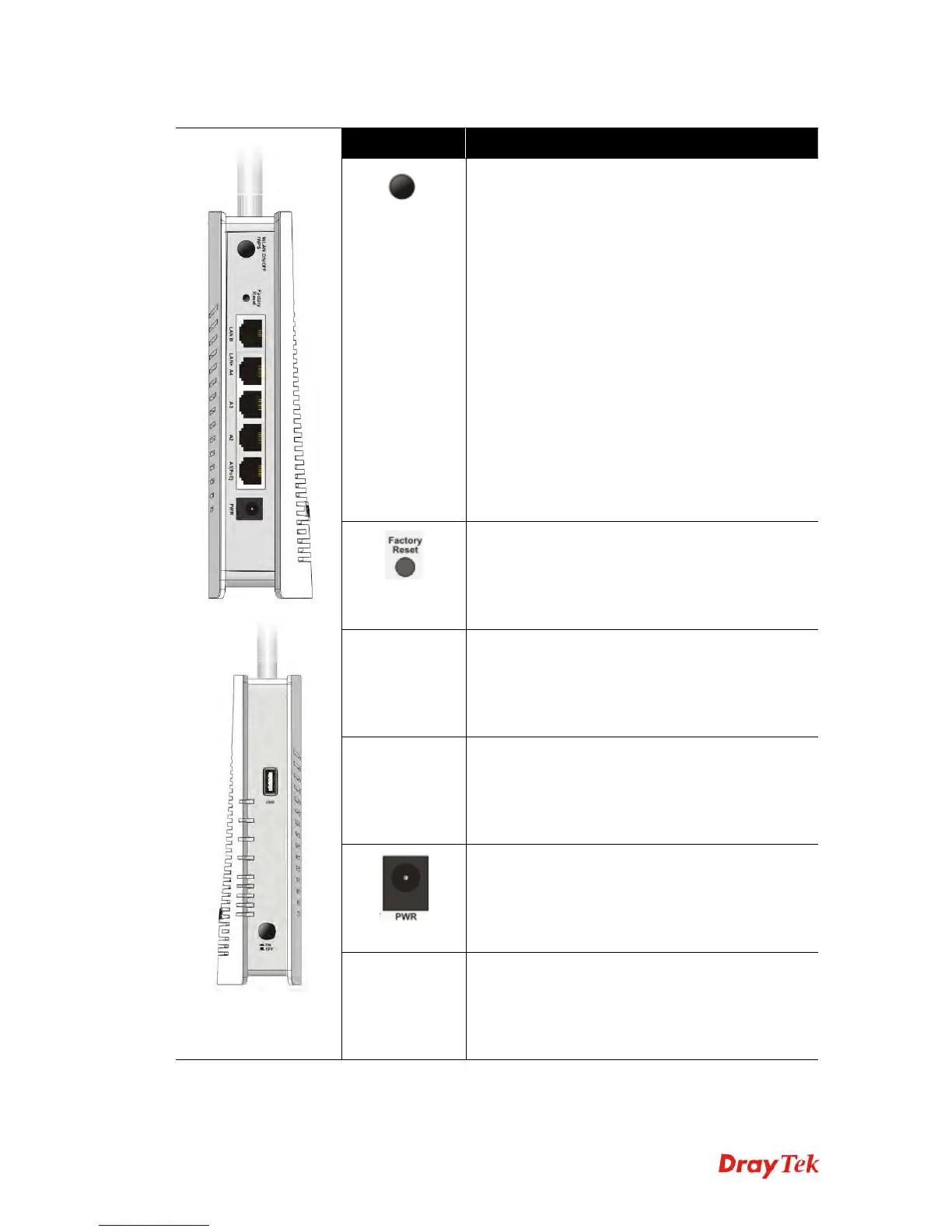
Interface Description
WLAN
ON/OFF WPS
WLAN ON - Press the button and release it within
2 seconds. When the wireless function is ready,
the 2.4G/5G blue LED on front panel will be on.
WLAN OFF - Press the button and release it
within 2 seconds to turn off the WLAN function.
When the wireless function is not ready, 2.4G/5G
blue LED on front panel will be off.
WPS - When WPS function is enabled by web
user interface, press this button for more than 2
seconds. This device will wait for any wireless
client connecting to it through WPS.
WPS – Press the button for more than 6 seconds,
VigorAP 900 will disable the option of Enable
AP Management under LAN>>General Setup
and reset to the factory IP address, 192.168.1.2.
Note that the disabled AP Management must be
enabled manually if enabled AP Management is
required.
Restore the default settings. Usage: Turn on
VigorAP 900. Press the button and keep for more
than 10 seconds. Then the device will restart with
the factory default configuration.
LAN B Connecter for xDSL / Cable modem (Giga level)
or router.
LAN A1 (PoE) -
A4
Connecter for xDSL / Cable modem (Giga level) /
computer or router.
PWR: Connecter for a power adapter.
USB
Connector for a printer.













 To Next Page