Tamarisk
®
Camera Control Software User Guide
NOTE
For best results, please allow the camera to reach steady state operating
temperature before starting the custome calibration process - it is recommended
that the camera sit in a powered-on stated for at least 30 mins prior to starting.
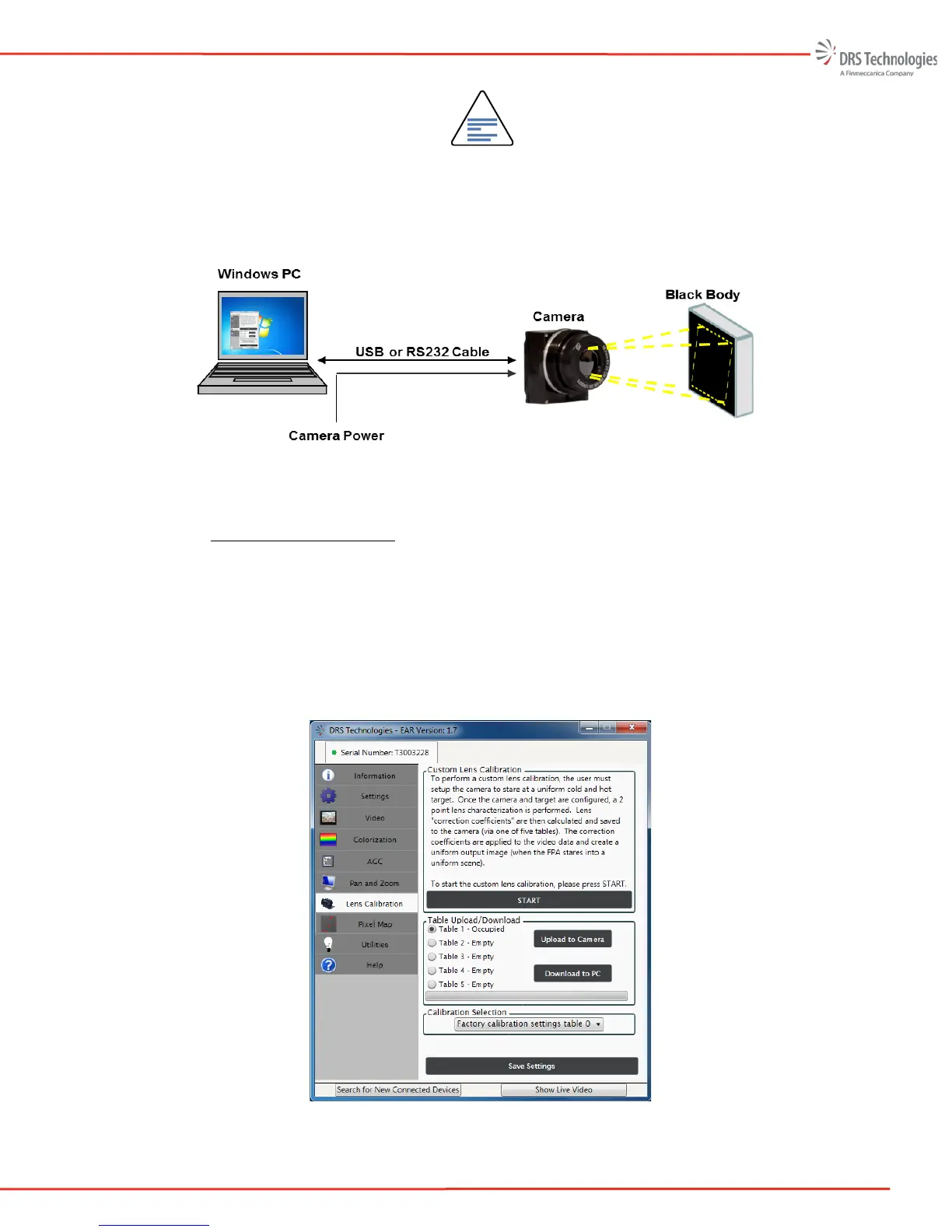
Figure 37. Lens Calibration Setup
5.7.4 Lens Calibration: Start
6. In Figure 38, the user is prompted to start the custom lens calibration process, See START
button at the bottom of the Custom Lens Calibration task pane. One of the 5 custom tables
may be selected. In this example, Table 1 is occupied with existing data (note, this is not
the factory calibration settings. Factory calibration data is stored elsewhere and will always
be available to return the camera to its original factory calibration settings). The user may
select or the Return to Factory Calibration Settings from the pull-down menu located in the
Calibration Selection task pane.
Figure 38. Lens Calibration Tab



 To Next Page