Tamarisk
®
Camera Control Software User Guide
5.9.2 Camera Communications
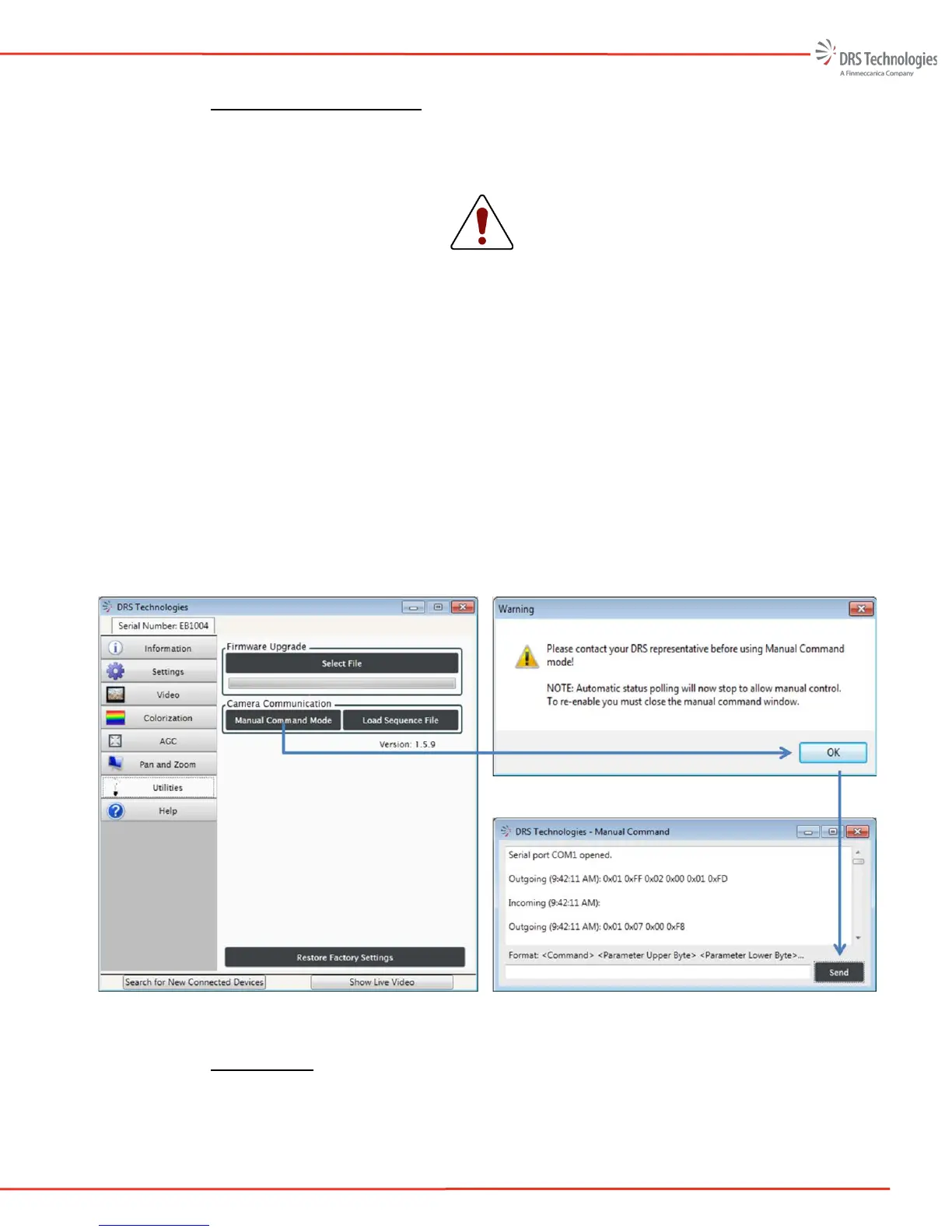
Under the Camera Communications section, a Manual Command Mode is provided. Clicking
Manual Command Mode will open a command line window for direct communication with the
camera (as shown in Figure 51).
CAUTION
Manual Command Mode requires advanced knowledge of the camera’s
registers; improperly writing commands to the camera may result in camera
malfunction. The user is encouraged to review the camera’s Interface Control
Document before using Manual Command Mode.
The Manual Command Mode requires advanced knowledge and should be used only after
reviewing the camera’s Interface Control Document.
Selecting Load Sequence File will open up your PCs file manager. The user may select a
file/script/sequence to be loaded. A sequence file is a sequence of manual commands where each
line of the command file contains only one command. Please refer to Tamarisk
®
640
Software
Interface Control Document for more information.
<Command><Parameter upper byte><Parameter lower byte><Additional Parameters>
Figure 51. Camera Communications
5.9.3 Camera Info
The Camera Info button allows the user to save (and read back) up to 252 ASCII characters. The
characters are stored in non-volatile memory and hence they are retained across power cycles.



 To Next Page