26
8.4 Monitor(s)
Monitor(s) can only be transported in an upright position and are therefore not mounted. Proceed as follows when
placing the monitor(s):
1
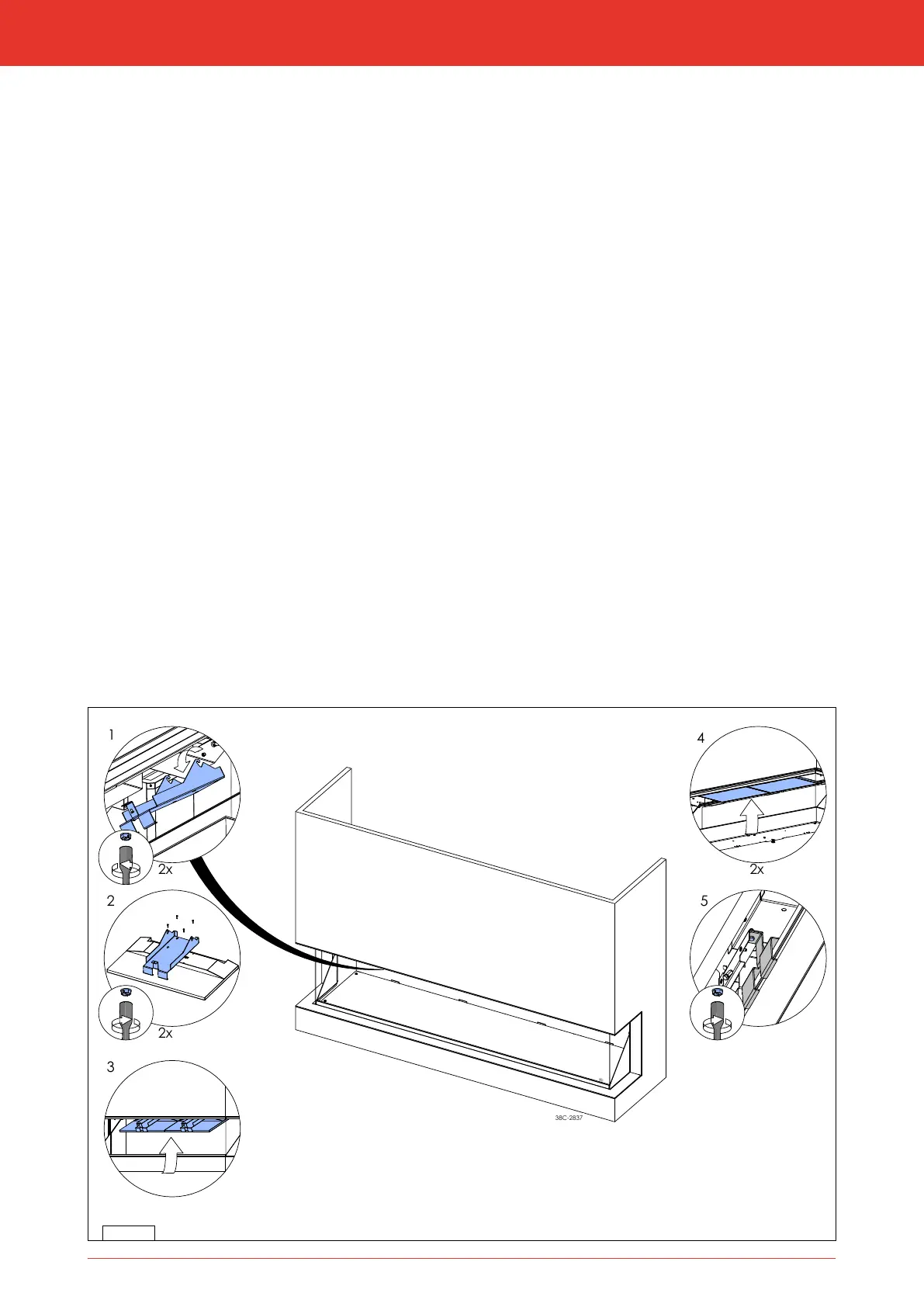
Loosen the bolts on the inside of the appliance and lift the suspension brackets from the hooks to remove them from
the stove. (g. 8-4, step 1).
1
Place the monitors with the displays pointing down. Ensure a soft / clean surface so that the monitors are not
damaged. Attach the suspension brackets with 4 screws each to the backs of the monitors. (g. 8-4, step 2)
3
Ensure the brackets clamp around the top sides of the monitors, so that the monitors are rmly fastened.
1
Attach the HDMI cables and power supply cables to the monitor(s).
1
Use the suspension brackets with the hooks to hang the monitor(s) from the top of the stove.
The monitors are now hanging in the stove at an angle (g. 8-4, step 3)
1
Push the front of the suspension bracket upwards and attach it to the inside of the appliance with a bolt
(g. 8-4, step 4 and 5).
3
Make sure no cables get stuck.
8-4
Installation manual



 To Next Page