35
4.3. Downloading the each setting file
Download the programming environment setting file into the current folder.
Prepare the definition file (extension .CM) and each Micom-pack file. Definition file and Micom-pack can be
downloaded from our website.
http://www.yokogawa-digital.com/support/support_netimpress_air/
Micom-pack
File for setting the programming environment for each MCU.
Please download it from our website. (Registration and login will be
necessary for downloading.)
Micom-pack file is a compressed file (ZIP format). You can extract the file
by double-clicking it.
More than one file is included in the Micom-pack. Contents of Micom-pack
are a parameter file (.PRM), manuals (.PDF), programming control
program (.BTP), and read me file etc.(It may vary depending on the MCU)
4.3.1 Downloading the definition file
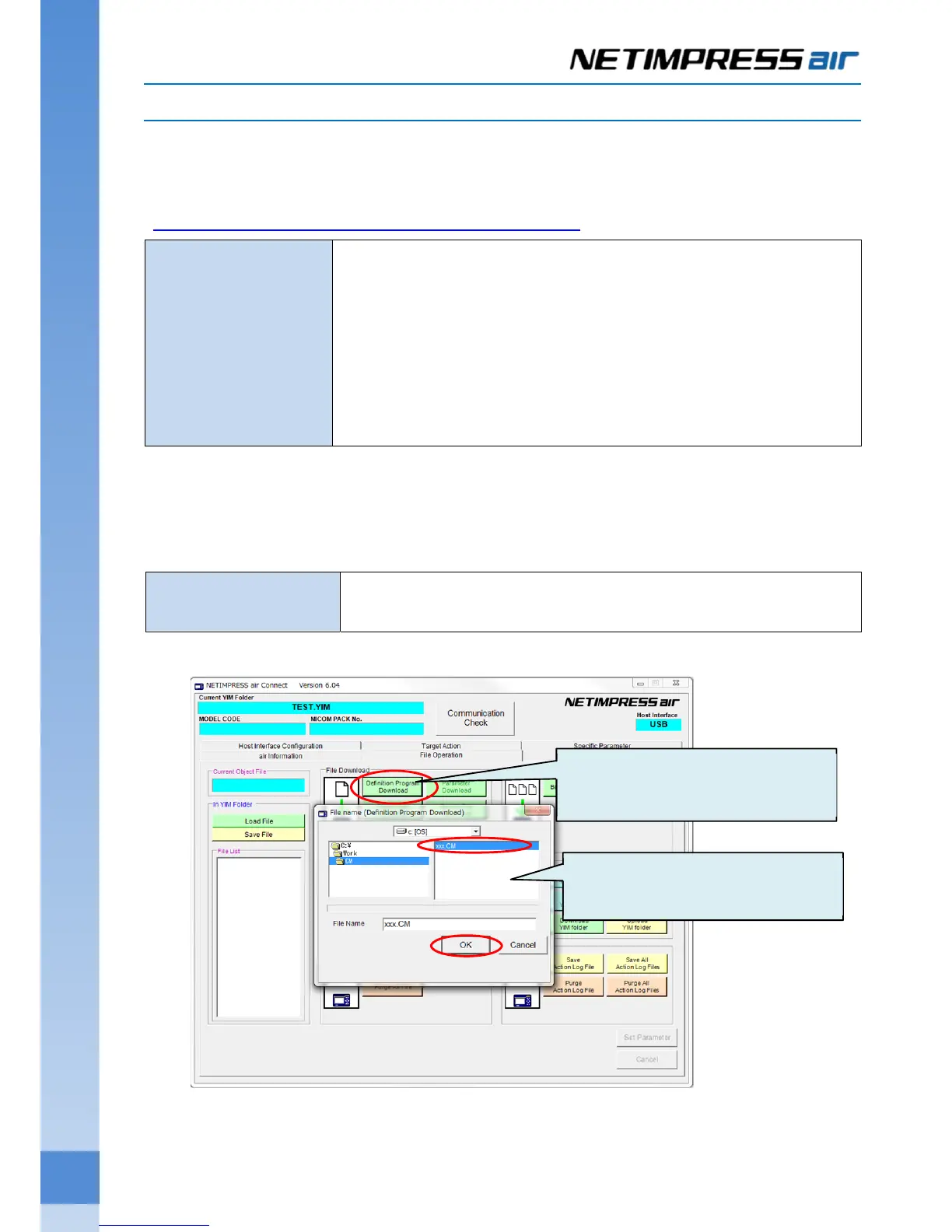
For downloading the definition file, click “Load Definition Program” on the “Control Module” group on the “File
Operation” tab.
Definition program file
Extension of the file is .CM.
Get it from our website.
(1) Click Definition Program
Download button.
(2) Select the definition program file and
then click OK button.



 To Next Page