32
4.2. Creating a YIM folder
By using a batch download, you can cover the steps on Chapter 4.2 to 4.3 (Except the parameter
settings) at once. If you want to use the batch download, see Chapter 4.4 “Batch Download”.
Settings of the programming object and programming environment are managed in YIM folder (extension .YIM)
in the SD card.
After you added the license, create a YIM folder and set the programming environment.
➥
For details of YIM folder, see Chapter 7 “
YIM folder
”.
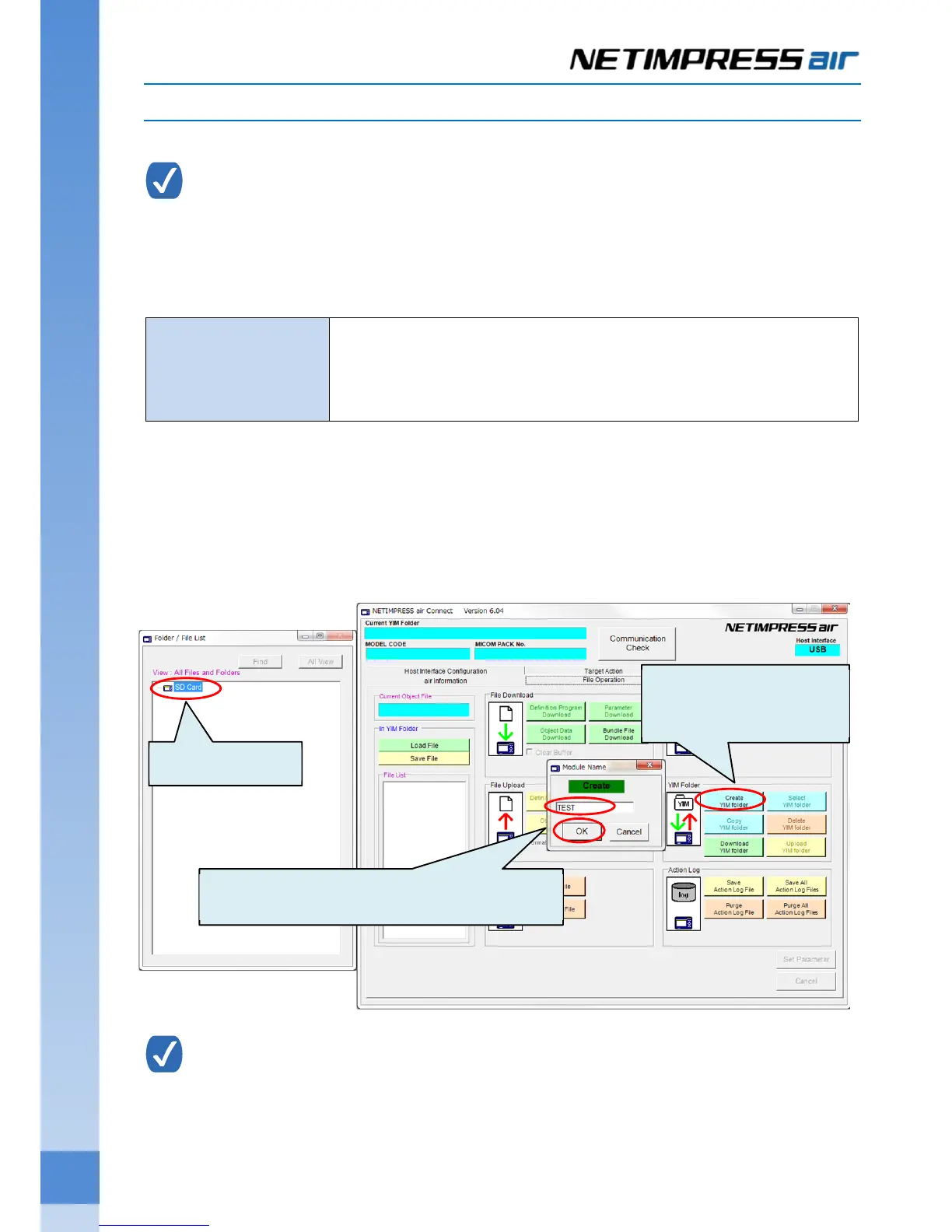
(1) Select “SD card" listed in the Folder/File List of AZ990 (air Connect).
(2) Click “File Operation” tab of the main window.
Dialog box for setting a YIM folder name will be shown if you click “Create YIM Folder” button. Enter the
name and then click OK button.
YIM folder can also be created by right-clicking SD card listed on the Folder/File List window, and
then select Create YIM Folder.
YIM folder
Extension of the folder is .YIM.
Manage the programming environment of the SD card for NETIMPRESS
air. More than one environment can be registered in the SD card (It is up to
the size of memory.)
(1)Select SD Card
(2) Click Create YIM Folder
button
(3) Enter a YIM folder name, and then click OK.



 To Next Page