45
5. Programming
This chapter explains how to start the programming of target system.
5.1. Programming from air Connect
(1) Connect the main unit and target system.
Make sure that it is connected correctly, and turn on the power of target system. (The power of main unit is
supplied from a battery of target system (VBAT) normally.)
(2) Start up AZ990 (air Connect)
➥
See Chapter 3.2 “Setting the environment of Wireless LAN” for checking the setting again if you canno
connect it by air Connect.
If you use USB for connection, connect the USB cable, and then check to make sure that “Interface” on
the Host Configuration window is USB.
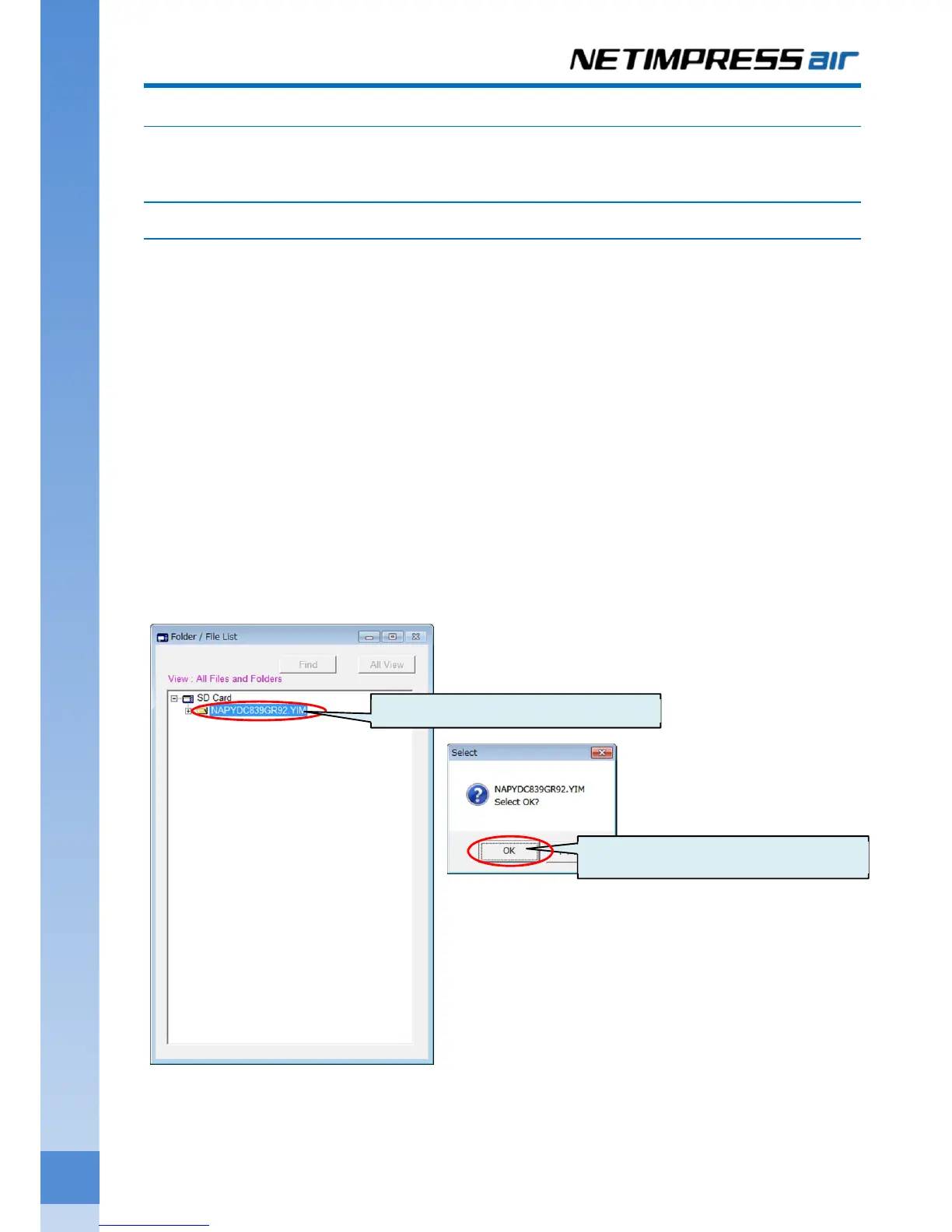
(3) Select YIM folder
On the Folder/File List window, double-clicking the YIM folder that you set the programming environment.
“Select” dialog box is shown. Click the OK button.
(1) Double-click the folder.
(2) Click OK button.



 To Next Page