
 Need help?
Do you have a question about the duagon MC50M and is the answer not in the manual?
Defines the target audience, scope, and content of the manual.
Lists EN 50155 chapters this document addresses for compliance.
Explains warning icons, formatting like italics, comments, and signal naming conventions.
Specifies the intended market, application area, and environmental conditions for the product.
Outlines the necessary qualifications for operating and working with the product system.
Details essential measures to prevent damage from static electricity to components.
States commitment to RoHS and explains REACH obligations for manufacturers.
Clarifies the non-applicability of WEEE and recommends recycling.
Covers the right to make changes and limitations of liability for product use and performance.
Provides contact details for duagon in Germany, France, USA, and China.
Covers product description, modularity, power saving, security, installation, and qualification.
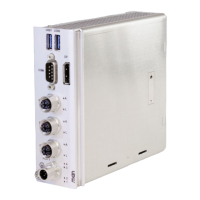
Illustrates and labels the connectors and indicators on the MC50M front panel.
Presents a block diagram showing the MC50M's internal components and their connections.
Lists CPU types, memory, eMMC, and SSD M.2 slot details.
Details interface connectors, signals, power input, and LED functions.
Covers BMC features, electrical, mechanical specs, and cooling.
Outlines environmental, shock, vibration, and safety standards for rail applications.
Details compliance for EMC, electrical safety, wayside, and road vehicle standards.
Covers predicted reliability and the system's BIOS/Boot Loader.
Details supported Linux kernels, Yocto BSP, and Windows versions, with driver/tool info.
Explains the fanless cooling method and required minimum space for airflow.
Explains how to identify products and system components using labels and numbers.
Guides on checking for damage, handling faulty devices, and preventing condensation.
Covers checking hardware requirements and installing system devices like SSDs.
Details safety measures for mounting, including weight, overheating, and liquid avoidance.
Provides step-by-step instructions for mounting the system onto a 35 mm top hat DIN rail.
Covers safety guidelines before connecting and the procedure for earthing the system.
Guides on connecting essential peripherals like keyboards, mice, and displays.
Explains how to connect an external power supply, including safety checks and configuration.
Details power connection for combinations and the initial system startup procedure.
Details steps for configuring UEFI firmware for PXE network booting.
Advises on OS installation and locating available software.
Lists supported Linux functions, drivers, and tools.
Covers Yocto BSP, Linux I2C tools, and triggering the BMC watchdog via GPIO.
Details RTC management and serial interface driver configuration in Linux.
Maps Linux serial ports (ttyFx) to their corresponding front panel connectors.
Lists supported Windows functions, drivers, and tools.
Details RTC management and serial interface configuration in Windows.
Describes the power inlet connector and provides pin assignments for different product versions.
Explains how the ignition pin controls system startup and shutdown.
Illustrates ignition behavior, shut-down delay, and power button event generation.
Provides inrush current data for circuit protection and mentions power cable options.
Details CPU, thermal considerations, TPM, and BMC supervision features.
Describes general status LEDs and the specific CPU board status LED.
Lists error codes indicated by status LED flashes and their meanings.
Describes the RTC and guides on setting system time via UEFI and software.
Covers system RAM, eMMC, and M.2 slot specifications for mass storage.
Specifies isolation voltage ratings for different interface groups for electrical safety.
Details the DisplayPort connector type, pin assignment, and signal mnemonics.
Discusses adapters for graphics interfaces and DisplayPort cables.
Describes the USB 3.0 connector, pin assignment, and signal mnemonics.
Details Ethernet connector, pin assignment, and mentions M12 to RJ45 adapter.
Explains MAC addresses and the function of Ethernet status LEDs.
Details the D-Sub connector, pin assignment, and signal mnemonics for serial communication.
Guides on entering, navigating menus, and understanding setup modes in UEFI firmware.
Describes the Main menu for viewing system parameters and setting language, date, and time.
Introduces the MEN menu for simplified access to functions and board information.
Details sub-functions like Setup Mode and configuration of BMC settings.
Details Network, Memory, SATA, and USB settings within the MEN menu.
Introduces the Advanced menu and lists its configuration categories.
Lists the configuration categories available within the Advanced menu.
Describes the Chipset menu for settings like HD Audio or PCI Express.
Explains how to set up administrator and user passwords for firmware access.
Details the security implications of setting no password, administrator password, or user password.
Covers settings for boot behavior, timeout, NumLock state, and boot order.
Describes options for saving changes, discarding changes, and exiting the setup utility.
Provides a table of SMBus/I2C devices and their addresses within a DIN-Rail system.
Maps register addresses to functions for controlling user LEDs and the ignition watchdog.
Details the read/write data and configuration registers for user LEDs and the ignition watchdog.
Describes bit fields for enabling/disabling watchdog control and user LED functions.
Lists EN 50155 chapters this document addresses for compliance.
Maps datasheet requirements from EN 50155 chapter 12.3 to document content.
Details compliance for electrical and mechanical features as per EN 50155.
Details compliance for environmental features like temperature, humidity, and shock/vibration.
Details compliance for Reliability, Availability, Maintainability, and Safety features.
Maps functional description and interface requirements to document chapters.
Covers compliance for labelling, tests, and commercial references.
Details compliance for software upload, programming tools, and datasheet revision history.
Maps EN 50155 chapter 12.5 requirements for integration and installation.
Maps requirements for diagrams and interface information to document sections.

 To Next Page
 General