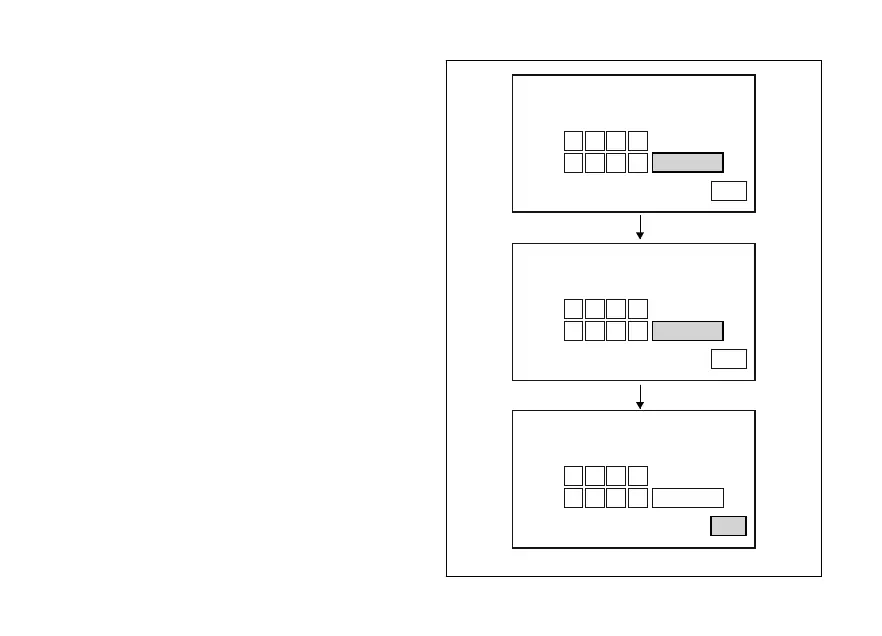
When you press button (4) to confirm the fourth and
last digit, the instrument panel highlights the
message MEMORY.
To save the new setting, hold button (4) for 3 seconds
while the message MEMORY is highlighted in
orange.
If storage is successful, MEMORIZED will be
highlighted in green for 1 second, and then EXIT will
be highlighted in green.
If settings have not been saved, the instrument panel
highlights again the string of four dashes "- - - -" of the
NEW PIN to allow the rider to try again and enter a
new code.
PIN CODE
NEW CODE
OLD CODE
MODIFY PIN CODE
EXIT
MEMORY
5 1 7 2
2 6 9 3
PIN CODE
NEW CODE
OLD CODE
MODIFY PIN CODE
EXIT
MEMORY
5 1 7 2
2 6 9 3
PIN CODE
NEW CODE
OLD CODE
MODIFY PIN CODE
EXIT
MEMORIZED
5 1 7 2
2 6 9 3
Fig. 82
136












 To Next Page