Dune HD Base 3.0 user manual
14
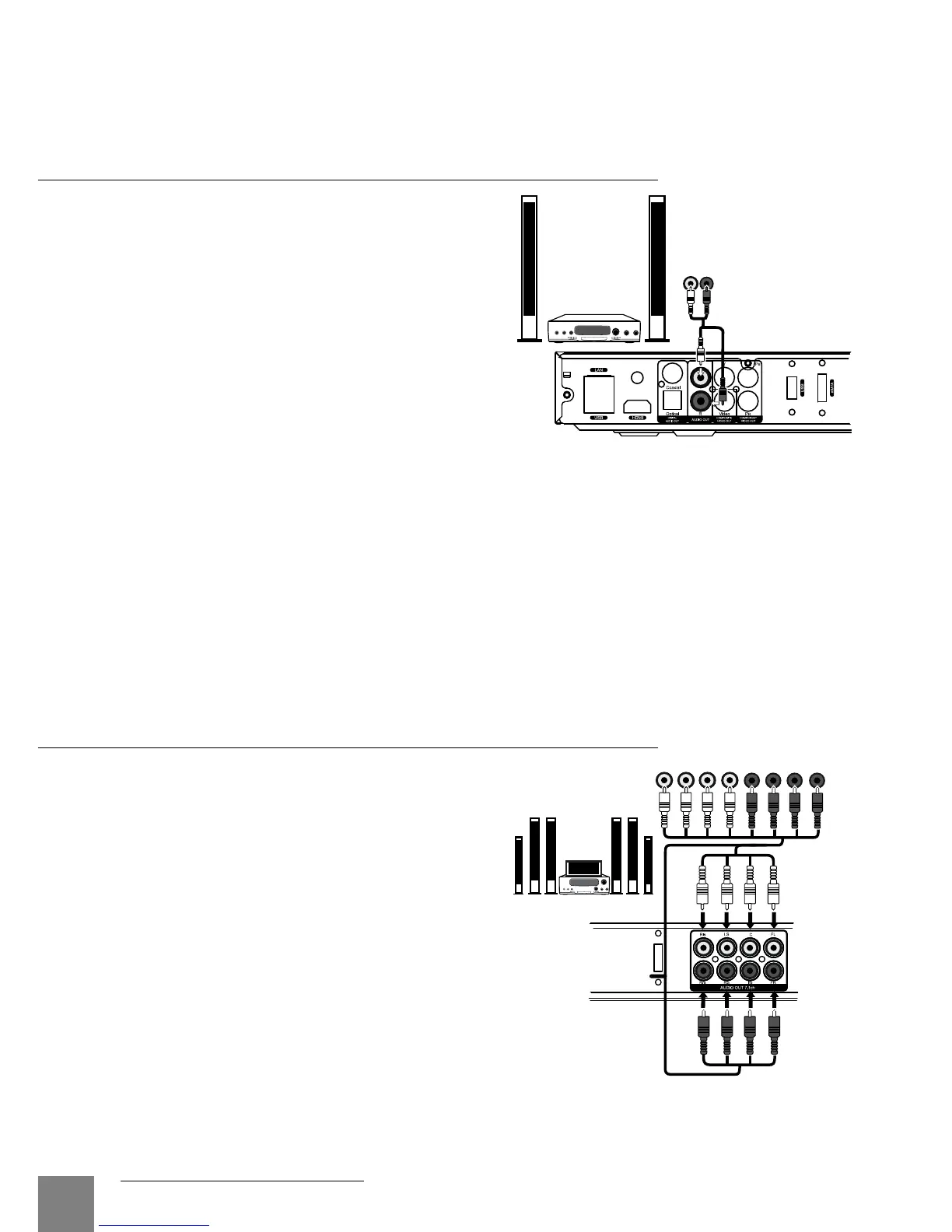
Transmission of Analog 7.1 Audio to External
Amplifier (Receiver)
Four analog 2RCA-2RCA cables
shall be used (not included). It is
better to use four identical cables.
We recommend you to turn
down the volume of your audio
equipment before connection and
before switching on the player, in
order to protect your hearing from
unexpectedly high volume, and
to eliminate the risk of damage to
your audio system.
Transmission of Analog Audio to External
Stereo Amplifier (or TV Set)
An analog 2RCA-2RCA cable shall be used
(not included).
1. Connect analog stereo audio output (AU-
DIO L/R) of your player to the audio input
of your stereo amplifier.
2. Select a relevant input in your amplifier.
We recommend you to turn down the
volume of your audio equipment before
connection and before switching on the
player, in order to protect your hearing
from unexpectedly high volume, and to
eliminate the risk of damage to your audio system.
You may send the analog audio signal from your player to the TV set, in case you use
DVI, Component video, or Composite video for video signal transmission and don’t use an
AV receiver for digital audio decoding. In case of connection via HDMI, video and audio sig-
nals will be transmitted using a single HDMI cable, that’s why there is no need of additional
analog audio connections in this case.
eSATA
RL
AUDIO IN



 To Next Page