EN-204 User and Installation Guide
60
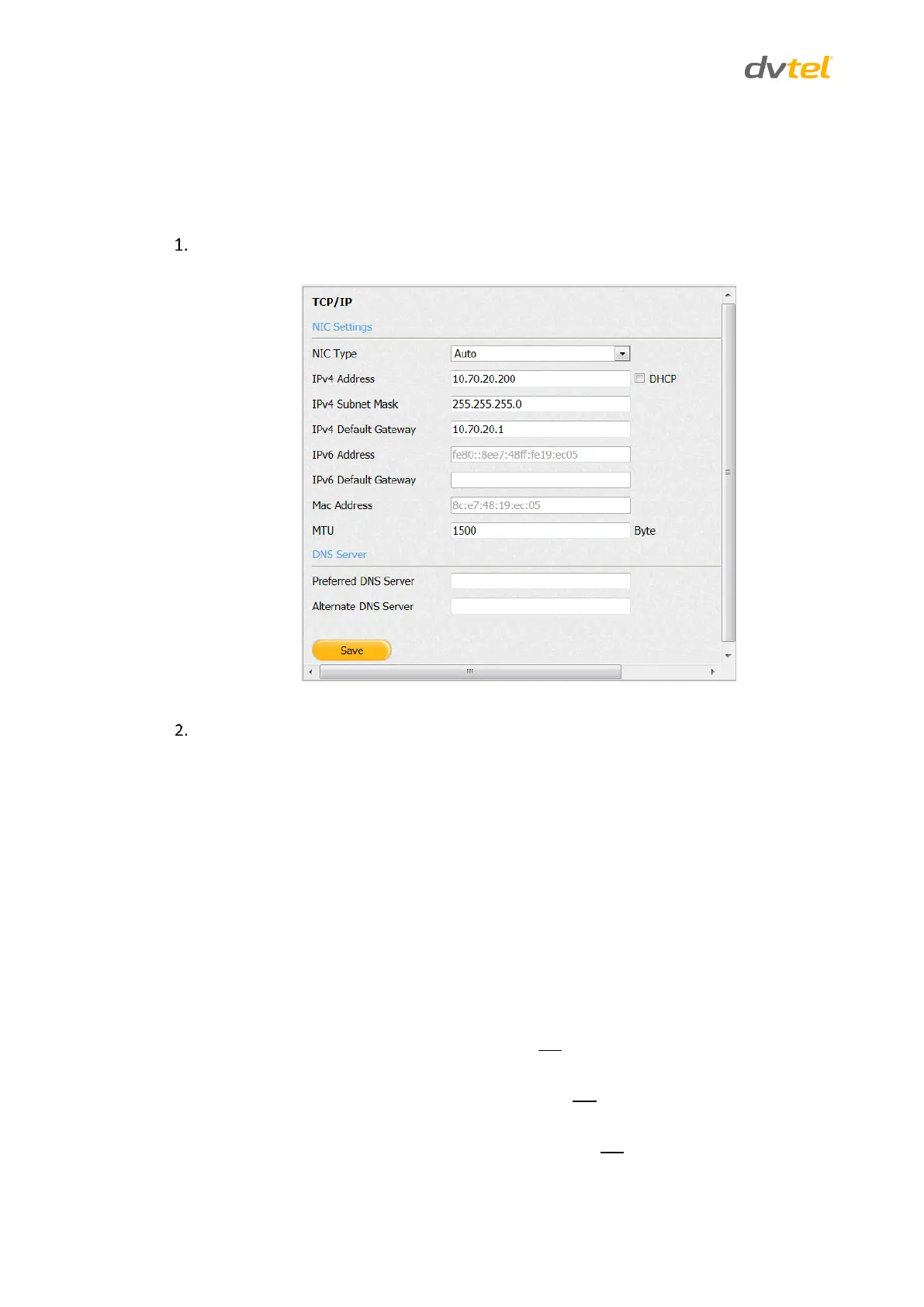
5.4.4.1 TCP/IP
The TCP/IP screen is used to configure the encoder’s network settings.
To enter TCP/IP settings
From the Configuration sidebar menu, select Network Settings > TCP/IP. The TCP/IP screen
opens.
Figure 61: TCP/IP Screen
Configure the following settings:
NIC Type – From the drop-down menu, select one of the following
options:
10M Half-dup
10M Full-dup
100M Half-dup
100M Full-dup
Auto (default)
If your network uses IPv4:
DHCP – Select this checkbox if your network uses a DHCP server to automatically
obtain an IP address, Subnet Mask and Default Gateway.
IPv4 Address – If your network does not use a DHCP server, enter the unit’s IP
address.
IPv4 Subnet Mask – If your network does not use a DHCP server, enter the
Subnet Mask used on the network.
IPv4 Default Gateway – If your network does not use a DHCP server, enter the
Default Gateway used on the network.



 To Next Page