Dymax BlueWave® 200 Version 3.0 User Guide
Q. Why does my shutter sometimes hesitate to close?
This problem may also relate to the cleanliness of the working environment. Dust and debris can
collect and cause the Shutter to work improperly.
Shutter alignment to Reflector Mount incorrect.
The Shutter is a mechanical part which may wear after extended use.
Incorrect alignment of the Shutter to the Bulb Mount Assembly.
Q. Why does my BlueWave 200 seem to run very hot?
Replace the Fan Filter Media on the Intake vent located in the back of the equipment. This is your
first line of defense against airborne dust and debris.
Ideal operation of this equipment suggests at least 12" of clearance behind the BlueWave 200 for
proper ventilation. Confirm that the Intake Fan is not feeding from the exhaust of other equipment.
Equipment may already be full of dust and debris.
Diagnostic Display
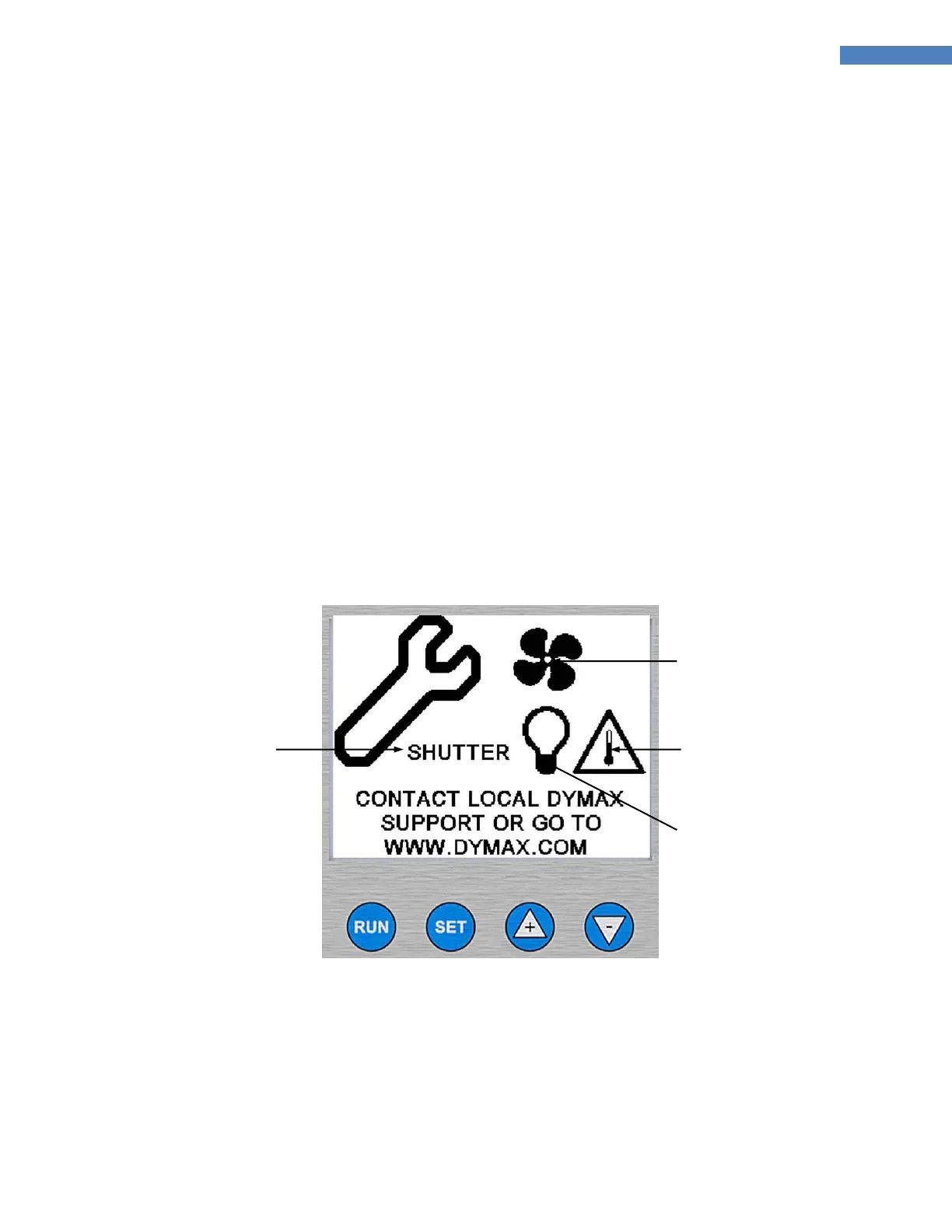
The LCD Screen will display any faults detected by the BlueWave 200 (Figure 47). Contact Dymax for
assistance, since most faults can be resolved over the phone.
Figure 47. Diagnostic LCD Screen
Temperature Too
Hot or Cold



 To Next Page