Dymax BlueWave® 200 Version 3.0 User Guide
Lightguide
Clean the ends of the lightguide monthly or as required. The ends of the lightguide should be kept clean to
transmit as much light as possible. Cured adhesive can be removed from a liquid lightguide with a razor blade.
Avoid sharp bends with the lightguide since this reduces light output and damages the guide.
Fan Filter
The external Fan Filter should be inspected and cleaned periodically to prevent dust buildup from affecting
airflow through the BlueWave 200. Spare Fan Filters are provided with each BlueWave 200 and with
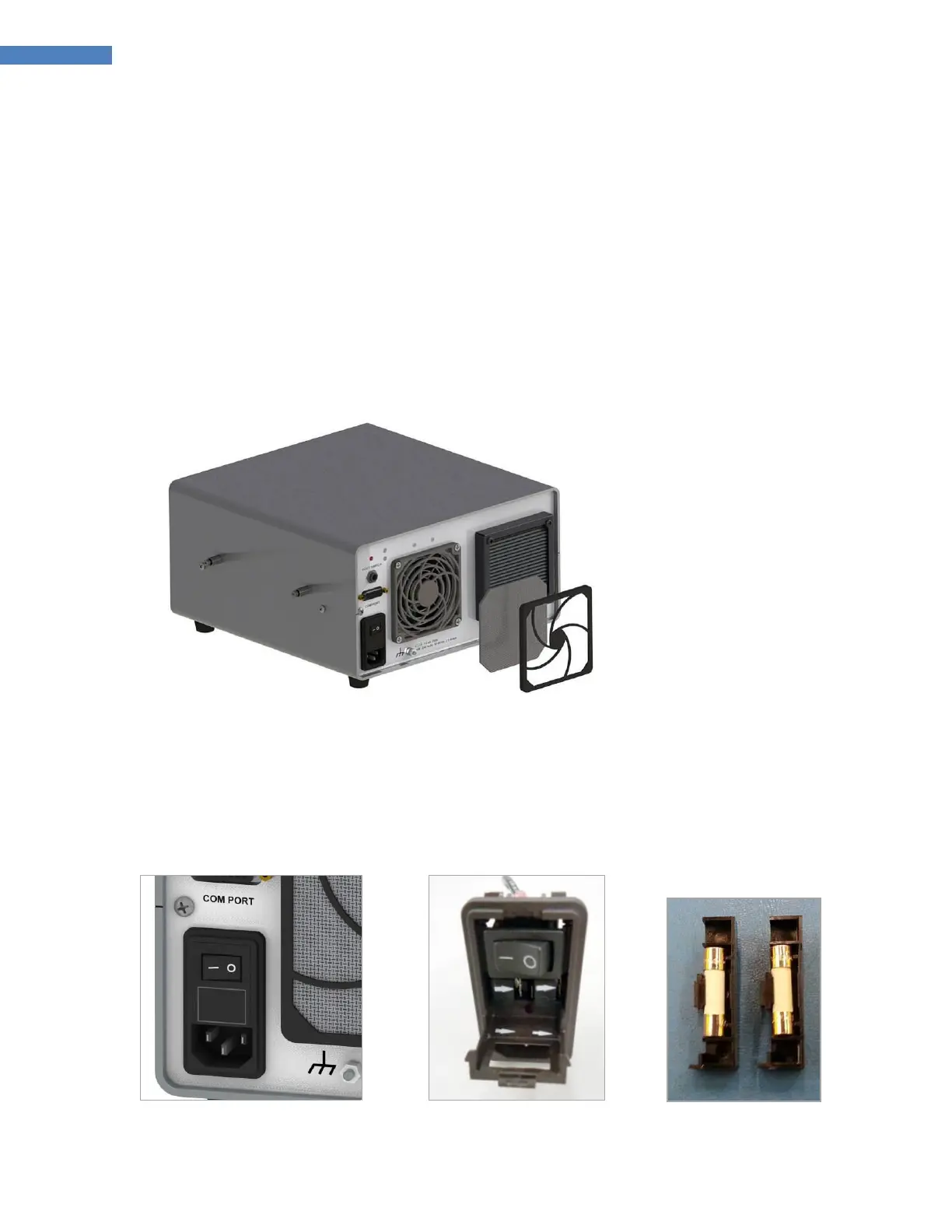
replacement Bulbs. The Fan Filters are washable and may be reused. Remove the Fan Filter by removing the
snap-on cover from the rear of each grill.
Figure 43. Intake Fan with Fan Filter Removed
Fuse Replacement
The BlueWave 200 has two Fuses that are installed in the Power Receptacle. To remove the Fuses, unplug the
BlueWave 200 and remove the Fuse Holder with a small screwdriver. Remove the Fuses from the Fuse Holder
and install new Fuses. Replace the Fuse Holder into the Power Receptacle. The correct Fuses are Dymax
PN 41099, 4.0 Amp fast-acting type.
Figure 44. Power Receptacle
Figure 46. Fuses
Removed from Holder



 To Next Page