Dymax BlueWave® 200 Version 3.0 User Guide
Maintaining Process Control
BlueWave 200 Bulbs will typically vary less than 1% over eight hours of normal use, and daily or weekly
adjustments are adequate to maintain a tightly controlled process. For your convenience, the BlueWave 200
reports the number of hours the Bulb has been operating on the LCD Display.
A Bulb Change Message and a Lamp Icon will appear on the LCD display to alert the operator to check Bulb
operation or to change the Bulb if required.
Maintaining the BlueWave 200
The BlueWave 200 was designed to operate with minimum maintenance. Typically the Bulb must be replaced
after it has operated for 2,000 hours.
Bulb Replacement Warning
As the Bulb nears the end of its 2,000 hour life, the LCD Display will begin flashing the Bulb Hours. The 1,950
Hour Warning output on the PLC connector also becomes asserted.
Bulb Replacement Procedure
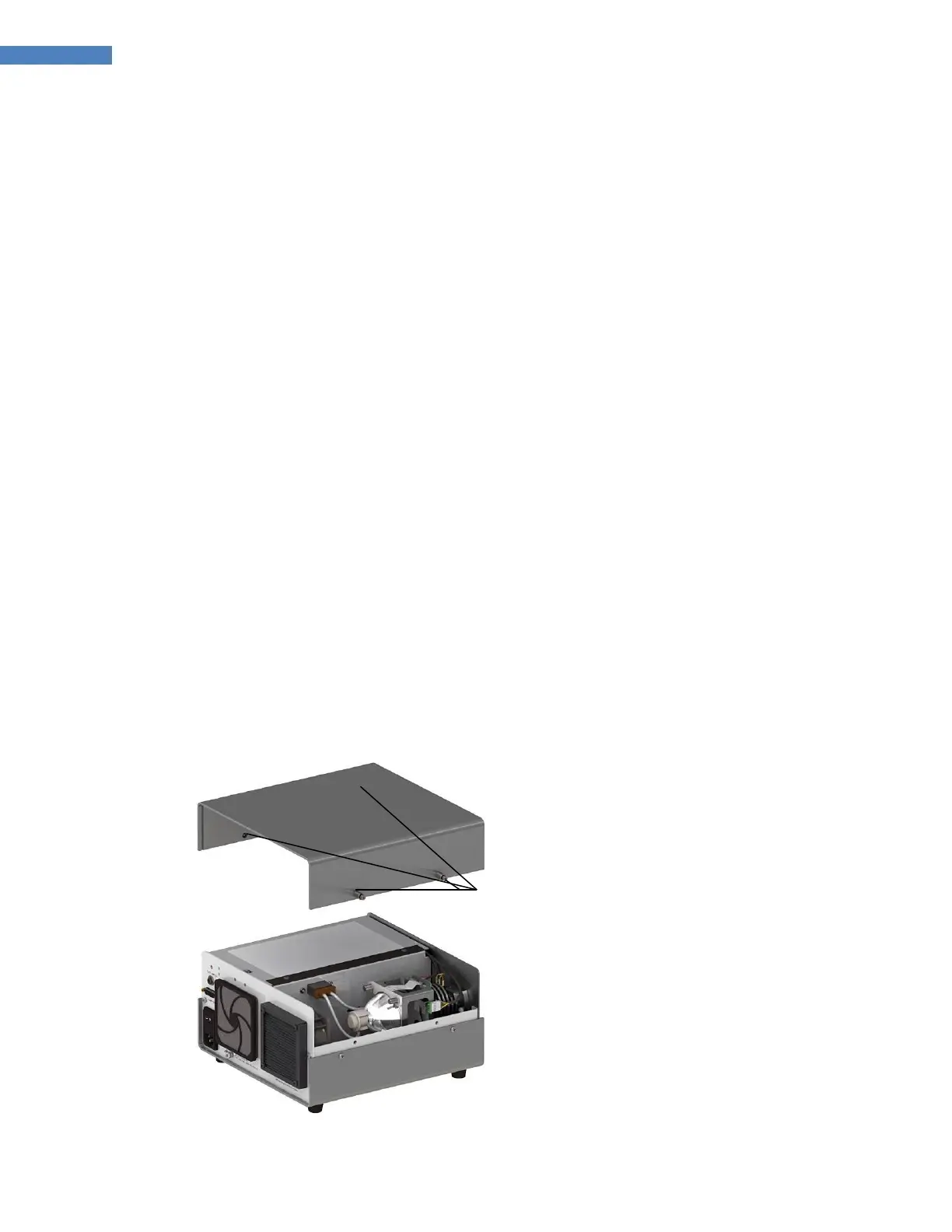
1. Bulb replacement is easily accomplished by following the steps below. Refer to the labeled diagrams
under the light source cover.
2. Ensure that the Power Cord is unplugged from the rear of the BlueWave 200.
3. Remove the top cover from the system by loosening the four Cover Fasteners (Figure 38).
Figure 38. Remove Cover



 To Next Page