Dymax BlueWave® 200 Version 3.0 User Guide
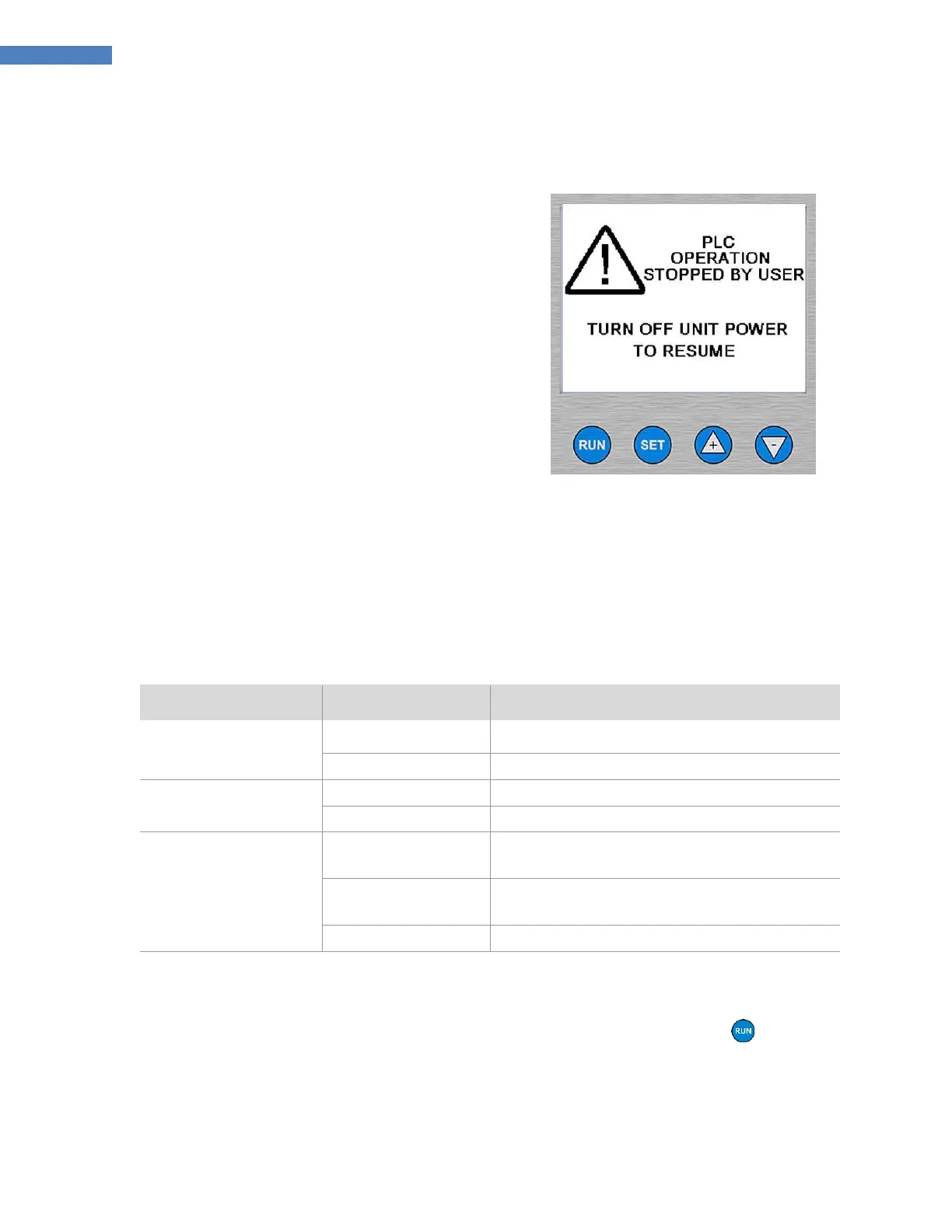
PLC Front Panel Emergency Stop
Press the Off Button on the Front Panel to close the
Shutter and turn off the Bulb to immediately
override any commands issued by the PLC. The
switch on the back panel must be turned off and on
before the BlueWave 200 can re-enter PLC Mode.
Figure 36. PLC Emergency Stop
Function
Troubleshooting the PLC Interface
Monitoring Input Signals
The LCD Screen gives the status of all of the input signals when the unit is in PLC Mode. (Figure 16, pg. 15). You
use this information to troubleshoot PLC operation, programming, and wiring. (Table 2)
Table 2. LCD Indications and Input Signal States
Remote Shutter Activate
and Remote Shutter Inhibit
Remote Shutter Inhibit is Un-Asserted
Remote Shutter Activate is Un-Asserted
Remote Shutter Inhibit is Un-Asserted
Remote Shutter Activate is Asserted
Remote Shutter Inhibit is Asserted
Testing the Shutter
When the unit is in PLC mode, as long as Remote Shutter Inhibit is not asserted, pressing the Button or
closing the Foot Pedal will open the Shutter so that optical fixturing can be set up or verified.



 To Next Page