EasyManua.ls Logo

Dynaudio Sub 3 - User Manual

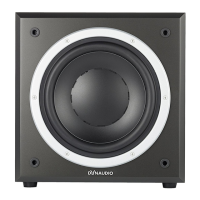
Dynaudio Sub 3
46 pages
Print Icon
To Next Page IconTo Next Page
Loading...
Sub 3
Owner’s
manual

Questions and Answers

  • M
    Michele MooreJul 27, 2025
    What to do if my Dynaudio Sub 3 Subwoofer is on but has no sound?
    • H
      hudsonlatoyaJul 27, 2025
      If your Dynaudio Subwoofer is on but producing no sound, there could be several reasons: * There might be no signal reaching the subwoofer inputs. * The subwoofer could be disabled in your processor or receiver's bass-management settings. * The subwoofer volume might be muted on your processor/receiver or on the subwoofer itself. To resolve this: 1. Ensure the system is off before making changes. 2. Verify all signal cables are securely connected. 3. Check the Bass Management settings on your amplifier or receiver. 4. Carefully increase the subwoofer volume on both the amplifier/receiver and the subwoofer GAIN control.
  • G
    gchristensenAug 3, 2025
    Why my Dynaudio Sub 3 will not switch on?
    • A
      Andrew BryantAug 3, 2025
      If your Dynaudio Subwoofer isn't turning on, it might be due to: * A disconnected AC mains cable (no LED light). * The mains switch on the rear being set to OFF (no LED light). To fix this: 1. Ensure the system is off before making changes. 2. Reconnect the mains cable. 3. Switch the mains back on. 4. Verify all signal cables are properly connected.
  • C
    Christina DavilaAug 11, 2025
    How to fix Dynaudio Sub 3 that will not switch on automatically?
    • J
      Jasmine MorrisAug 11, 2025
      If your Dynaudio Subwoofer isn't automatically switching on, the issue is likely that no signal is reaching either of the subwoofer's inputs (the LED light will be red). To resolve this: 1. Make sure to switch the system off first before making any changes! 2. Check if all signal cables are connected properly. 3. Check if the subwoofer output on the source is engaged.
  • P
    penasonyaAug 19, 2025
    Why does my Dynaudio Sub 3 Subwoofer switch off when music is playing?
    • L
      lopezedwinAug 19, 2025
      Your Dynaudio Subwoofer might be turning off during playback because it's not receiving enough low-frequency signals. This often happens when the content you're playing (music or movies) doesn't contain very deep bass frequencies, such as during extended dialogue scenes. The subwoofer will automatically turn back on when it detects low-frequency signals.

Summary

Introduction

Important Safety Instructions

About This Manual

Unpacking and Grille

Grille Installation

Instructions for mounting the front baffle grille for protection and sound quality.

Controls and Connections Overview

Operation Guide

Connecting the Subwoofer

Details on connecting the Sub 3 to audio sources and speakers, including single and multiple unit setups.

Powering On and Off

How to power the subwoofer on and off, and select power modes.

Adjusting the Volume (GAIN)

Guidance on adjusting the subwoofer's volume level using the GAIN control.

Subwoofer Cut-off Frequency Selection

How to set the subwoofer's low-pass cut-off frequency for optimal bass integration.

Setting the Phase

Instructions for adjusting the phase setting to synchronize the subwoofer with main speakers.

Satellite Cut-off Frequency Setting

How to set the high-pass filter for satellite speakers to manage bass distribution.

Subwoofer Positioning

Impact of Room-Modes

Understanding how room modes influence bass response and identifying optimal subwoofer placement.

Positioning Possibilities

Exploring various subwoofer placement options like corner, near wall, and free-standing for best bass output.

Using Multiple Subwoofers

Strategies for using multiple subwoofers to achieve a more even bass response across the listening room.

General Tips

Setup and Listening Advice

Practical advice on experimenting with settings, documenting configurations, and using appropriate music for testing.

Volume and Crossover Adjustments

Guidance on adjusting volume (GAIN) and setting crossover frequencies for balanced audio.

Control Possibilities Explained

Detailed explanation of SUB Lowpass and SAT Highpass controls for matching subwoofer and speaker frequency responses.

Specific Tips

Recommended Settings for Speaker;Amplifier Combinations

Settings for SUB Lowpass and SAT Highpass based on different speaker and amplifier types.

Troubleshooting

Common Problems and Solutions

A guide to diagnosing and resolving common issues encountered with the subwoofer's operation.

Care and Maintenance

Cleaning and Fuse Replacement

Instructions for safely cleaning the subwoofer cabinet and replacing the fuse if necessary.

Warranty Information

Dynaudio Sub 3 Specifications

General IconGeneral
On/off switchYes
Product colorBlack
AC input voltage100 - 240 V
Power source typeAC
AC input frequency50 - 60 Hz
Power consumption (standby)0.5 W
Subwoofer typeActive subwoofer
Number of subwoofers1
Subwoofer peak power300 W
Subwoofer driver diameter240 mm
Subwoofer frequency range22 - 175 Hz
Subwoofer crossover frequencies60 - 80 Hz
Line inputs (RCA)3
Weight and Dimensions IconWeight and Dimensions
Subwoofer depth320 mm
Subwoofer width266 mm
Subwoofer height276 mm
Subwoofer weight10500 g

Related product manuals