EasyManua.ls Logo

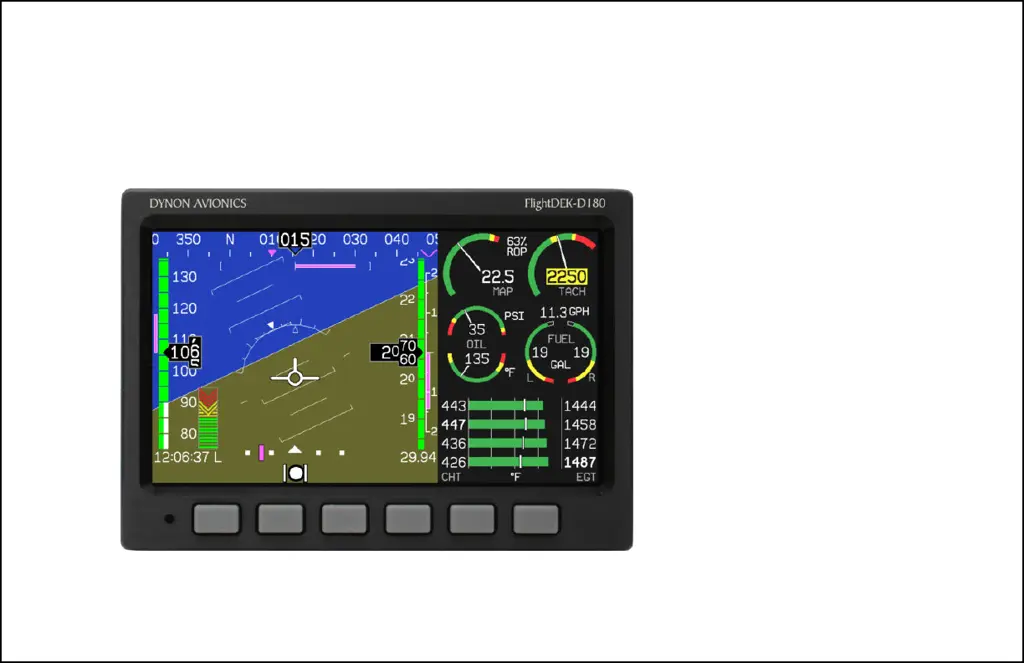
Dynon Avionics FlightDEK-D180 - User Manual

Dynon Avionics FlightDEK-D180
116 pages
Print Icon
To Next Page IconTo Next Page
Loading...
FlightDEK-D180
Combined EFIS and EMS
Pilot’s User Guide
P/N 100601-000, Revision F
For use with firmware version 5.1
May, 2009
Dynon Avionics
This product is not approved for
installation in type certificated aircraft

Table of Contents

Other manuals for Dynon Avionics FlightDEK-D180

Questions and Answers

  • L
    Lisa FloresSep 12, 2025
    Why does my Dynon Avionics GPS say 'TEMPERATURE UNSTABLE'?
    • M
      Megan ChavezSep 12, 2025
      If your Dynon Avionics GPS displays 'TEMPERATURE UNSTABLE', the screen will remain normal color, but the message will be displayed until the internal temperature stabilizes. This should take no more than 2 minutes. It's recommended to turn on the unit before preflight procedures to ensure it's ready for flight.
  • M
    Mr. Jason SalazarSep 12, 2025
    How to fix 'REMOTE COMPASS NOT DETECTED' on Dynon Avionics GPS?
    • S
      Shane ContrerasSep 12, 2025
      If your Dynon Avionics GPS shows 'REMOTE COMPASS NOT DETECTED', ensure that you have an EDC-D10A installed and that the wiring to the EDC-D10A is correct. If you updated the firmware without the remote compass connected, try uploading the firmware again with the EDC-D10A connected within the first few seconds of operation.
  • J
    James ReedSep 15, 2025
    What to do if Dynon Avionics GPS says 'OAT SENSOR NOT DETECTED'?
    • C
      Corey EnglishSep 15, 2025
      If your Dynon Avionics GPS displays 'OAT SENSOR NOT DETECTED', double-check the wiring between the FlightDEK-D180 and the EDC-D10A, as well as the wiring of the OAT sensor itself.

Summary

3. Product Operation

5. EFIS Operation

POWER - Power on;off

Procedures for turning the FlightDEK-D180 unit on and off.

BARO - Changing Altimeter Setting

How to adjust the altimeter setting for accurate altitude readings.

BUGS - Setting Bug Markers

Setting heading, airspeed, and altitude bugs on display tapes.

SETUP - Setting Preferences

Configuring system preferences for units, clock, and display settings.

6. HSI Operation

7. Autopilot Operation

EFIS AP Indicators

New indicators and status displays for the Autopilot on the EFIS presentation.

AP Modes

Description of the different operational modes for the Autopilot system.

AP Control Methods

Various ways to control and monitor the Autopilot via menus and panels.

EFIS Autopilot Control

Detailed explanation of controlling the Autopilot through the EFIS menu system.

8. Alerts

Alarm Indicators

How alarms are triggered and indicated visually and audibly.

Multiple Alarms

Handling and acknowledging multiple simultaneous alarm events.

DSAB Alerts

Error messages related to Dynon Smart Avionics Bus (DSAB) network failures.

9. EMS Monitoring Functions

Engine Leaning and Power

Using EMS to monitor and adjust engine mixture for optimal performance.

Detonation Characterization

Understanding and identifying engine detonation based on EGT and CHT.

Pre-ignition Characteristics

Identifying pre-ignition based on high EGT and CHT temperatures.

Ignition Misfire

Diagnosing ignition misfires through engine monitor parameters.

Shock Cooling

Recognizing and managing engine shock cooling to prevent damage.

10. EMS Operation

Engine Leaning

Entering and exiting the engine leaning mode for mixture adjustment.

Dynon Avionics FlightDEK-D180 Specifications

Operating Environment IconOperating Environment
operating temperature-22° to 122° F
operating temperature (celsius)-30° to 50° C
Power IconPower
voltage10 - 30 Vdc
typical power consumption14 watts
maximum power consumption19 watts
Display IconDisplay
display typeAMLCD, TFT
backlight brightness400 nits (or 800 nits for super-bright option)
display size7.0 inches diagonal
display resolution854 x 480 color pixels
Weight and Dimensions IconWeight and Dimensions
width6.95 inches
height4.90 inches
depth4.51 inches

Related product manuals