PFD Operation
SkyView SE Pilot’s User Guide - Revision I 4-17
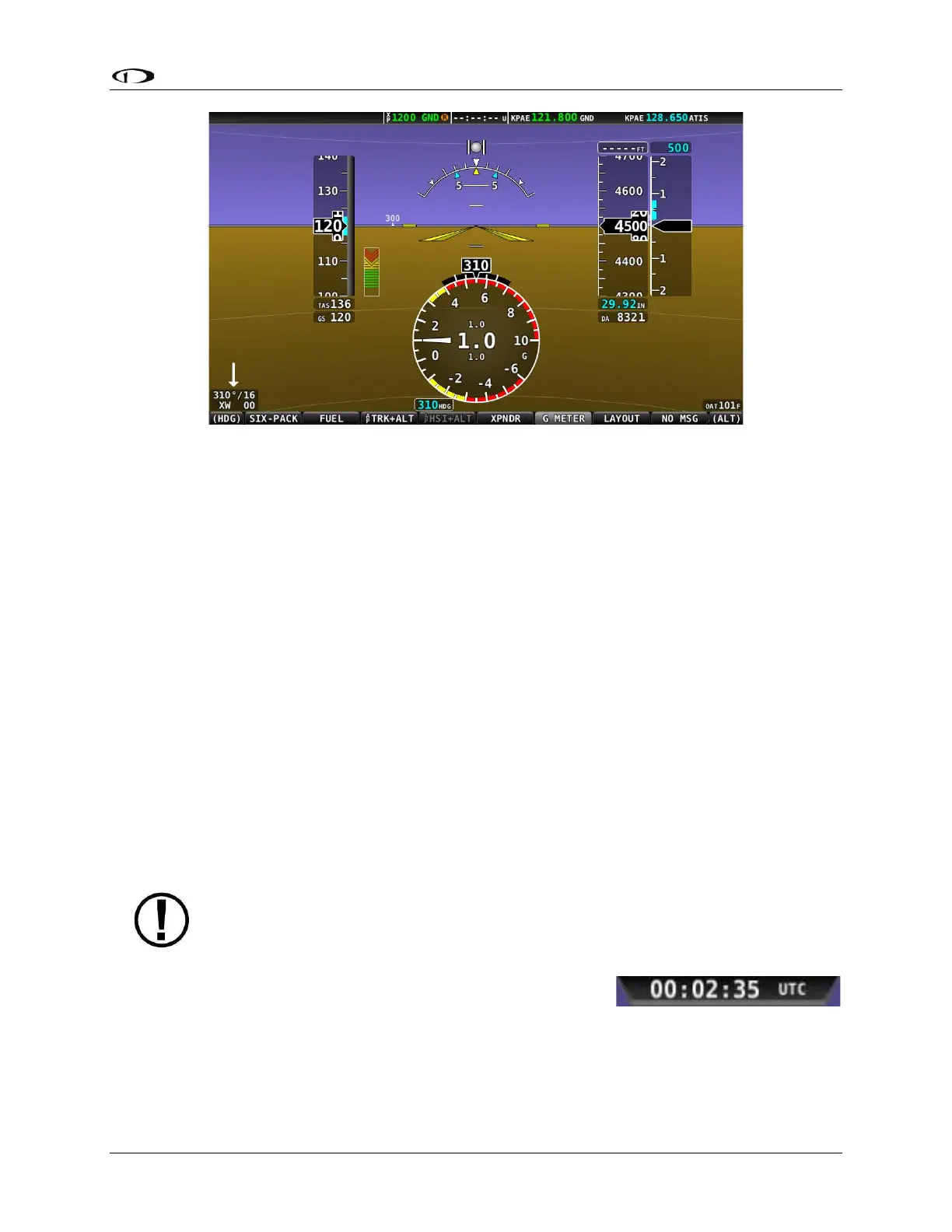
Figure 31 – G Meter on PFD
The smaller digital numbers above and below the larger instantaneous G number are the
maximum and minimum Gs that the aircraft has experienced since the G Meter was last reset.
Press and hold G METER (Button 6) to manually reset the G Meter. The G Meter may also be set
up to automatically reset the min/max G readings every time SkyView SE starts up.
The G Meter can also be configured to “pop up” automatically under certain conditions. When
configured this way, the G Meter will appear automatically when the aircraft’s instantaneous G
loads exceed thresholds that have been selected. Once the G Meter has appeared, it will
remain on the display until the instantaneous aircraft G loading falls back below those
thresholds.
See the SkyView Classic / SE / HDX System Installation Guide for further information about G
Meter configuration.
Top Bar
The Top Bar contains a clock, as well as status information for Autopilot, Transponder, SkyView
SE Backup Battery and COM Radio. Clock behavior is described here. All other Top Bar behavior
is covered in the relevant chapter of this guide.
The clock is always displayed centered at the top of the screen
in all screen display modes on the Top Bar in 24 hour/military
format. Time is initially sourced from a GPS feed and is only
displayed when valid GPS data is being received or if (primary or
battery) power has been maintained continuously since valid GPS data was received. If there



 To Next Page