35
K800000000EJ 020650A0 170512
Print report
Print setup
Print test
►Printer type
PRINT
►Print report
Print setup
Printer pairing
Printer type
PRINT
Print report
Print setup
►Printer pairing
Printer type
PRINT
Turn on the
Printer and start
searching
PRINTER PAIRING
START QUIT
Turn on the
Printer and start
searching
Bluetooth...
PRINTER PAIRING
►MAC1 000A3A835B32
MAC2 00190127D996
MAC3 00188D3D5419
PRINTER PAIRING
MAC1 000A3A835B32
►MAC2 00190127D996
MAC3 00188D3D5419
PRINTER PAIRING
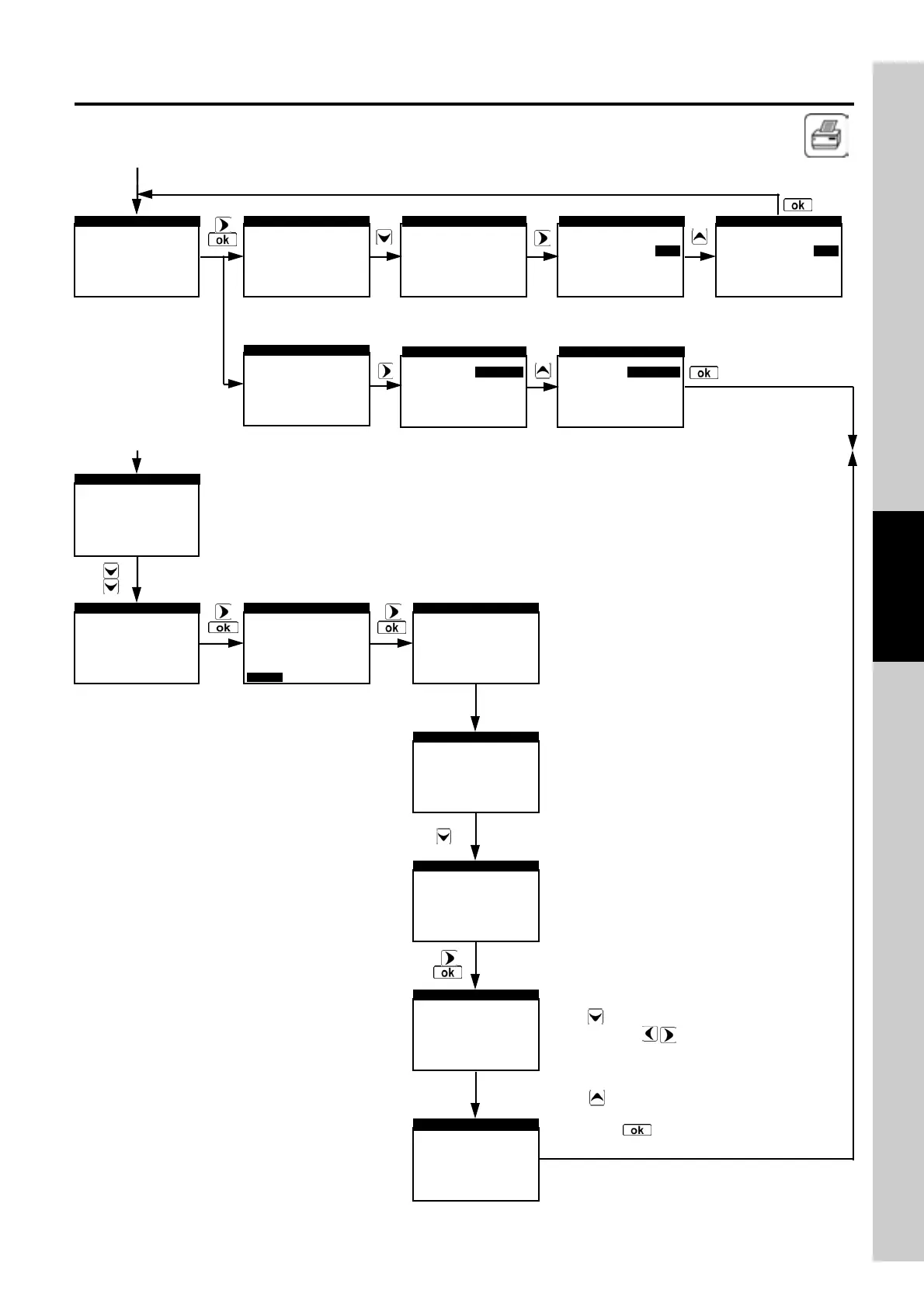
The instrument detects and shows all the
Bluetooth devices found.
Select the MAC code of the printer that must
be connected.
0000_
▲
◄ TUVXYWZ 012345678 ►
▼
PRINTER PIN
Enter the PIN code of the selected printer to
complete the pairing procedure.
TU12_
▲
◄ TUVXYWZ 012345678 ►
▼
PRINTER PIN
Use 'EDIT TEXT' as follows:
With arrow the proposed code is erased.
With arrows mov e the cursor to the
position corresponding to the destre letter or
digit in order to compose the required PIN
number.
With arrow the selected letter or digit is
inserted.
Press the key to confirm the PIN code
just entered.
►Type
Mode
PRINTER TYPE
HP82240B
slow
Type
Mode
PRINTER TYPE
HP82240B
slow
Type
PRINTER TYPE
Bluetooth
Type
►Mode
PRINTER TYPE
HP82240B
slow
Type
Mode
PRINTER TYPE
HP82240B
slow
Type
Mode
PRINTER TYPE
HP82240B
fast
►Type
Mode
PRINTER TYPE
HP82240B
slow



 To Next Page