39
K800000000EJ 020650A0 170512
4.14 Draft Menu
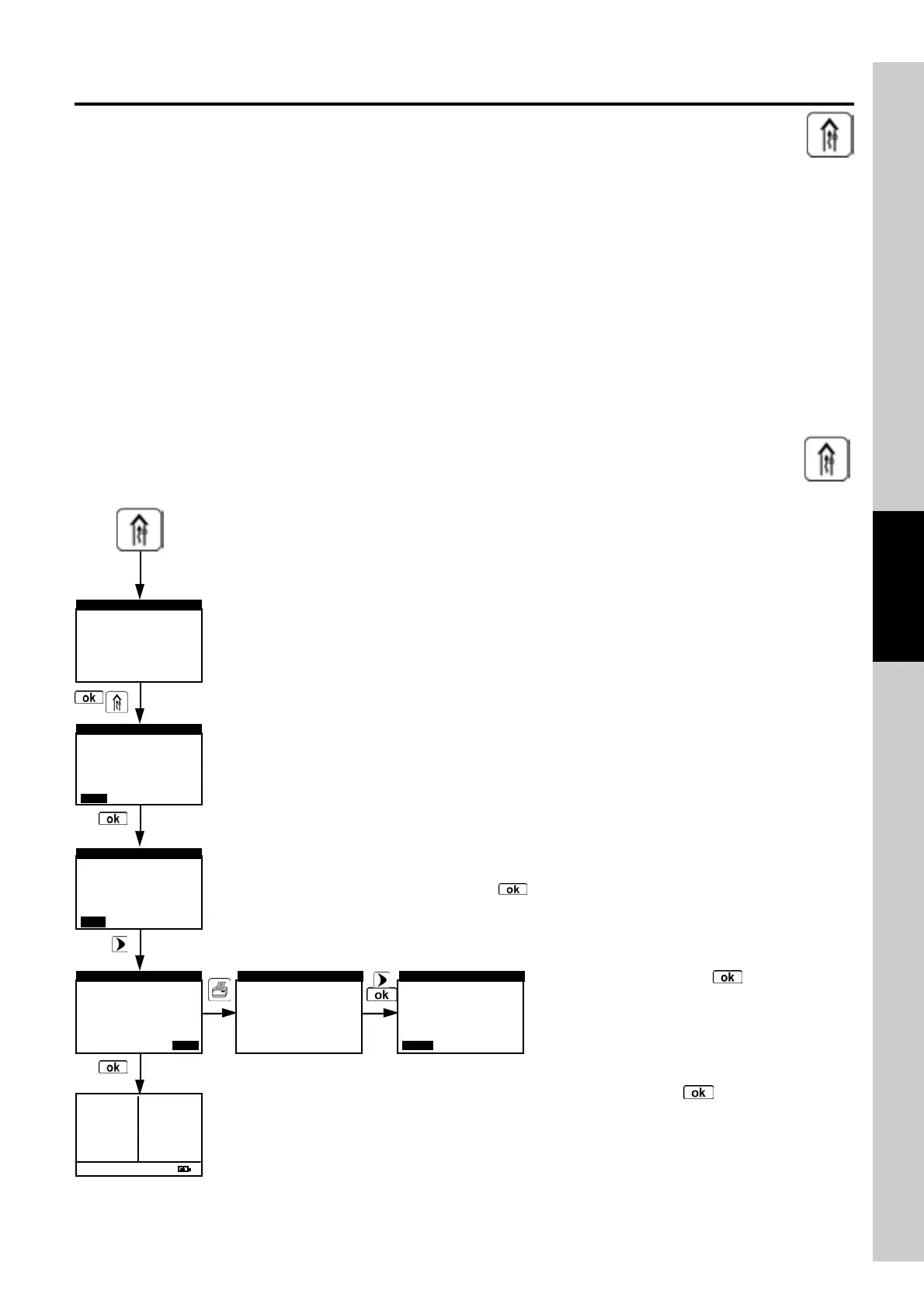
The DRAFT menu gives access to the stack draft measurement.
The user to input the external air temperature as required by the standard. Afterwards the measurement screen
is reached: here the user can acquire the value displayed in order to add it to the running analysis
measurements or, alternatively, print the relevant ticket through the ‘PRINT’ menu.
NOTE: The measurement may not be accurate due to condensation inside the sample probe. Should
you notice an inaccurate or unstable reading on the instrument, it is advisable to disconnect the sample
probe from the instrument itself, and purge pipes by blowing with a compressor. In order to be sure
there is no humidity, it is suggested to perform the measurement by means of the transparent rubber
pipe supplied on issue.
Once the data is stored, the instrument progresses automatically from the Draft Menu to the Analysis
Menu.
NOTE: The draft values to be stored in the memory must be acquired bef ore storing the analysis data.
Activates the Draft Menu.
4.14.1 Flow Chart - Draft Menu
Before starting the pressure zeroing sequence pay attention to remove the gas probe from the stack.
Connect the probe pressure input hose to the instrument P+ input.
WARNING
Use P+ positive
inlet
DRAFT
0.00hPa
0.00hPa0.00hPa
0.00hPa
DRAFT
ZERO KEEP
KEEPKEEP
KEEP
0.00hPa
DRAFT
ZERO
ZEROZERO
ZERO
KEEP
KEEPKEEP
KEEP
-0.05hPa
DRAFT
ZERO
ZEROZERO
ZERO
KEEP
KEEPKEEP
KEEP
►Print report
Print setup
Print test
Printer type
PRINT
PRINTPRINT
PRINT
►RefO
2
Auto:001 ▼
O
2
4.2٪
CO
2
9.3٪
Xair 1.25
Tf 190.1C
Ta 15.4C
∆T 74.7C
Eff 83.4٪
Loss16.6٪
CO 146p
NO 40p
NO
X
51p
Analysis
Model
PRINT REPORT
PRINT QUIT
draft
running
Pressure zeroing is accomplished by pressing with the ZERO option highlighted in the background.
Insert the probe in the stack and measure the
draft. In order to add the draft value to those of the
ongoing analysis, please select KEEP through the
right arrow key, then press ' '. For a printout of
the ticket with the draft value, enable the PRINT
menu through the relevant key, then proceed as in
the combustion analysis printing. A draft value
acquired into memory can be deleted by pressing
again the 'draft' key: a series of dashes will appear
in place of the measurement value; after this select
the 'KEEP' option with ' '.



 To Next Page