34
K800000000EJ 020650A0 170512
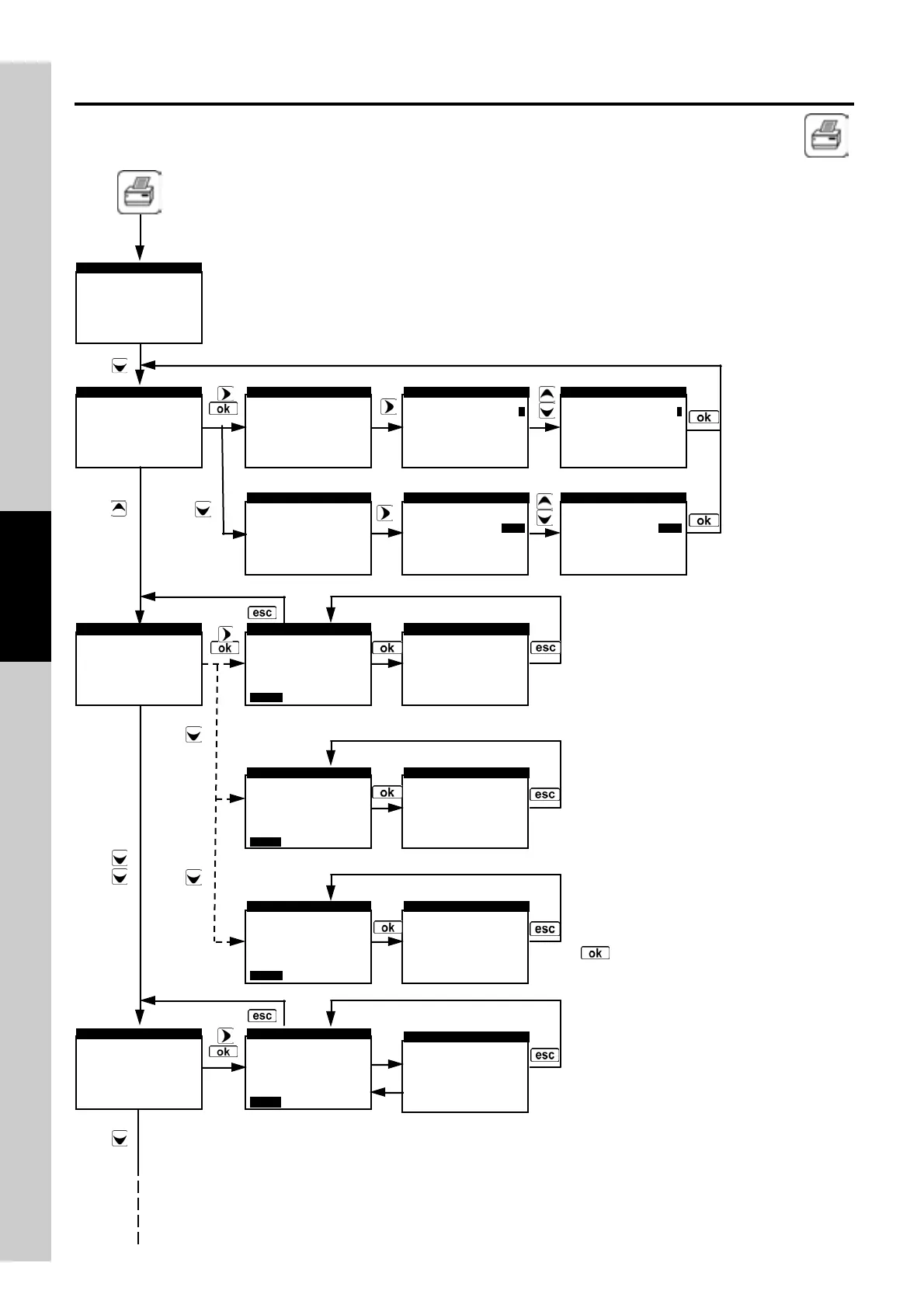
Enables the Print Menu. Allows to print the combustion analysis data on a paper ticket which reports the
measurement v alues. The printed v alues are those shown on the display when the menu is enabled.
This menu can be used for combustion analysis, even when recalled f rom the memory, for draft, smoke
and ambient gas results.
►Print report
Print setup
Print test
Printer type
PRINT
Print report
►Print setup
Print test
Printer type
PRINT
Several copies of the
test ticket can be
printed, choosing
among diff erent
layouts according to
the inf ormations
included.
1
2
3
4
5
6
7
8
►Copies
Model
PRINT SETUP
full
1
►Copies
Model
PRINT SETUP
full
1
►Copies
Model
PRINT SETUP
full
fullfull
full
1
11
1
Copies
►Model
PRINT SETUP
full
1
Copies
►Model
PRINT SETUP
full
1
Copies
►Model
PRINT SETUP
full
1
4.12.1 Flow Chart - Print Menu
►Print report
Print setup
Print test
Printer type
PRINT
Print report
Print setup
►Print test
Printer type
PRINT
Analysis
Model
PRINT REPORT
PRINT QUIT
full
running
Analysis
Model
Please wait ...
PRINT REPORT
full
running
Memory
Analysis
Model
PRINT REPORT
PRINT QUIT
full
1
001
Memory
Analysis
Model
Please wait ...
PRINT REPORT
full
1
001
Memory
Analysis
Model
PRINT REPORT
PRINT QUIT
full
average
001
Memory
Analysis
Model
Please wait ...
PRINT REPORT
full
average
001
Report test print
PRINT TEST
PRINT QUIT
Report test print
Please wait ...
PRINT TEST
According to the values shown on the display
when the menu is activ ated and the selected
ticket layout, the user can choose among
different models.
In the examples are reported the cases of
printing the analysis under acquisition,
printing a single analysis after recall f rom
memory and printing an average analysis
after recall from memory.
Go-ahead for printing is giv en by pressing
' ' with the PRINT option highlighted in
the background.



 To Next Page