46
K800000000EJ 020650A0 170512
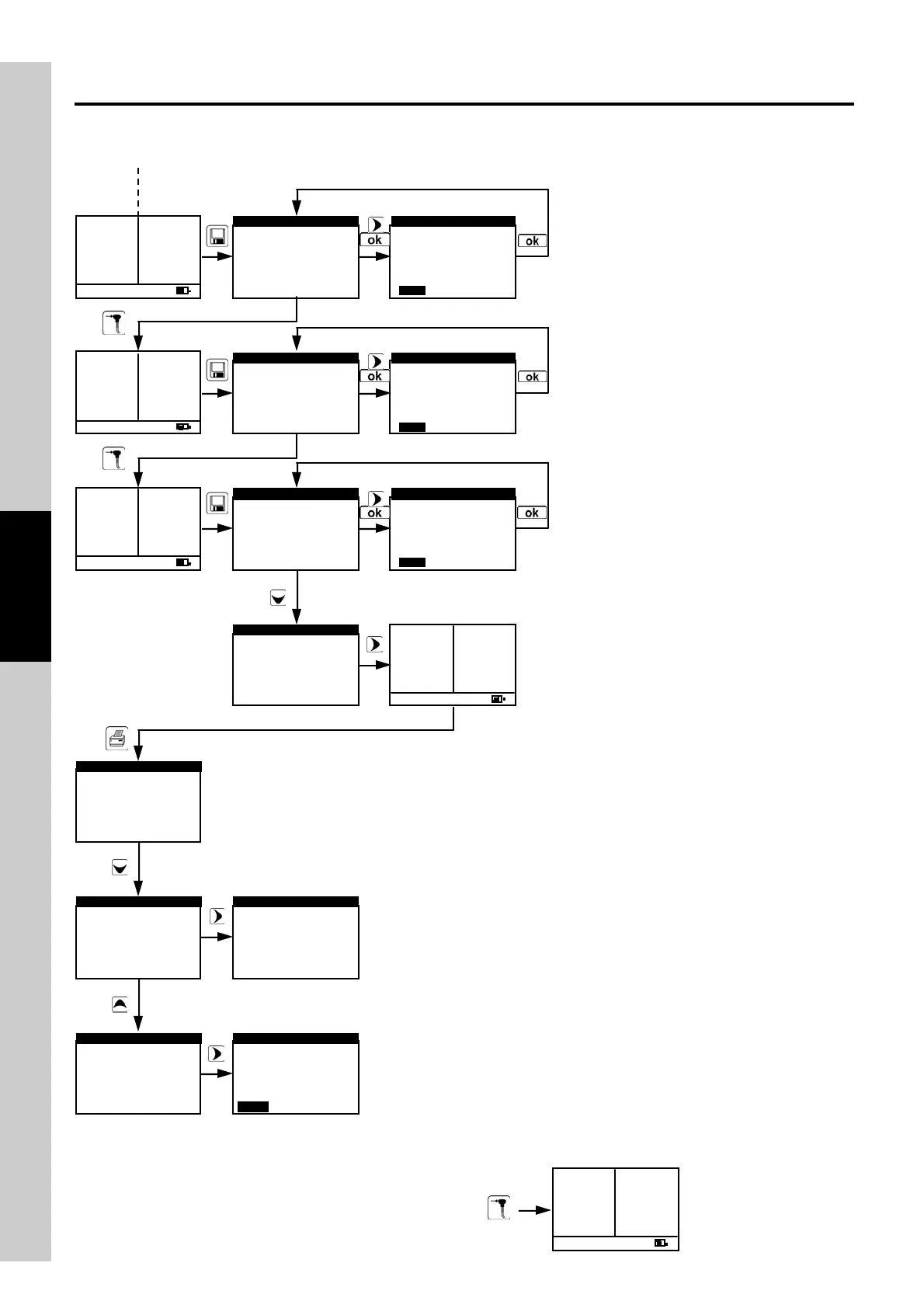
How to proceed in manual mode (standard sequence).
SAVE test 3.
SAVE test 1.
SAVE test 2.
Recall the average test values.
If desired, set the preferred number of copies and analysis report format.
Print the analysis report.
►Save analysis
Display average
Select memory
Recall memory
Delete single
▼
MEMORY
Memory 001/1
Draft yes
Smoke yes
CO,NO amb yes
SAVE ANALYSIS
SAVE QUIT
►Save analysis
Display average
Select memory
Recall memory
Delete single
▼
MEMORY
►Save analysis
Display average
Select memory
Recall memory
Delete single
▼
MEMORY
►Save analysis
Display average
Select memory
Recall memory
Delete single
▼
MEMORY
►Print report
Print setup
Print test
Printer type
PRINT
Print report
►Print setup
Print test
Printer type
PRINT
►Copies
Model
PRINT SETUP
full
1
►Print report
Print setup
Print test
Printer type
PRINT
►RefO
2
▼
O
2
4.2٪
CO
2
9.3٪
Xair 1.25
Tf 190.1C
Ta 15.4C
∆T 74.7C
Eff 83.4٪
Loss16.6٪
CO 146p
NO 40p
NO
X
51p
►RefO
2
▼
O
2
4.2٪
CO
2
9.3٪
Xair 1.25
Tf 190.1C
Ta 15.4C
∆T 74.7C
Eff 83.4٪
Loss16.6٪
CO 146p
NO 40p
NO
X
51p
►RefO
2
▼
O
2
4.2٪
CO
2
9.3٪
Xair 1.25
Tf 190.1C
Ta 15.4C
∆T 74.7C
Eff 83.4٪
Loss16.6٪
CO 146p
NO 40p
NO
X
51p
►RefO
2
▼
O
2
4.2٪
CO
2
9.3٪
Xair 1.25
Tf 190.1C
Ta 15.4C
∆T 74.7C
Eff 83.4٪
Loss16.6٪
CO 146p
NO 40p
NO
X
51p
The sy stem is ready to
carry out further tests.
When printing is complete return to the Analysis Menu by pressing:
►RefO
2
▼
O
2
4.2٪
CO
2
9.3٪
Xair 1.25
Tf 190.1C
Ta 15.4C
∆T 74.7C
Eff 83.4٪
Loss16.6٪
CO 146p
NO 40p
NO
X
51p
Memory 001/2
Draft yes
Smoke yes
CO,NO amb yes
SAVE ANALYSIS
SAVE QUIT
Memory 001/3
Draft yes
Smoke yes
CO,NO amb yes
SAVE ANALYSIS
SAVE QUIT
Analysis
Model
PRINT REPORT
PRINT QUIT
draft
running



 To Next Page