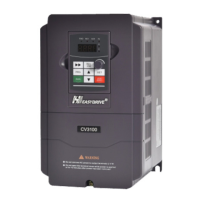
CV3100 series and MINI series high performance general purpose inverter instruction manual
1-2
1.2 Safety attentions
Check after having received product
1. The damaged inverter or the inverter lack of parts can’t be installed.
Otherwise, danger of injury would be caused.
Installing
1. When carrying, please hold the bottom of inverter.
Only the panel is held, the inverter would fall off and such that you
would be injured.
2. Please install it on metallic plate not apt to be burned.
Install it on the flammable material, there would be fire caused.
3. If two or more inverters are installed in the same control cabinet,
please mount a fan and keep the air inlet temperature at below 40℃.
If too hot, there would be fire or other accidents caused.
Connection
1. Please make sure the input power supply has been cut off before
connecting.
Otherwise, danger of electric shock and fire would be caused.
2. Lease invites electric engineering technicians to connect the wire.
Otherwise, danger of electric shock and fire would be caused.
3. The earthing terminal must be earthed reliably.
(Class 380V: Suitable for earthing 3).
Danger of electric shock and fire would be caused.
4. After electrifying the emergency stop terminal, please check the
operation is available.
Otherwise, danger of injury would be caused. (The connection



 To Next Page