32 Eaton SPD Series for Mounting External to Electrical Distribution Equipment Installation Manual IM01005031E—Rev 09
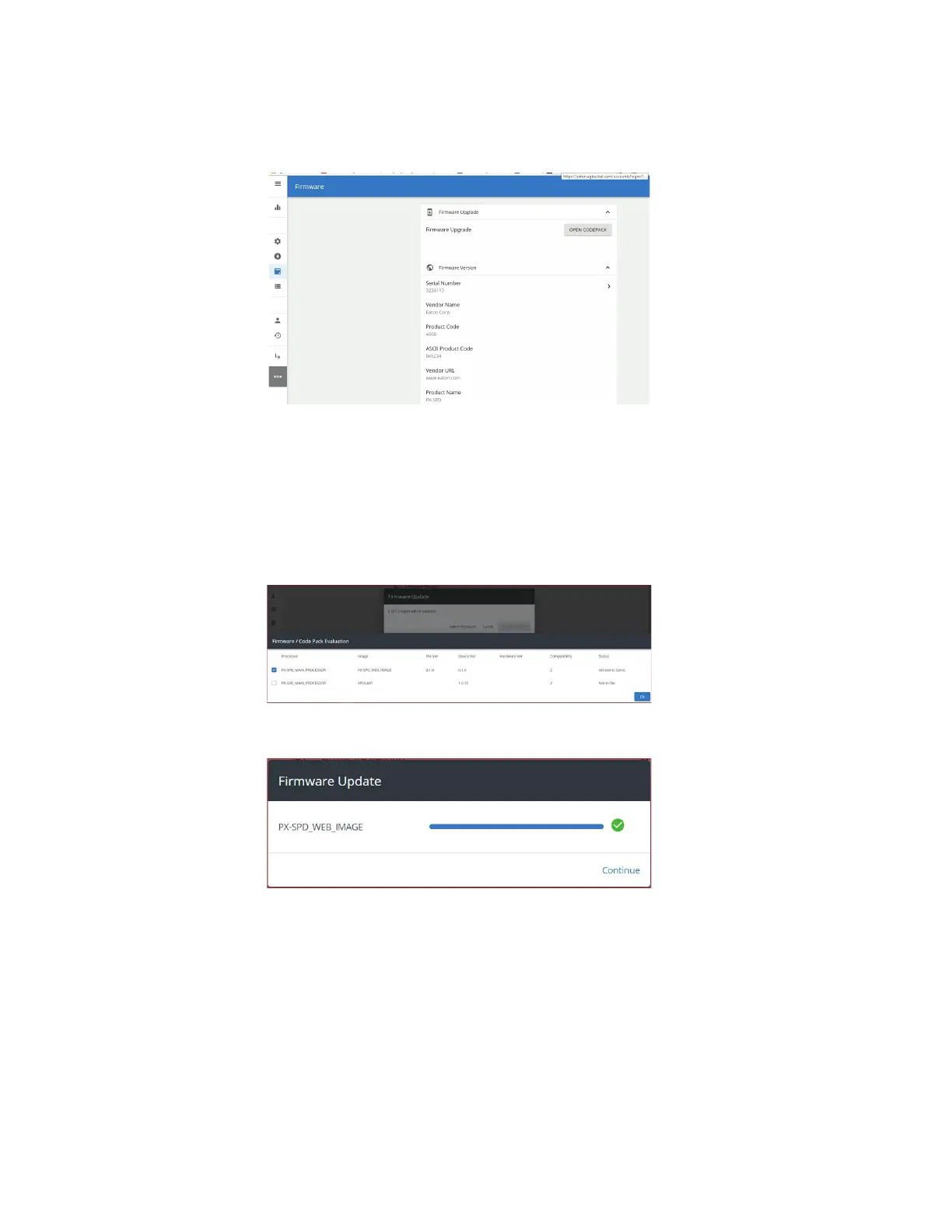
FFiigguurree 3399.. SSeelleecctt ""OOPPEENN CCOODDEEPPAACCKK""
A window will open to allow the user to browse their hard drive to the place where they saved the downloaded
firmware. Select the *.xml file and click open. The End-User License Agreement window will appear. Check
the “I agree to the terms of the License Agreement” and then click accept. The firmware update window will
open and then click "Select Processor". The firmware/code pack evaluation window will open and then click on
the box to the left of PX-SPD_MAIN_PROCESSOR and then click Ok. A status window will open and show the
status of the download.
FFiigguurree 4400.. SSeelleecctt PPXX--SSPPDD__MMaaiinn__PPrroocceessssoorr
FFiigguurree 4411.. FFiirrmmwwaarree UUppddaattee CCoommpplleettee
Once the download has been completed the device will return to the login screen.
Login to the device and click on the General tab and verify the SNTP server 1 has a green circle around it, as
shown below. This verifies the device has synced with the network and will provide accurate time stamped
events
Power Xpert SPD User Setup


 To Next Page
 Loading...