MAINTENANCE
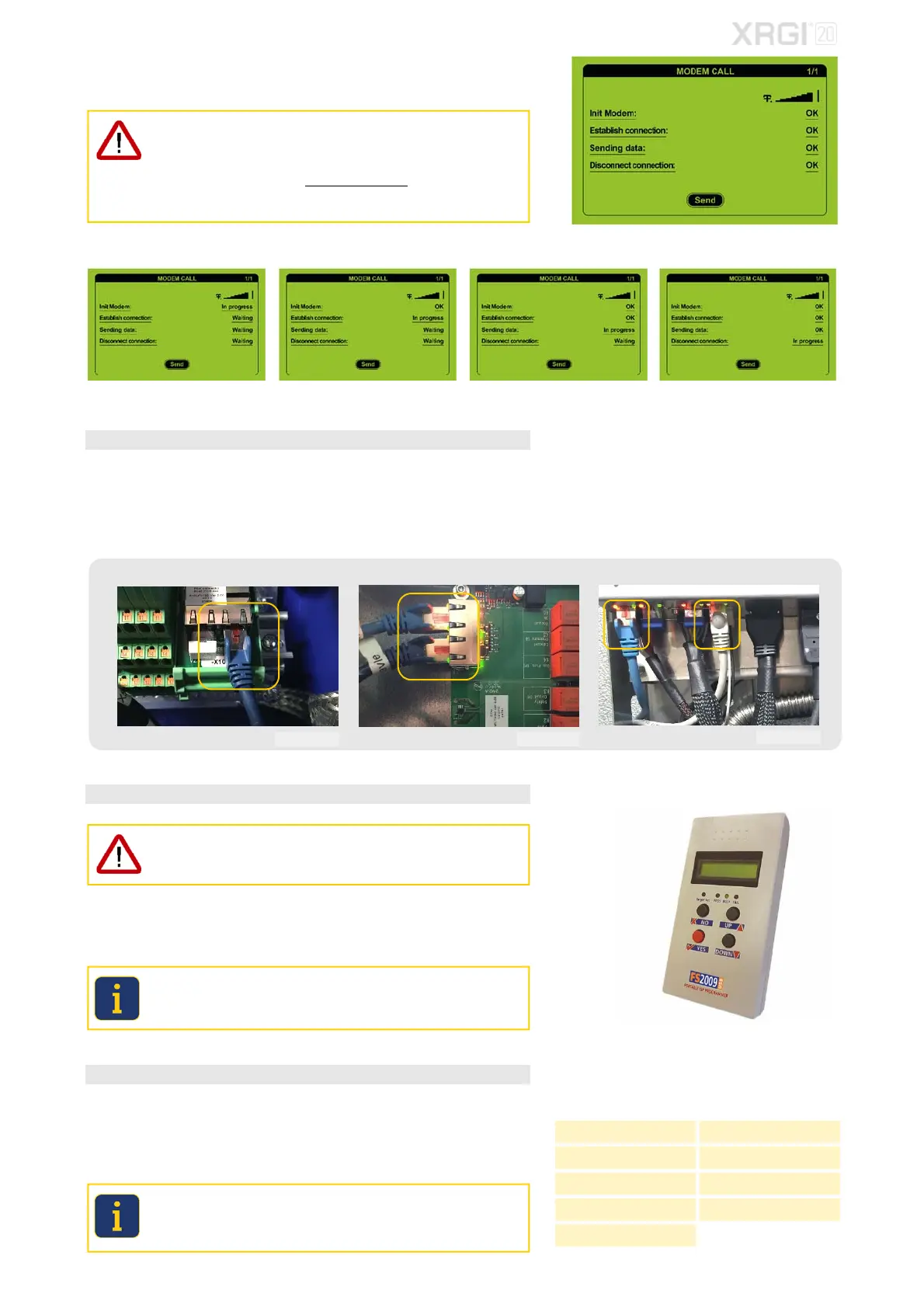
Move the cursor to Send by using the ▲▼ buttons and press OK on the
user interface. The communication system will be initialised.
FOR SOFTWARE VERSION 1.14.6 (OR HIGHER) ONLY!
If it is not possible to make a manual modem call, please note all settings
and operating parameters of the XRGI
®
system before the software update
on the form REQUEST DATA MODIFICATION and send the form to the
EC POWER customer service (support@ecpower.dk).
The submitted data will be transferred to the XRGI
®
system after verifica-
tion by EC POWER.
The connection is being established. All data have been received. The connection is being established.
STEP 3 – NETWORK CABLES
Disconnect the network communication to avoid any interference between the
XRGI
®
system components.
Remove all network cables between the Power Unit, iQ-Control Panel and
Q-Heat Distributor and cover all unused RJ45 plugs with RJ45 ISDN net-
work terminators.
iQ-Control Panel Power Unit Q-Heat Distributor
STEP 4 – SOFTWARE UPDATE XRGI® SYSTEM
Software update of the XRGI
®
system requires that the boards of all XRGI
®
components must be updated, otherwise the XRGI
®
system may malfunc-
tion.
Update the heat control PCB of the Q-Heat Distributor, the central control
PCB of the iQ-Control Panel and the ECU PCB or the gas safety PCB of the
Power Unit.
Use the FS2009USB programming device.
The ECU PCB has to be updated at 3 places (in priority order: J12, J19
and J20), the heat control PCB (Q40/Q50/Q60) at 2 places (J3 Heat
Control UART and J1 Heat Control) and all other PCB’s at 1 place.
STEP 5 – SOFTWARE UPDATE Q-NETWORK MODULES
After completing the software update of the XRGI
®
system, remove all RJ45
terminators and reconnect all network cables.
Update all boards of the Q-Network modules connected to the XRGI
®
sys-
tem.
Please note that Q-Network modules run on PoE sorce (Power over Ether-
net). Thus, after updating the Q-Heat Distributor, restore the network con-
nections in order to update the Q-Network modules such as Storage Con-
trol and Flow Control.
Fig. 7.37
Fig. 7.38 Fig. 7.39 Fig. 7.40
Fig. 7.41
Fig. 7.42 Fig. 7.43
Fig. 7.44
Fig. 7.45
Q-Network modules
Flow Control VPP Gateway
Boiler Control Modbus Gateway
Storage Control Load Sharer S
Flow Master Control Electric Heater Control
Aux Temp Tracker
Fig. 7.46



 To Next Page