EasyManua.ls Logo

echosens FibroScan 502 touch - Front View

Default Icon
70 pages
Print Icon
To Next Page IconTo Next Page
To Previous Page IconTo Previous Page
Loading...
EE
FIBROSCAN
502
TOUCH
USER
MANUAL
FibroScan
5.3.
FRONT
VIEW
The
device
contains
the
electrical
power
supply,
dedicated
electronics
and
a
computer.
It
also
supports
a
monitor,
three
probe
holders,
and
a
gel
holder.
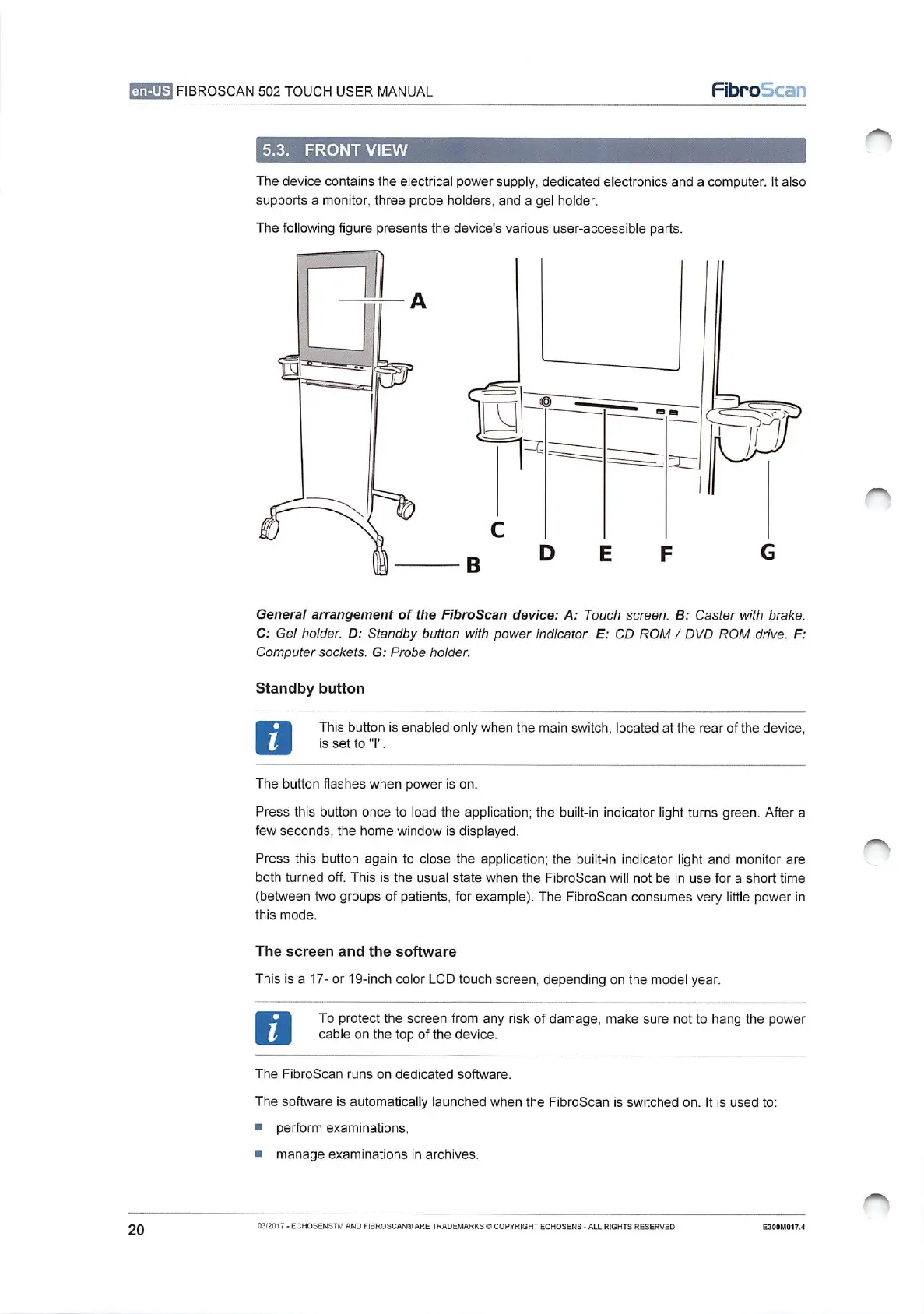
The
following
figure
presents
the
device's
various
user-accessible
parts.
_
CT
G
General
arrangement
of
the
FibroScan
device:
A:
Touch
screen.
B:
Caster
with
brake.
C:
Gel
holder.
D:
Standby
button
with
power
indicator.
E:
CD
ROM
/
DVD
ROM
drive.
F:
Computer
sockets.
G:
Probe
holder.
Standby
button
This
button
is
enabled
only
when
the
main
switch,
located
at
the
rear
of
the
device,
is
set
to
"I".
The
button
flashes
when
power
is
on.
Press
this
button
once
to
load
the
application;
the
built-in
indicator
light
turns
green.
After
a
few
seconds,
the
home
window
is
displayed.
Press
this
button
again
to
close
the
application;
the
built-in
indicator
light
and
monitor
are
both
turned
off.
This
is
the
usual
state
when
the
FibroScan
will
not be
in
use
for
a
short
time
(between
two
groups
of
patients,
for
example).
The
FibroScan
consumes
very
little
power
in
this
mode.
The
screen
and
the
software
This
is
a
17-
or
19-inch
color
LCD
touch
screen,
depending
on the
model
year.
To
protect
the
screen
from
any
risk
of
damage,
make
sure
not
to
hang
the
power
cable
on
the top
of
the
device.
The
FibroScan
runs
on
dedicated
software.
The
software
is
automatically
launched
when
the
FibroScan
is
switched
on.
It
is
used
to:
m
perform
examinations,
и
manage
examinations
in
archives.
20
03/2017
-
ECHOSENSTM
AND
FIBROSCAN®
ARE
TRADEMARKS
©
COPYRIGHT
ECHOSENS
-
ALL
RIGHTS
RESERVED
E300M017.4

Table of Contents