EasyManua.ls Logo

echosens FibroScan 502 touch - Patient Data; Ultrasound Images

Default Icon
70 pages
Print Icon
To Next Page IconTo Next Page
To Previous Page IconTo Previous Page
Loading...
ES
FIBROSCAN
502
TOUCH
USER
MANUAL
FibroScan
~
The
acquisition
window
comprises
the
following
elements:
6.6.1.
Patient
data
~
)
Shows/Hides
the
patient
data.
6.6.2.
Ultrasound
images
TM
and
Amplitude
Modes
=
an,
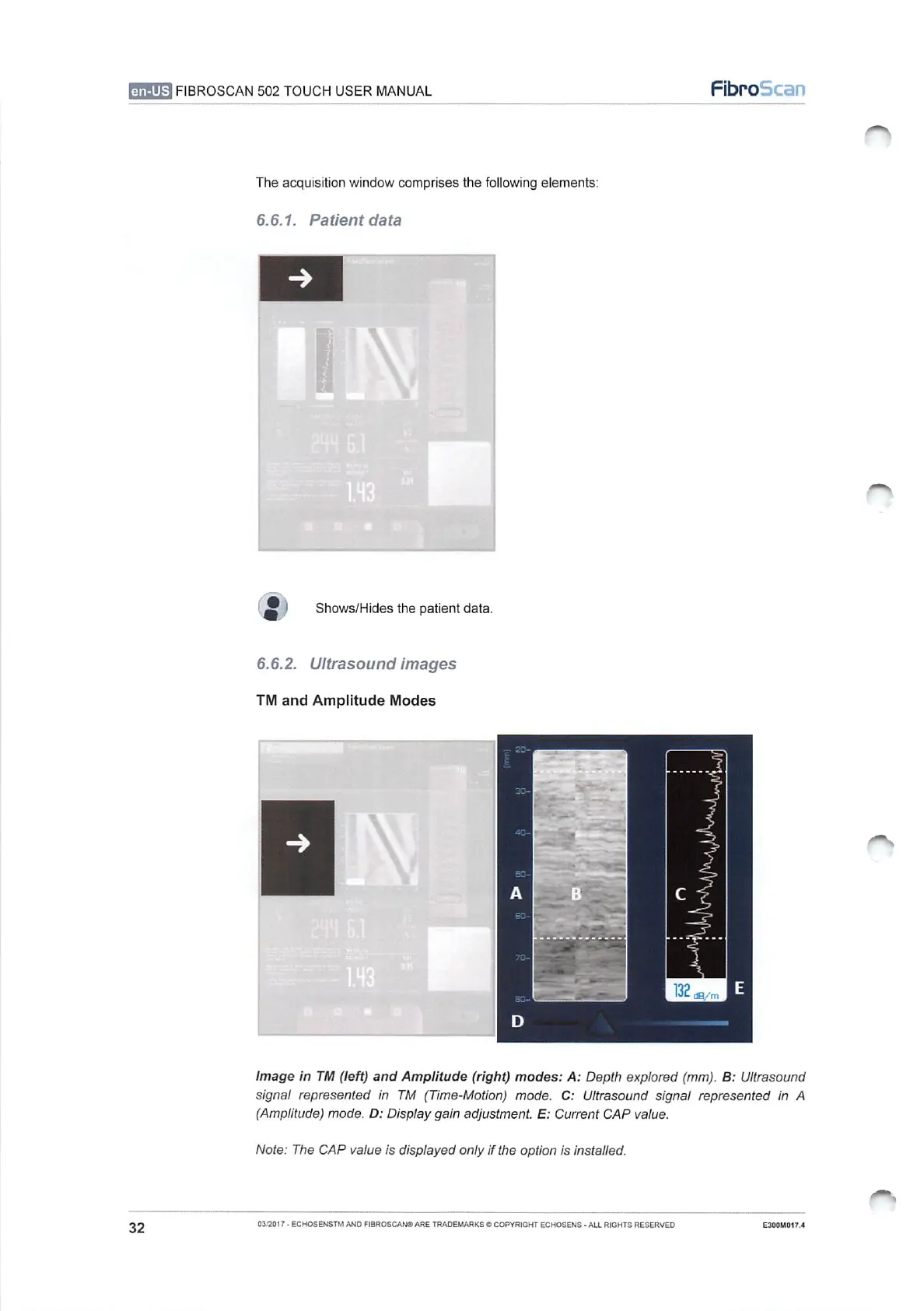
Image
in
TM
(left)
and
Amplitude
(right)
modes:
A:
Depth
explored
(mm).
B:
Ultrasound
signal
represented
in
TM
(Time-Motion)
mode.
C:
Ultrasound
signal
represented
in
A
(Amplitude)
mode.
D:
Display
gain
adjustment.
E:
Current
CAP
value.
Note:
The
CAP
value
is
displayed
only
if
the
option
is
installed.
PS
32
03/2017
-
ECHOSENSTM
AND
FIBROSCANO
ARE
TRADEMARKS
©
COPYRIGHT
ECHOSENS
-
ALL
RIGHTS
RESERVED
E300M017.4

Table of Contents