EasyManua.ls Logo

echosens FibroScan 502 touch - Pressure Indicator

Default Icon
70 pages
Print Icon
To Next Page IconTo Next Page
To Previous Page IconTo Previous Page
Loading...
EE
FIBROSCAN
502
TOUCH
USER
MANUAL
FibroScan
6.6.3.
Pressure
indicator
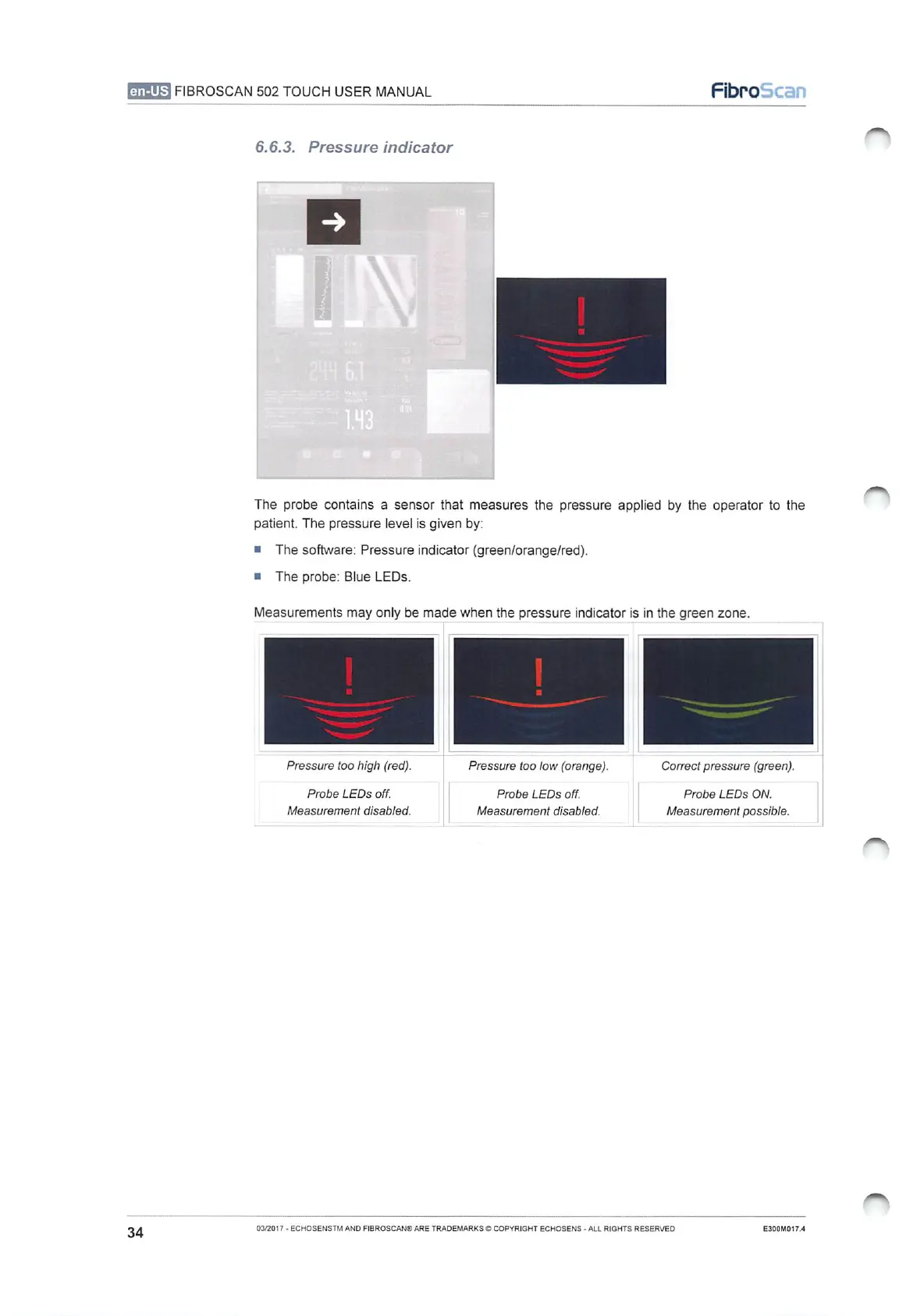
The
probe
contains
a
sensor
that
measures
the
pressure
applied
by
the
operator
to
the
patient.
The
pressure
level
is
given
by:
и
The
software:
Pressure
indicator
(green/orange/red).
The
probe: Blue
LEDs.
Measurements
may
only
be
made
when
the
pressure
indicator
is
in
the
green
zone.
Pressure
too
high
(red).
Pressure
too
low
(orange).
Correct
pressure
(green).
Probe
LEDs
off.
Probe
LEDs
off.
|
Probe
LEDs
ON.
Measurement
disabled.
Measurement
disabled.
|
Measurement
possible.
34
03/2017
-
ECHOSENSTM
AND
FIBROSCAN®
ARE
TRADEMARKS
©
COPYRIGHT
ECHOSENS
-
ALL
RIGHTS
RESERVED
E300M017.4

Table of Contents