TABLE OF CONTENTS INTRODUCTION INSTALLATION OPERATING INSTRUCTIONS APPENDIX
15
Installation Instructions
Ford Juice
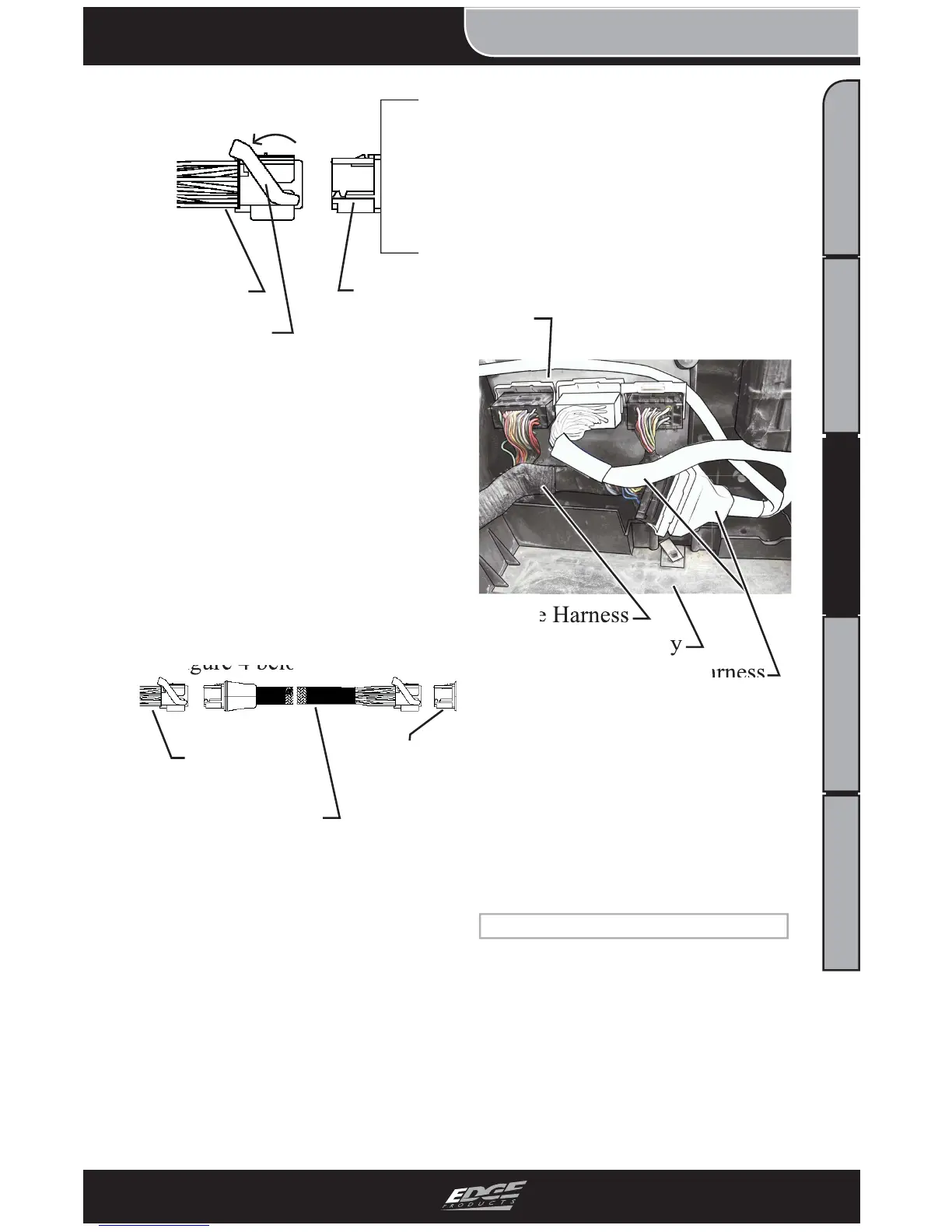
FIGURE 3 - Connector Removal
3. Disconnect the center har-
ness as shown in Figure 2.
4. Connect the Main Edge
PCM Harness as described in
Figure 1 in between the PCM
and Engine harness as described
in Figure 4 below.
FIGURE 4 - PCM Installation
CAUTION: The two con-
nectors should slide easily
together. DO NOT force the
two connectors together. If
the connectors do not slide
smoothly, inspect for bent pins,
and retry.
CAUTION: To keep water from
causing damage to the engine
and Juice harnesses, route
the Juice harness as shown in
Figure 5. This will also insure
that the battery cover will fi t
back into place.
PCM
Engine Harness
Battery Tray
Edge Harness
FIGURE 5 - Harness Routing
6. Replace the battery.
7. Reinstall battery cover.
8. Reconnect battery cables.
(Positive fi rst.)
MAP SENSOR CONNECTION
1. Using the Engine compart-
ment section of this manual,
locate the MAP Sensor.
2. Unplug the stock MAP har-
ness, and insert the Edge MAP
Sensor harness in between the
PCM
Connector
Engine
Harness
Lever
Engine
Harness
Edge PCM
Harness
PCM
Connector


 To Next Page