40
Chapter6ConnectingCables
Chapter 6 Connecting Cables
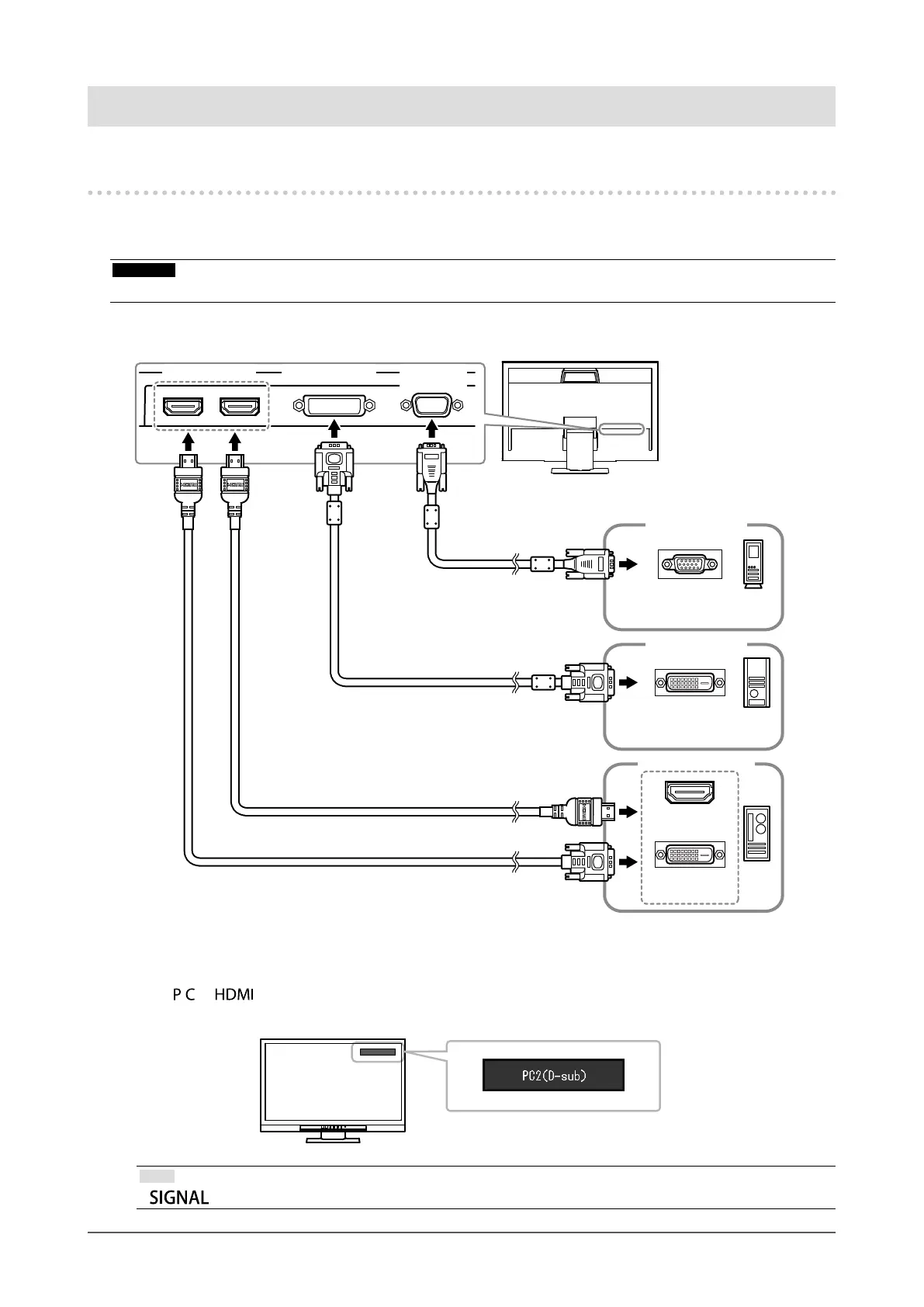
6-1. Connecting Multiple External Devices
The product has multiple connections to external devices and allows you to switch to one of the connections for
display.
Attention
• Do not use dual link cables.
Connection examples
DVI-HDMIconvertercable
(Commerciallyavailableproduct)
D-Submini
15-pinconnector
DVIconnector
Signalcable
(suppliedFD-C39)
Signalcable
(MD-C87option)
HDMIcable
*1
(Commerciallyavailableproduct)
HDMI
connector
AnalogDigital
(DVI)
Digital
(HDMI)
D-Sub
connector
Toext.device1
Toext.device2
Toext.device3,4
HDMIconnector
or
DVIconnector
DVI-Dconnector
*1 Use a product able to handle High Speed.
●
To switch among input signals
Press or on the remote control to change the input signal.
When the signal is switched, the active input port name appears at the top right corner of the screen.
Note
• on the monitor also can change the input (see “1-2. Controls and Functions” (page 8)).










 To Next Page