10
3.2 Touch Screen Control Operation
The Touch Screen command works by touching, with a finger on the display, the icon of the parameter
and/or function displayed (use only clean dry fingers, and not other tools such as knives, forks or other
objects in general).
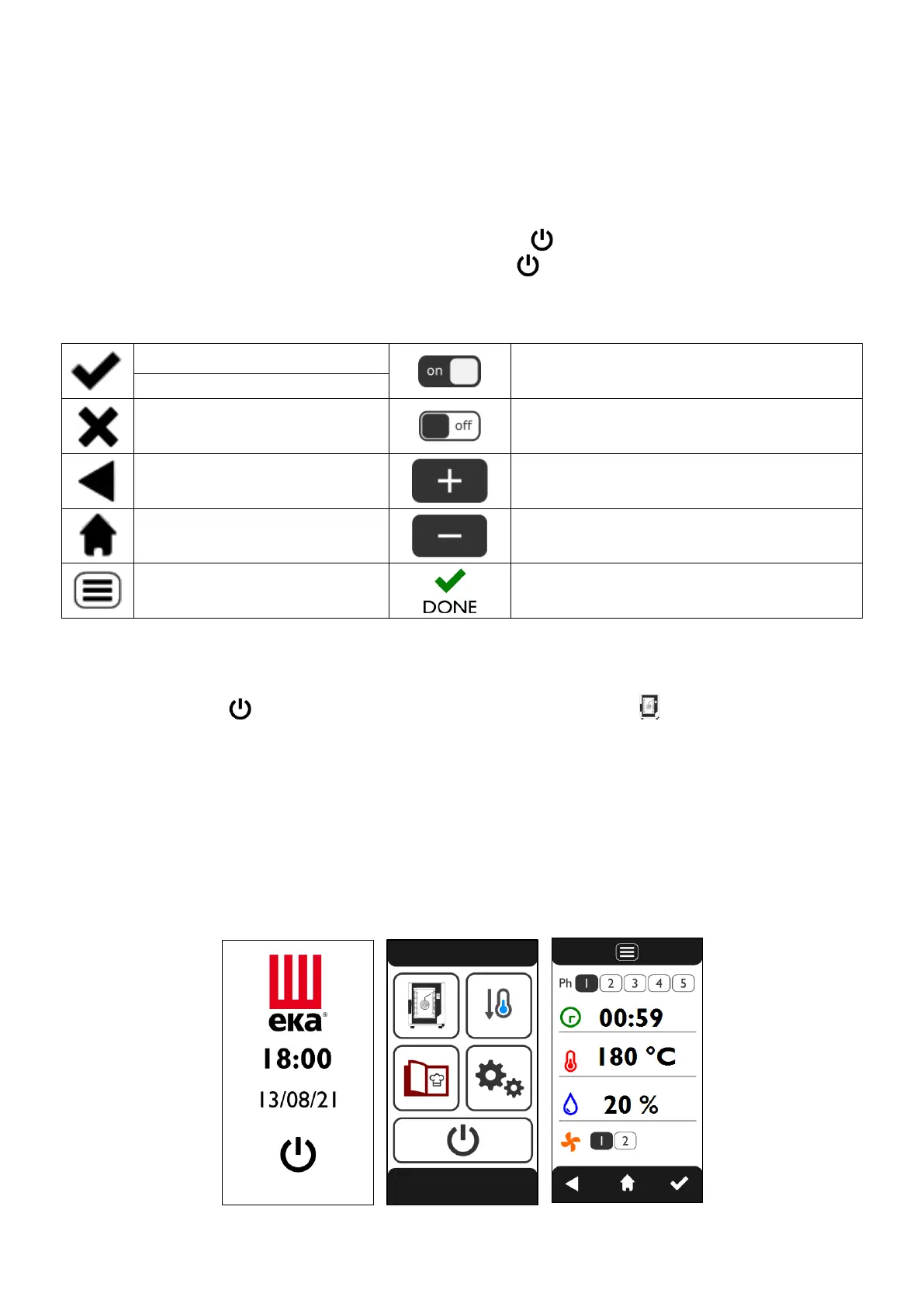
“Stand-by” Mode
If the oven is not being used (it is not performing any operation), after 10 minutes the “stand-by” mode is
automatically activated. In this configuration, the current time is visible in the centre of the display. To
reactivate the oven's functional mode, simply touch the symbol .
To activate the “stand-by” mode, manually touch the symbol from the “HOME” screen.
Explanations of symbols:
PREHEATING or DELAYED START
COMPLETED
3.3 COOKING PARAMETERS SCREEN
Touching the symbol from the “STAND-BY” screen (Fig.2), or the symbol from the “HOME” screen
(Fig.3), displays the “COOKING PARAMETERS” screen (Fig.4), where it is possible to set the following
parameters:
Cooking phases (from 1 to 5)
Cooking time / “Core probe”
temperature
Enabling of cooking with “core
probe”
Fig.2 Fig.3 Fig.4












 To Next Page