14
Fig.15
3.7 HUMIDITY SETTING
From the “COOKING PARAMETERS” screen, by touching the value of the symbol , it is possible to set the
desired value using the symbols and . Touch the symbol to confirm.
3.8 FAN SPEED SETTING
From the “COOKING PARAMETERS” screen (Fig.2) by touching the symbols it is possible to select
the fan speed. The selected symbol is highlighted.
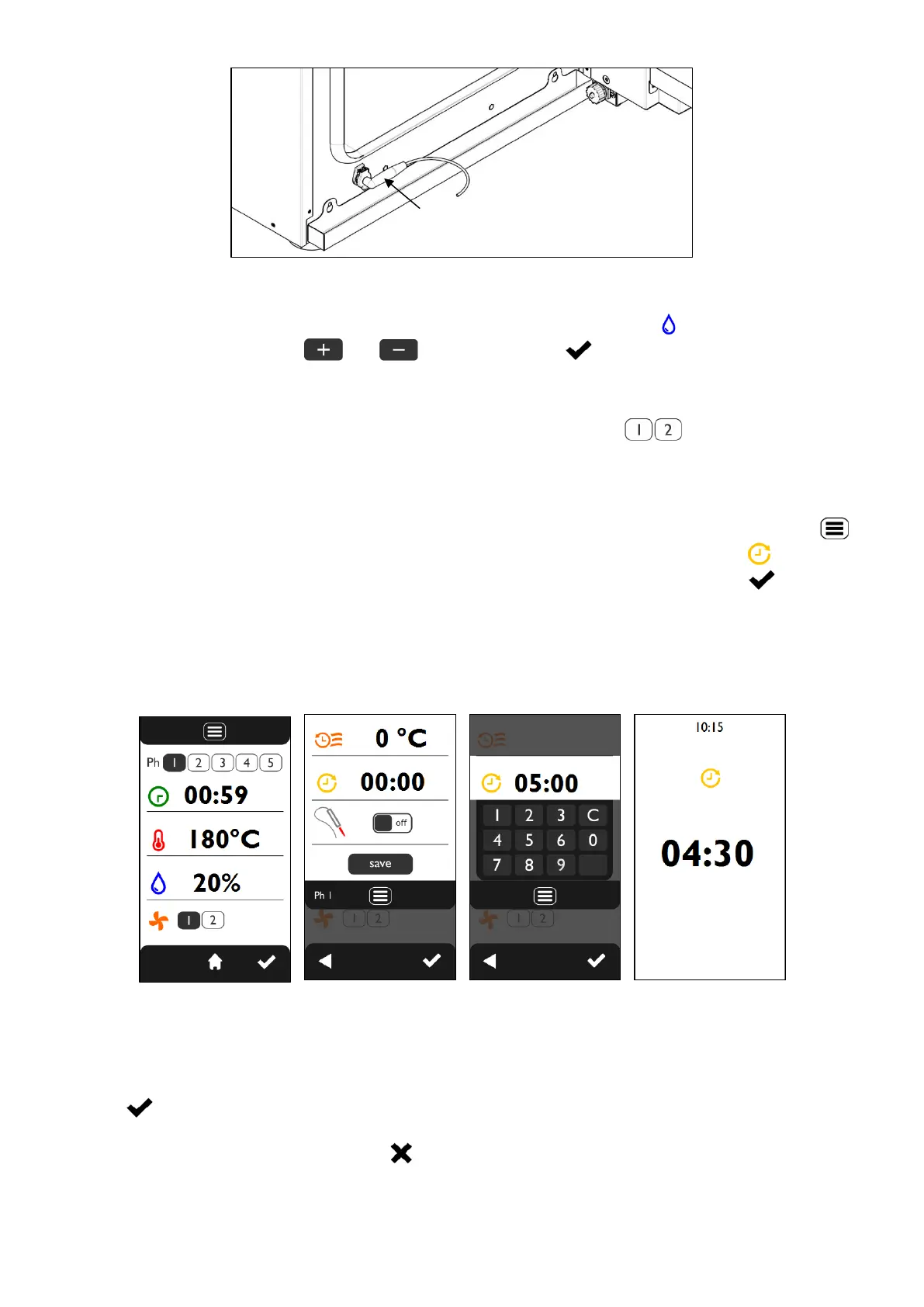
3.8 DELAYED START SETTING
From the “COOKING PARAMETERS” screen (Fig.16), when “phase 1” is selected, touching the symbol
displays the “ADDITIONAL FUNCTIONS” screen (Fig.17). By touching the value of the symbol it is
possible to set the desired value using the keyboard that appears (Fig.18). Touch the symbol to
confirm.
The DELAYED START can be set for a maximum time of 23 hours and 59 minutes.
To deactivate the DELAYED START function, the value 00:00 must be set.
During the delayed start phase, the “DELAYED START IN PROGRESS” screen appears (Fig.19) which
displays the “count-down” of the time before the start of the cooking cycle.
Fig.16 Fig.17 Fig.18 Fig.19
3.9 STARTING/STOPPING THE COOKING CYCLE
After setting the parameters and their desired values for cooking, to start the cycle, simply touch the
symbol .
To interrupt the cooking cycle at any time, touch any area of the screen to return to the parameters screen
and keep the symbol pressed for 3 seconds .
When a cooking cycle ends (in “manual” mode or in “programmed” mode) an acoustic warning (“beep”)
is activated for 1 minute.












 To Next Page